loading…
en/
Browse all
 by Anthropic
 by wenb1n-dev
 by madhurprashby modelcontextprotocol
HasanJahidul/terminal-history-mcp
FreeNot checkedFull-text search over your shell history (zsh / bash / fish) via SQLite FTS5. Local-only. 11-pattern secret redaction runs BEFORE insert. Captures cwd / exit co

About
Full-text search over your shell history (zsh / bash / fish) via SQLite FTS5. Local-only. 11-pattern secret redaction runs BEFORE insert. Captures cwd / exit code / duration via opt-in shell hook. Tools: searchhistory, recentindir, failedcommands, commandchains, reindex.
README

terminal-history-mcp
MCPize mcp.so terminal-history-mcp MCP server CI npm version License: MIT
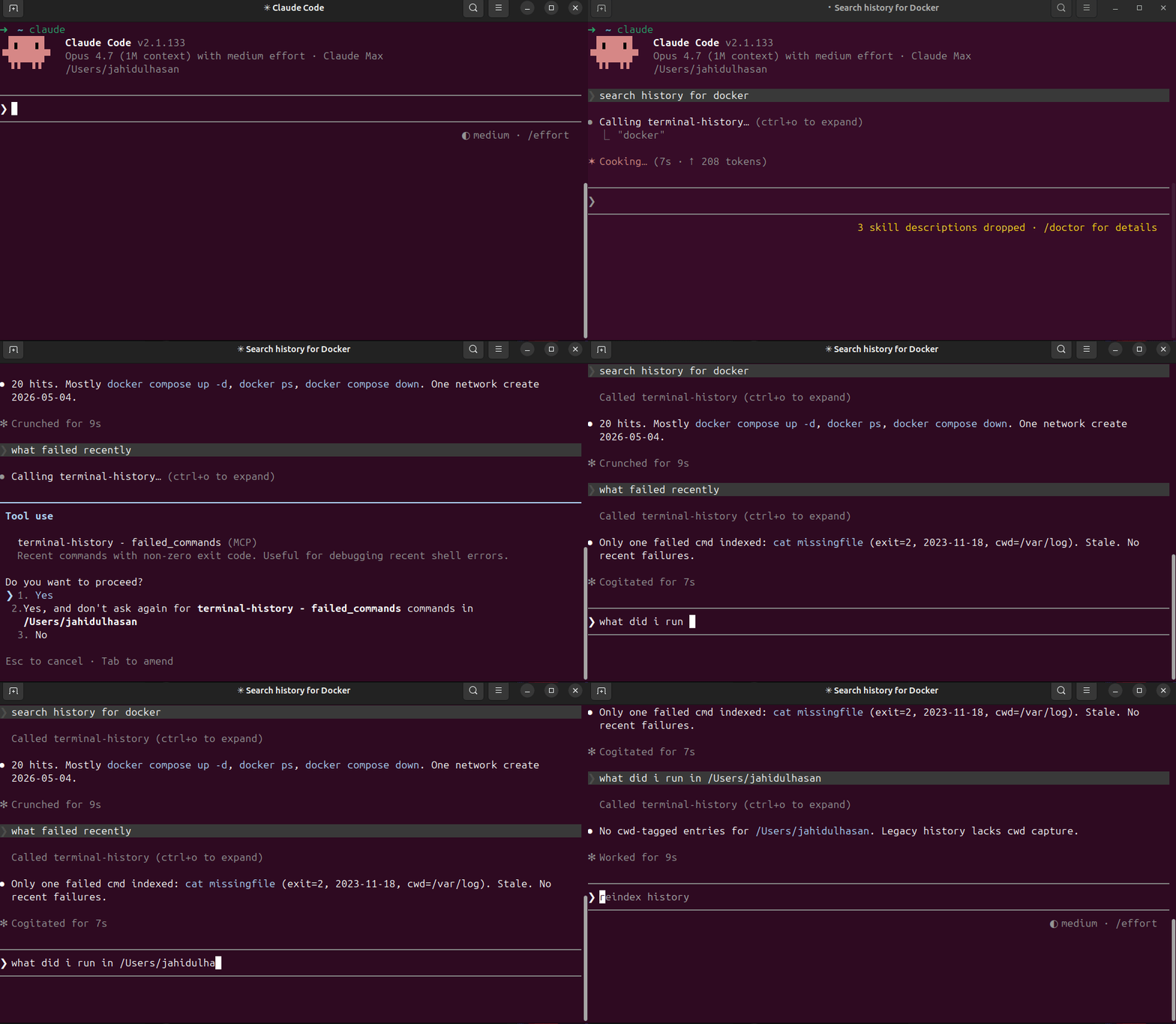
Search your shell history (zsh / bash / fish) from Claude Code, Cline, Cursor, Zed, or any MCP client. Local-only. SQLite FTS5. Secret-redacted before storage.
What you can ask
- "When did I last ssh into the staging server?"
- "Show recent failed commands."
- "What did I run yesterday in
/etc/nginx?" - "What's that long docker compose flag I used 3 weeks ago?"
- "Show command chains around
kubectl apply."
Install
npm install -g terminal-history-mcp
terminal-history-mcp index           # one-time backfill from existing history
(Or run from a clone: git clone … && npm install && npm run build && npm link.)
Wire to Claude Code
claude mcp add --scope user terminal-history -- terminal-history-mcp
claude mcp list
Wire to other MCP clients
Anywhere that takes a stdio MCP server config:
{
  "mcpServers": {
    "terminal-history": {
      "command": "terminal-history-mcp"
    }
  }
}
Connect via MCPize
Use this MCP server instantly with no local installation:
npx -y mcpize connect @HasanJahidul/terminal-history --client claude
Or connect at: https://mcpize.com/mcp/terminal-history
Capture cwd + exit code (recommended)
By default zsh/bash history files store only the command. To unlock recent_in_dir and failed_commands, install the shell hook:
terminal-history-mcp install-hook zsh    # or bash, or fish
exec $SHELL                              # reload
The hook appends pipe-delimited lines to ~/.terminal-history-mcp/extended.log. Reindex picks them up.
To inspect the snippet first:
terminal-history-mcp print-hook zsh
To remove:
terminal-history-mcp uninstall-hook zsh
Tools
| Tool | What it does |
|---|---|
search_history(query, limit) |
FTS5 keyword + prefix match across all history |
recent_in_dir(cwd, limit) |
Last N commands in a working dir (needs hook) |
failed_commands(since_ts_ms, limit) |
Commands with non-zero exit (needs hook) |
command_chains(query, window_ms, limit) |
For each match, list commands within ±5 min |
reindex |
Re-parse history files + extended log |
Privacy
Everything is local. The DB lives at ~/.terminal-history-mcp/history.db. Nothing is uploaded.
Secrets are scrubbed before insert. Detected patterns:
- GitHub PATs (
ghp_*,gho_*, …) - OpenAI keys (
sk-*) - Slack tokens (
xox[baprs]-*) - AWS access keys (
AKIA…) Authorization: Bearer/Basic <value>X-*-Token: …,X-*-Key: …,X-*-Secret: …headers- Env vars containing
TOKEN/KEY/SECRET/PASSWORD/API_KEY - CLI flags
--token=…,--api-key …,-k … - URL basic-auth
https://user:pass@host - JWTs (
eyJ.*.*)
If you find a leak, please open an issue. To wipe and re-index after upgrading patterns:
rm ~/.terminal-history-mcp/history.db*
terminal-history-mcp index
Development
git clone https://github.com/hasanjahidul/terminal-history-mcp
cd terminal-history-mcp
npm install
npm run build
npm test
License
MIT — see LICENSE.
Install HasanJahidul/terminal-history-mcp in Claude Desktop, Claude Code & Cursor
Run in your terminal:
claude mcp add hasanjahidul-terminal-history-mcp -- npx FAQ
Is HasanJahidul/terminal-history-mcp MCP free?
Yes, HasanJahidul/terminal-history-mcp MCP is free — one-click install via Unyly at no cost.
Does HasanJahidul/terminal-history-mcp need an API key?
No, HasanJahidul/terminal-history-mcp runs without API keys or environment variables.
Is HasanJahidul/terminal-history-mcp hosted or self-hosted?
Self-hosted: the server runs locally on your machine via the install command above.
How do I install HasanJahidul/terminal-history-mcp in Claude Desktop, Claude Code or Cursor?
Open HasanJahidul/terminal-history-mcp on unyly.org, pick your client tab (Claude Desktop, Claude Code, Cursor) and press Install — the config is generated automatically, no JSON editing.
Related MCPs
Postgres
Query your database in natural language
by Anthropic4.822.3K
wenb1n-dev/SmartDB_MCP
A universal database MCP server supporting simultaneous connections to multiple databases. It provides tools for database operations, health analysis, SQL optim
by wenb1n-devPostgres Server
This server enables interaction with PostgreSQL databases through the Model Context Protocol, optimized for the AWS Bedrock AgentCore Runtime. It provides tools
by madhurprashPostgreSQL
Read-only database access with schema inspection.
by modelcontextprotocolCompare HasanJahidul/terminal-history-mcp with
Not sure what to pick?
Find your stack in 60 seconds
Author?
Embed badge for your README
Browse similar
All data MCPs