loading…
en/
Browse all
 by Microsoft
 by modelcontextprotocol
 by opentabs-dev
 by robhunter
Pilot
FreeNot checkedA high-performance browser automation MCP server that provides AI agents with a fast, persistent Chromium instance via Playwright. It features reference-based e

About
A high-performance browser automation MCP server that provides AI agents with a fast, persistent Chromium instance via Playwright. It features reference-based element interaction, snapshot diffing, and manual handoff capabilities to handle complex tasks like CAPTCHAs.
README
Install a Chrome extension. Your AI agent gets a tab in the browser you're already using.
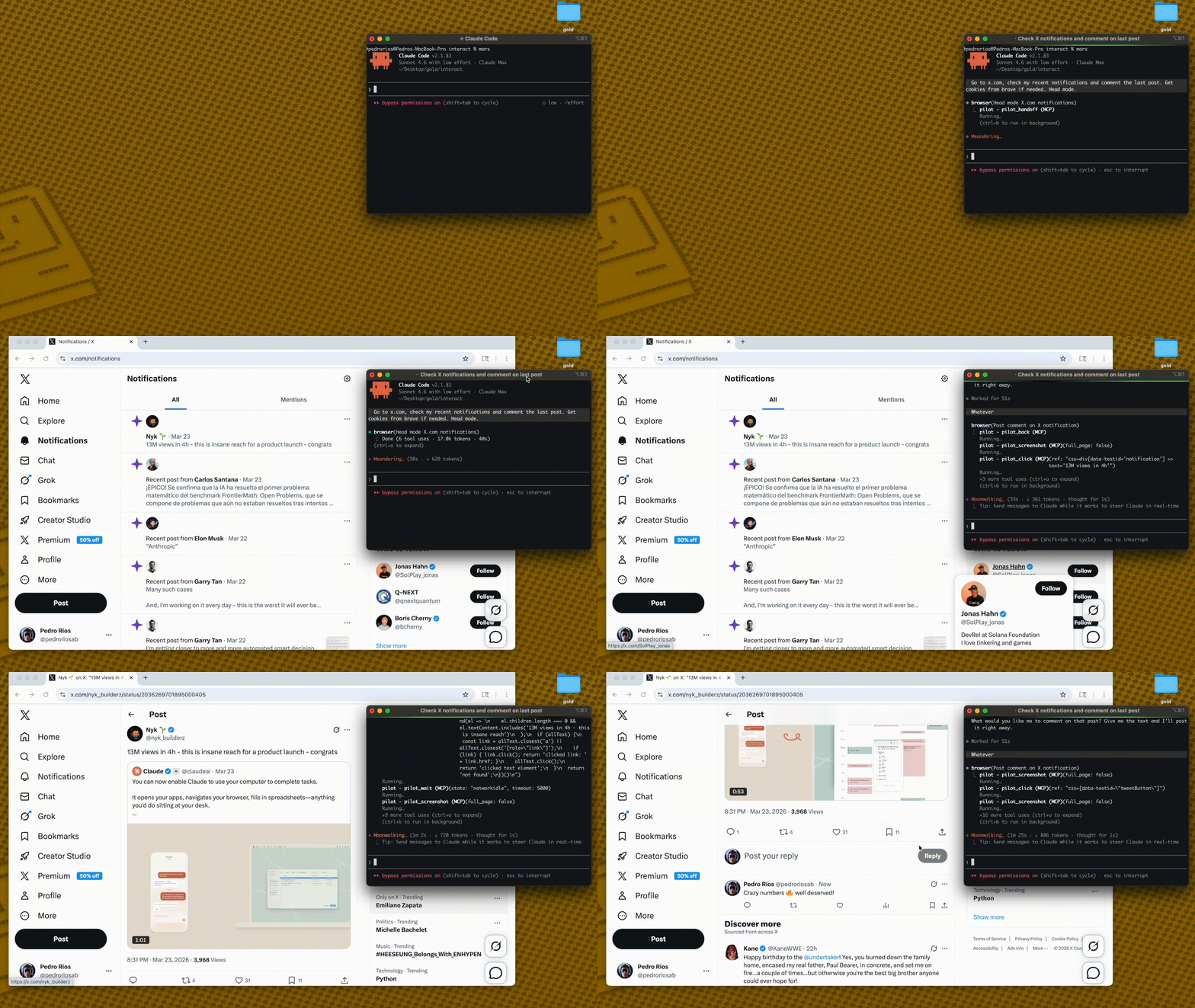
Every other browser tool launches a new, anonymous browser. Your agent starts logged out, gets blocked by Cloudflare, can't reach anything behind auth.
Pilot is a Chrome extension + MCP server. It connects your AI agent to your real browser — same sessions, same cookies, same logins. Your agent sees what you see.
You: "Summarize my GitHub notifications"

→ New tab opens in YOUR Chrome
→ Already logged into GitHub
→ Agent reads, summarizes, done
No headless browser. No cookie hacking. No re-authentication. No bot detection.
How it works
AI Agent → MCP Server → WebSocket → Chrome Extension → Tab in your browser
         (stdio)       (localhost)
- Pilot runs as an MCP server — Claude Code, Cursor, or any MCP client connects via stdio
- The Chrome extension connects via WebSocket on localhost
- Your agent gets its own tab in your real Chrome — all your sessions intact
- Multiple agents get separate tabs — color-grouped so you can tell them apart
Quick Start
1. Add the MCP server
{
  "mcpServers": {
    "pilot": {
      "command": "npx",
      "args": ["-y", "pilot-mcp"]
    }
  }
}
2. Install the Chrome extension
npx pilot-mcp --install-extension
Opens Chrome's extensions page. Click Load unpacked → select the path shown in terminal.
3. Use it
"Go to my GitHub notifications and summarize them"
A tab opens in your Chrome — already logged in as you.
Lean snapshots
Other tools dump 50K+ chars per page into your context window. Pilot keeps things small:
Other tools:   navigate(58K) → navigate(58K) → answer        = 116K chars
Pilot:         navigate(2K)  → navigate(2K)  → snapshot(9K)  =  13K chars
snapshot_diff shows only what changed between actions — no redundant re-reads.
Less context = faster responses, cheaper API calls, fewer hallucinations.
Pilot vs @playwright/mcp
| Pilot | @playwright/mcp | |
|---|---|---|
| Browser | Your real Chrome (extension) | New Chromium instance |
| Auth state | Already logged in everywhere | Anonymous — manual setup |
| Bot detection | Real fingerprint — not blocked | Blocked by Cloudflare |
| Snapshot size | ~2K navigate, ~9K full | ~50-60K |
| Snapshot diff | pilot_snapshot_diff |
❌ |
| Cookie import | Chrome, Arc, Brave, Edge, Comet | Manual JSON |
| Iframes | ✅ | ❌ |
| Tool profiles | core (9) / standard (30) / full (61) |
--caps groups |
| Transport | stdio | stdio, HTTP, SSE |
61 tools across 3 profiles
Most LLMs degrade past ~30 tools. Load only what you need:
| Profile | Tools | What's included |
|---|---|---|
core |
9 | navigate, snapshot, click, fill, type, press_key, wait, screenshot, snapshot_diff |
standard |
30 | Core + tabs, scroll, hover, drag, iframes, forms, links, auth, block, find, element_state |
full |
61 | Standard + network intercept, assertions, clipboard, geolocation, CDP, evaluate, PDF, responsive |
{
  "mcpServers": {
    "pilot": {
      "command": "npx",
      "args": ["-y", "pilot-mcp"],
      "env": { "PILOT_PROFILE": "standard" }
    }
  }
}
Default: standard. Full tool reference →
Headed fallback
When the extension isn't connected, Pilot opens a visible Chromium window automatically.
Import cookies from your real browser: pilot_import_cookies({ browser: "chrome", domains: [".github.com"] })
Supports Chrome, Arc, Brave, Edge, Comet via macOS Keychain / Linux libsecret. For CAPTCHAs: pilot_handoff → you intervene → pilot_resume.
Requires: npx playwright install chromium
Requirements
- Node.js >= 18
- Chrome + Pilot extension (recommended)
- macOS or Linux
- Fallback only:
npx playwright install chromium
Security
- Extension communicates on localhost only (127.0.0.1)
- Output path validation prevents writes outside
PILOT_OUTPUT_DIR - Path traversal protection on all file operations
PILOT_PROFILEcontrols which tools are exposed (core/standard/full)
Credits
Core architecture — ref-based element selection, snapshot diffing, annotated screenshots — ported from gstack by Garry Tan. Built on Playwright and the MCP SDK.
If Pilot is useful, star the repo — it helps others find it.
Install Pilot in Claude Desktop, Claude Code & Cursor
Run in your terminal:
claude mcp add pilot -- npx FAQ
Is Pilot MCP free?
Yes, Pilot MCP is free — one-click install via Unyly at no cost.
Does Pilot need an API key?
No, Pilot runs without API keys or environment variables.
Is Pilot hosted or self-hosted?
Self-hosted: the server runs locally on your machine via the install command above.
How do I install Pilot in Claude Desktop, Claude Code or Cursor?
Open Pilot on unyly.org, pick your client tab (Claude Desktop, Claude Code, Cursor) and press Install — the config is generated automatically, no JSON editing.
Related MCPs
Playwright
Browser automation, scraping, screenshots
by Microsoft4.915.2K
Puppeteer
Browser automation and web scraping.
by modelcontextprotocolopentabs-dev/opentabs
Plugin-based MCP server + Chrome extension that gives AI agents access to web applications through the user's authenticated browser session. 100+ plugins with a
by opentabs-devrobhunter/agentdeals
1,500+ developer infrastructure deals, free tiers, and startup programs across 54 categories. Search deals, compare vendors, plan stacks, and track pricing chan
by robhunterCompare Pilot with
Not sure what to pick?
Find your stack in 60 seconds
Author?
Embed badge for your README
Browse similar
All browse MCPs