
Agentcore Search
FreeNot checkedMCP server bridging Amazon Bedrock AgentCore Gateway WebSearch (SigV4) to any MCP client

About
MCP server bridging Amazon Bedrock AgentCore Gateway WebSearch (SigV4) to any MCP client
README
🔄 Bedrock API Proxy
Zero-Code Migration: Seamlessly Connect Anthropic SDK with AWS Bedrock


Overview
⚠️ Disclaimer: This project is provided as sample code for demonstration and learning purposes only, and is not intended for production use. Please conduct your own thorough security review, testing, and hardening before deploying to any production environment.
A lightweight API translation service that lets you use various large language models on AWS Bedrock through the Anthropic SDK without modifying your code, while also providing Anthropic-compatible server-side features such as Code Execution, Dynamic Web Search, and PTC. Primarily designed as a proxy for Claude Code / Claude Agent SDK, it includes a visual management web interface for API key distribution, usage monitoring, and quota management. Now with full support for GPT on Bedrock, providing proxy services for Codex.
📝 AWS Global Blog:Implementing programmatic tool calling on Amazon Bedrock
📝 AWS Chinese Blog: Programmatic Tool Calling Agent Using Amazon Bedrock and ECS Docker Sandbox
📝 AWS Chinese Blog: Implement Dynamic Filtering Web Search and Web Fetch on Amazon Bedrock
Key Advantages:
- 🔄 Zero Code Migration - Fully compatible with Anthropic API, no code changes required
- 🚀 Ready to Use - Supports streaming/non-streaming, tool calling, multi-modal content
- 🤖 Programmatic Tool Calling - First proxy to implement Anthropic-compatible PTC API on Bedrock
- 🔍 Dynamic Web Search - Supports
web_search_20250305/web_search_20260209with dynamic code filtering - 🌐 Web Fetch - Supports
web_fetch_20250910/web_fetch_20260209, no extra API key required - 🧠 GPT Model Proxy - OpenAI Responses API & Chat Completions API passthrough with proxy-managed web search
- 💰 Cost Optimization - Use open-source models on Bedrock to reduce inference costs
- 🔐 Enterprise-Grade - API key management, rate limiting, usage tracking, monitoring
- 🔒 HTTPS Encryption - Built-in CloudFront HTTPS termination without custom domain
- ☁️ Cloud-Native - One-click deployment to AWS ECS with auto-scaling
Typical Use Cases: Use Qwen3-Coder-480B for code generation in Claude Code, or mix models in Claude Agent SDK applications to balance performance and cost.
Features
Core
- Full Anthropic Messages API compatibility with bidirectional format conversion
- Streaming (SSE) and non-streaming responses
- Tool use (function calling) with format conversion
- Extended thinking support
- Multi-modal content (text, images, documents)
Advanced
- Programmatic Tool Calling (PTC): Claude generates and executes Python code in Docker sandbox for tool calling. Supports multi-round execution,
asyncio.gatherparallel calls, and session reuse. - Web Search: Proxy-side
web_search_20250305/web_search_20260209via Tavily /Brave/ Bedrock AgentCore Gateway WebSearch. Domain filtering, search limits, user location. Dynamic filtering version requires Docker. - AgentCore Search MCP Server: Standalone MCP server (PyPI:
uvx agentcore-search-mcp) exposing Amazon Bedrock AgentCore Gateway WebSearch to any MCP client (Claude Code, Codex, Cursor) — a local stdio bridge that adds the SigV4 signing the gateway requires. Independent of the proxy; includes a one-shot gateway deployment script. - Web Fetch: Proxy-side
web_fetch_20250910/web_fetch_20260209via httpx (no API key). PDF support. Dynamic filtering version requires Docker. - Prompt Cache TTL: Extends
cache_controlwith configurable 1-hour TTL. Three-level priority: API key → request → env default. - Beta Header Mapping: Auto-maps Anthropic beta headers to Bedrock beta headers.
- Tool Input Examples:
input_examplesparameter for tool definitions. - OpenAI-Compatible API: Scoped non-Claude IDs (
global.,us., etc.) default to Bedrock Runtime Responses, including streaming and tools. Unscoped models can use Mantle Chat Completions. Mapsthinking→reasoning. - OpenAI Passthrough:
/openai/v1/*endpoints forward OpenAI SDK requests to Bedrock Mantle. Supports Responses API web search with statefulprevious_response_id. - Service Tier: Per-key Bedrock service tier (
default/flex/priority/reserved) with auto-fallback.
Infrastructure
- API key authentication with DynamoDB storage
- Token bucket rate limiting per API key
- Usage tracking and analytics
- OpenTelemetry distributed tracing (Langfuse, Jaeger, Grafana Tempo)
- Admin Portal with Cognito auth for key/usage/pricing management
- CloudFront HTTPS encryption (optional)
Supported Models
- Claude 4.5/4.6/4.7/4.8, Claude 4.5 Haiku
- GPT-5.4/5.5
- Qwen3-coder-480b, Qwen3-235b-instruct
- Kimi 2.5, MiniMax 2.5, GLM 4.7/5
- Any Bedrock model supporting Converse API or OpenAI Chat Completions API
- Bedrock application inference profile ARNs supported
You can create model ID alias mappings in the Admin Portal, or use ARNs directly.
Quick Start
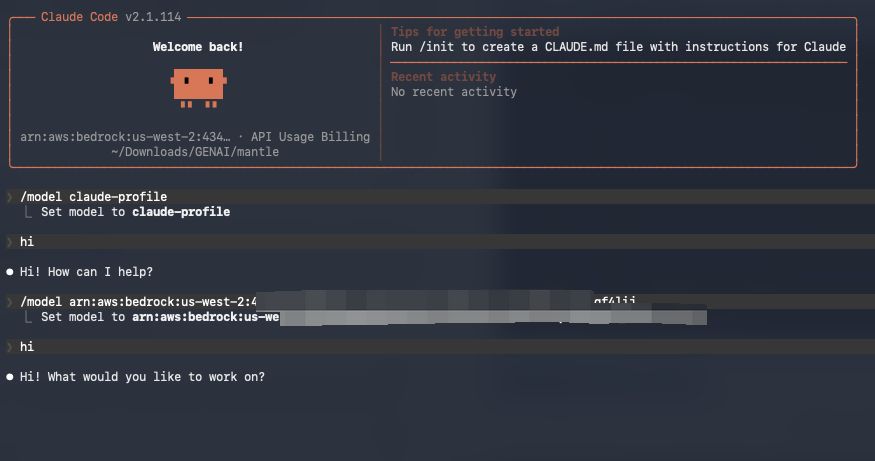
Claude Code Setup
1. Create ~/.claude.json
{
  "hasCompletedOnboarding": true
}
2. Create ~/.claude/settings.json
{
  "env": {
    "ANTHROPIC_API_KEY": "your_api_key",
    "ANTHROPIC_BASE_URL": "https://your-proxy-url"
  }
}
For non-Claude models, add model environment variables:
{
  "env": {
    "ANTHROPIC_API_KEY": "your_api_key",
    "ANTHROPIC_BASE_URL": "https://your-proxy-url",
    "ANTHROPIC_DEFAULT_HAIKU_MODEL": "mooonshotai.kimi-k2.5",
    "ANTHROPIC_DEFAULT_SONNET_MODEL": "mooonshotai.kimi-k2.5",
    "ANTHROPIC_DEFAULT_OPUS_MODEL": "mooonshotai.kimi-k2.5"
  }
}
Note: Claude Code/Agent SDK detects direct Bedrock connections and discards beta headers. This proxy disguises the connection to preserve official API behavior.
Claude Agent SDK
The same settings apply to Claude Agent SDK. See AgentCore Demo for a Dockerfile example.
Deployment
Option 1: AWS ECS (Recommended)
| Feature | Fargate (Default) | EC2 |
|---|---|---|
| PTC Support | No | Yes |
| Management | Serverless | Requires ASG |
| Docker Access | No | Yes (socket mount) |
| Recommended For | Standard API proxy | PTC/Web Search dynamic filtering |
Prerequisites: AWS CLI configured, Node.js, and Docker running (the image is built locally from your working tree).
cd cdk && npm install

# One-time per account/region
npx cdk bootstrap aws://<account-id>/<region>
Optional — enable features that need a credential. Shared settings live in
config/config.ts; secrets belong in cdk/.env.local, which is gitignored and
loaded automatically, so you don't re-export them on every deploy:
cp .env.local.example .env.local # then fill in what you need
Skip this entirely if you only need the Anthropic /v1/messages surface — it
authenticates with the task's IAM role and needs no extra credential.
# First deploy: --all creates the Network, DynamoDB, Cognito and ECS stacks
./scripts/deploy.sh -e prod -r us-west-2 -p arm64 --all

# Subsequent deploys: application stack only (the default)
./scripts/deploy.sh -e prod -r us-west-2 -p arm64

# EC2 launch type (enables PTC + dynamic filtering)
./scripts/deploy.sh -e prod -r us-west-2 -p arm64 -l ec2
After the first deploy, prefer the default (ECS-only).
--allalso deploys the Network stack, which against a long-lived environment whose VPC has drifted from this code can provision parallel NAT gateways and VPC endpoints and orphan the live ones. Runcdk diffbefore any infrastructure change.
Enabling a feature without its required configuration fails at synth with a
message naming what's missing, rather than deploying a proxy that errors on every
request. Feature flags such as ENABLE_OPENAI_PASSTHROUGH and
ENABLE_CLOUDFRONT can go in .env.local alongside the secrets, or be exported
for a single deploy:
ENABLE_CLOUDFRONT=true ./scripts/deploy.sh -e prod -r us-west-2 -p arm64
Deployment takes ~15-20 minutes. See CDK Deployment Guide for full details. For AgentCore web search, run AWS_REGION=us-east-1 uv run bash scripts/create_agentcore.sh in us-east-1, then deploy with WEB_SEARCH_PROVIDER=agentcore and AGENTCORE_GATEWAY_URL=<gateway-mcp-url> instead of WEB_SEARCH_API_KEY.
Post-Deployment
# Create admin user
./scripts/create-admin-user.sh -e prod -r us-west-2 --email [email protected]
visit https://xxx.cloudfront.net/admin/ Admin portal to config api keys
Option 2: Local Development
# Install (the model-mappings/ submodule holds the offline default model-mapping snapshot)
git clone --recurse-submodules https://github.com/xiehust/sample-bedrock-api-proxy.git
cd sample-bedrock-api-proxy   # already cloned? run: git submodule update --init
pip install uv && uv sync
cp env.example .env  # configure

# Setup DynamoDB tables and create API key
uv run scripts/setup_tables.py
uv run scripts/create_api_key.py --user-id dev-user --name "Dev Key"

# Run
uv run uvicorn app.main:app --reload --port 8000 --no-proxy-headers
Source-IP policy deployment checklist
Per-key IP restrictions are checked on every authenticated request, including cache
hits, before rate limiting or handlers. Historical keys without a policy remain
unrestricted; master keys and REQUIRE_API_KEY=False bypass policy enforcement.
An IP denial or malformed stored policy returns 403 in the Anthropic/OpenAI error
envelope. Invalid keys still return 401. Public health/docs paths stay public.
Launch invariant: the application must receive the raw transport peer in
ASGI scope['client']. Docker and the Python entry points disable Uvicorn proxy
rewriting. For manual Uvicorn launches always pass --no-proxy-headers; for a custom
ASGI host disable equivalent rewriting and any outer proxy-header middleware.
--forwarded-allow-ips='*' is not a substitute. A previously rewritten peer cannot
be recovered or reliably detected by the application; parsing XFF again could
otherwise authorize a forged address.
| Ingress topology | Settings | Required protection |
|---|---|---|
| Direct / local Docker | CLIENT_IP_TRUSTED_PROXY_CIDRS= and CLIENT_IP_TRUSTED_PROXY_HOPS=0 |
No peer rewriting; all forwarded headers ignored |
| ALB → proxy | Actual ALB subnet CIDRs (comma-separated), hops 1 |
Proxy port reachable only from ALB security group; ALB XFF append, client ports disabled |
| CloudFront → ALB → proxy | Same ALB subnet CIDRs, hops 2 |
Above, plus distribution-specific secret validated by every forwarding listener rule; default rejects direct ALB traffic |
CDK injects public ALB subnet CIDRs and the appropriate hop count for both Fargate and EC2, explicitly sets XFF append/port attributes, and retains the existing ALB-only task/host security group and CloudFront secret rules. Do not widen task ingress, add an unprotected ALB listener, or mix one-hop and two-hop ingress on a single proxy deployment. CIDR membership alone does not authenticate a proxy. Other proxies require an operator-verified fixed, appended/sanitized topology.
Configuration fails startup for invalid/host-bit CIDRs, trust-all ranges (including unions covering a whole address family), inconsistent CIDRs/hops, or hops outside 0–8. Maximum: 100 trusted CIDRs and 8 KiB configuration. Proxy mode accepts one XFF header, at most 8 KiB and 64 address tokens. Duplicate headers, malformed tokens (even in the prefix), ports, scoped addresses, short/missing chains, or untrusted peers make source attribution indeterminate and deny an IP-restricted key. Bare IPv4/IPv6 are supported; IPv4-mapped IPv6 normalizes to IPv4. Repeated valid address tokens are allowed (e.g. shared NAT). No arbitrary XFF-first selection is used.
The application never changes request.client. Handlers can use
request.state.client_ip (canonical string or None) and client_ip_reason for
attribution; request.state.access_policy is the immutable admitted snapshot.
Trusted ingress may set a single X-Forwarded-Proto: http or https; only the
scheme is honored so slash redirects retain their upstream scheme. Untrusted,
duplicate or malformed proto headers are ignored. The current CloudFront origin
uses HTTP to ALB, so ALB may report http, not the viewer's HTTPS scheme; use
canonical API paths (no trailing-slash redirect), and smoke-test redirects rather
than treating a viewer-supplied scheme header as trusted.
Before activating a non-master canary key:
- Finish deploying enforcement-capable code to all workers before enabling restrictions in the admin portal. Never activate policies on a mixed-version or partially enforcing deployment.
- Verify real ingress peers, append mode, disabled XFF ports, task/host SGs, and CloudFront secret rejection of direct ALB requests. Include EC2 bridge-network source preservation if using that launch type. Never broaden trust to fix an unexplained peer address.
- Test both API surfaces from known allowed and denied NAT/VPN exits, with no XFF, forged allowlisted XFF prefixes, duplicate/malformed XFF, and IPv6 where enabled. Confirm denied requests produce no upstream/tool effects. The observed address is the external exit address, not a workstation behind NAT/VPN.
- Repeat with the same cached key from a different exit. Policy changes converge
within
API_KEY_CACHE_TTL_SECONDS(default 60) under healthy consistent reads; lookup failures do not reuse expired permissions. Already admitted requests and streams keep their snapshots and are not forcibly cancelled. - Check redirect schemes and canonical URLs through the actual ingress. Local tests/synthesis are not proof of production topology. No production smoke test is implied by these instructions.
Rollback to a binary that ignores policies is unsafe. Use an enforcing version, or revoke affected keys and wait out the validation-cache window before rollback; drain workers deliberately. Denial logs contain a server-generated request ID, reason and canonical source address, never credentials or full forwarding headers.
Per-key IP and model restrictions
In Admin → API Keys → Create / Edit, enable Restrict source IPs and/or
Restrict actual models independently. Enter one IPv4/IPv6 address or CIDR per
line. CIDRs must have no host bits: 203.0.113.0/24 is valid, while
203.0.113.8/24 is rejected, never silently broadened. Individual addresses are
stored as host CIDRs; mapped IPv6 host rules normalize to IPv4.
Choose a mapping to preview its exact upstream target, then Add exact target, or enter literal model IDs/ARNs manually, even when also catalogued as aliases. The chooser only suggests the current mapped target: selecting a mapping does not change the list; Add exact target appends the displayed target ID. Manual entries and existing saved permissions are never silently mapped or rewritten.
Only the exact ID sent upstream at runtime controls access. For example, the
legacy OpenAI-compatible adapter may send the original request name gpt-5.4.
In that mode, enter gpt-5.4 literally, even if the chooser maps it elsewhere. The
editor warns but permits saving it; this authorizes literal gpt-5.4, not its
mapped target. Verify the actual wire ID for your API mode, routing and failover.
Two client aliases that actually send the same allowed target can work; remapping
an alias never expands stored permissions. IDs are case-sensitive; regional/global
prefixes, versions, bare IDs and ARNs are not interchangeable. Routing, failover,
tools and continuations must remain within the allowed targets. An ARN permits
the exact resource, not immutable internals of an externally managed inference profile.
The table shows IP/model restriction badges. Turning a switch off retains its list for later reuse; explicitly clear the list if you want it removed. An enabled empty list is invalid. Each list is limited to 100 entries (before deduplication), model IDs to 2048 characters, and the complete policy to 64 KiB of compact UTF-8 JSON. Disabled lists are validated too. The editor trims line-edge whitespace; server validation is authoritative and validation details appear in the form.
The admin API (POST /api/keys, PUT /api/keys/{api_key}) accepts this
complete replacement document alongside other key fields:
{
  "access_policy": {
    "version": 1,
    "ip": {"enabled": true, "allow": ["203.0.113.8/32", "2001:db8::/48"]},
    "model": {"enabled": true, "allow": ["global.anthropic.claude-sonnet-4-5-20250929-v1:0"]}
  }
}
Omitting access_policy on update preserves it; historical keys with no field
remain unrestricted. null, partial documents, unknown versions and enabled-empty
lists are rejected (422). To disable explicitly, send the complete v1 object with
the relevant enabled: false and the lists to retain. Unrelated form edits omit
the policy. Runtime corrupt policy data fails closed. Master keys and disabled
API authentication bypass these restrictions; public health/docs remain public.
Activation: changes converge within API_KEY_CACHE_TTL_SECONDS (default
60 seconds) under healthy consistent reads. Already admitted requests/streams
keep their snapshot and are not forcibly cancelled. This is separate from
prompt-cache TTL. Follow the source-IP deployment checklist
for raw-peer preservation, NAT/VPN exit addresses, verified proxy trust, staged
rollout and safe rollback. Local tests do not verify your production ingress.
Responses retention: model-restricted keys need verifiable owner, historical
model and backend metadata for response-ID operations and previous_response_id.
New Responses record attribution in the existing response-context table, without
storing ordinary message content for authorization. Retention uses
RESPONSE_CONTEXT_TTL_SECONDS (default 3600 seconds / 1 hour), not the
upstream's retention. Missing, pre-upgrade, foreign, expired or unverifiable IDs
return generic 404, without probing upstream; an owned forbidden model returns
403. Metadata read failures fail closed (503). A changed provider/backend can
invalidate old IDs. Start a new request when an old ID is no longer verifiable;
allowing a new model does not authorize the historical model automatically.
Verified proxy-managed IDs do not gain upstream CRUD support (unsupported
operations return 400). Unrestricted/master response-ID behavior is unchanged:
this is not universal tenant isolation for unrestricted Responses. Restricting a
previously unrestricted key may therefore require starting new conversations.
API Usage
Anthropic SDK
from anthropic import Anthropic

client = Anthropic(
    api_key="sk-your-api-key",
    base_url="http://localhost:8000"
)

# Non-streaming
message = client.messages.create(
    model="claude-opus-4-7",
    max_tokens=1024,
    messages=[{"role": "user", "content": "Hello!"}]
)
print(message.content[0].text)

# Streaming
with client.messages.stream(
    model="claude-opus-4-7",
    max_tokens=1024,
    messages=[{"role": "user", "content": "Tell me a story"}]
) as stream:
    for text in stream.text_stream:
        print(text, end="", flush=True)
curl
# Non-streaming
curl http://localhost:8000/v1/messages \
  -H "Content-Type: application/json" \
  -H "x-api-key: sk-xxx" \
  -d '{"model": "claude-sonnet-4-5-20250929", "max_tokens": 1024, "messages": [{"role": "user", "content": "Hello!"}]}'

# Streaming
curl http://localhost:8000/v1/messages \
  -H "Content-Type: application/json" \
  -H "x-api-key: sk-xxx" \
  -d '{"model": "claude-sonnet-4-5-20250929", "max_tokens": 1024, "stream": true, "messages": [{"role": "user", "content": "Hello!"}]}'

# List models
curl http://localhost:8000/v1/models -H "x-api-key: sk-xxx"
OpenAI SDK (/openai/v1)
Requires ENABLE_OPENAI_PASSTHROUGH=True on the proxy. Point the OpenAI SDK at <proxy>/openai/v1 and use your proxy API key — the proxy supplies the upstream Bedrock credentials. Bedrock model IDs (e.g. openai.gpt-oss-120b) are passed through; Anthropic-style aliases are resolved via the model mapping table.
Codex CLI / IDE
Codex can use the proxy as a custom Responses API model provider. Put the provider settings in your user-level ~/.codex/config.toml because Codex ignores model provider settings from project-local .codex/config.toml files.
model_provider = "bedrock-proxy"
model = "openai.gpt-5.5"
model_reasoning_effort = "high"

# Recommended when the proxy has no Tavily/Brave web-search provider configured.
# Codex's default cached web search sends external_web_access=false, which this
# proxy does not support.
# If proxy-side web search is enabled, set web_search to "live".
web_search = "disabled"

[model_providers.bedrock-proxy]
name = "Bedrock API Proxy"
base_url = "https://your-proxy.example.com/openai/v1"
env_key = "OPENAI_API_KEY"
wire_api = "responses"
Set OPENAI_API_KEY to a proxy API key, not a Bedrock API key:
export OPENAI_API_KEY="sk-your-proxy-api-key"
If you want Codex web search through the proxy, configure ENABLE_WEB_SEARCH=True plus WEB_SEARCH_PROVIDER/WEB_SEARCH_API_KEY on the proxy service, then set:
web_search = "live"
Chat Completions API
from openai import OpenAI

client = OpenAI(
    api_key="sk-your-api-key",
    base_url="http://localhost:8000/openai/v1",
)

# Non-streaming
resp = client.chat.completions.create(
    model="openai.gpt-oss-120b",
    messages=[{"role": "user", "content": "Hello!"}],
)
print(resp.choices[0].message.content)

# Streaming — set stream_options to capture usage
stream = client.chat.completions.create(
    model="openai.gpt-oss-120b",
    messages=[{"role": "user", "content": "Tell me a story"}],
    stream=True,
    stream_options={"include_usage": True},
)
for chunk in stream:
    if chunk.choices and chunk.choices[0].delta.content:
        print(chunk.choices[0].delta.content, end="", flush=True)
Responses API
Supports stateful conversation chaining via previous_response_id and proxy-managed web_search tool calls.
from openai import OpenAI

client = OpenAI(
    api_key="sk-your-api-key",
    base_url="http://localhost:8000/openai/v1",
)

# Basic call
resp = client.responses.create(
    model="openai.gpt-oss-120b",
    input="What's the capital of France?",
)
print(resp.output_text)

# Stateful follow-up using previous_response_id
followup = client.responses.create(
    model="openai.gpt-oss-120b",
    input="And its population?",
    previous_response_id=resp.id,
)
print(followup.output_text)

# Streaming
stream = client.responses.create(
    model="openai.gpt-oss-120b",
    input="Write a haiku about Bedrock",
    stream=True,
)
for event in stream:
    if event.type == "response.output_text.delta":
        print(event.delta, end="", flush=True)

# Web search (proxy-managed via Tavily/Brave)
resp = client.responses.create(
    model="openai.gpt-oss-120b",
    input="What were the top AI announcements this week?",
    tools=[{"type": "web_search"}],
)
print(resp.output_text)
Architecture
+----------------------------------------------------------+
|              Client Application                          |
|           (Anthropic Python SDK)                         |
+---------------------------+------------------------------+
                            |
                            | HTTP/HTTPS (Anthropic Format)
                            v
+----------------------------------------------------------+
|          FastAPI API Proxy Service                       |
|                                                          |
|  +----------+  +-----------+  +----------------+         |
|  |   Auth   |  |   Rate    |  |   Format       |         |
|  |Middleware|->| Limiting  |->|  Conversion    |         |
|  +----------+  +-----------+  +----------------+         |
+-------+---------------+---------------+------------------+
        |               |               |
        v               v               v
  +----------+    +----------+    +----------+
  | DynamoDB |    |   AWS    |    |CloudWatch|
  |          |    | Bedrock  |    |   Logs/  |
  | API Keys |    | Runtime  |    | Metrics  |
  |  Usage   |    | Converse |    |          |
  +----------+    +----------+    +----------+
Routing Logic
- Resolve model aliases before selecting the API.
- Model contains "anthropic" or "claude" → InvokeModel API (native format)
- Other IDs with a scope prefix (
global.,us.,eu.,apac.,us-gov., etc.) → Bedrock Runtime Responses API, enabled by default independently ofENABLE_OPENAI_COMPAT ENABLE_OPENAI_COMPAT=true→ OpenAI Chat Completions (via bedrock-mantle)- Otherwise → Converse API (unified Bedrock API)
/openai/v1/*→ OpenAI Passthrough (independent routes)
Runtime uses https://bedrock-runtime.<region>.amazonaws.com/openai/v1.
Set OPENAI_BASE_URL to select a Runtime region explicitly, or let the proxy derive
it from the existing AWS/Mantle configuration. MANTLE_ENDPOINT_URL takes precedence
if both URL variables are set. Explicit custom provider endpoints are preserved.
Authentication uses the Bedrock API key when configured, otherwise AWS credentials
with SigV4. Set ENABLE_BEDROCK_RESPONSES=false to restore previous routing.
Model support still depends on the selected model and region; the proxy forwards
upstream errors instead of silently retrying a different API.
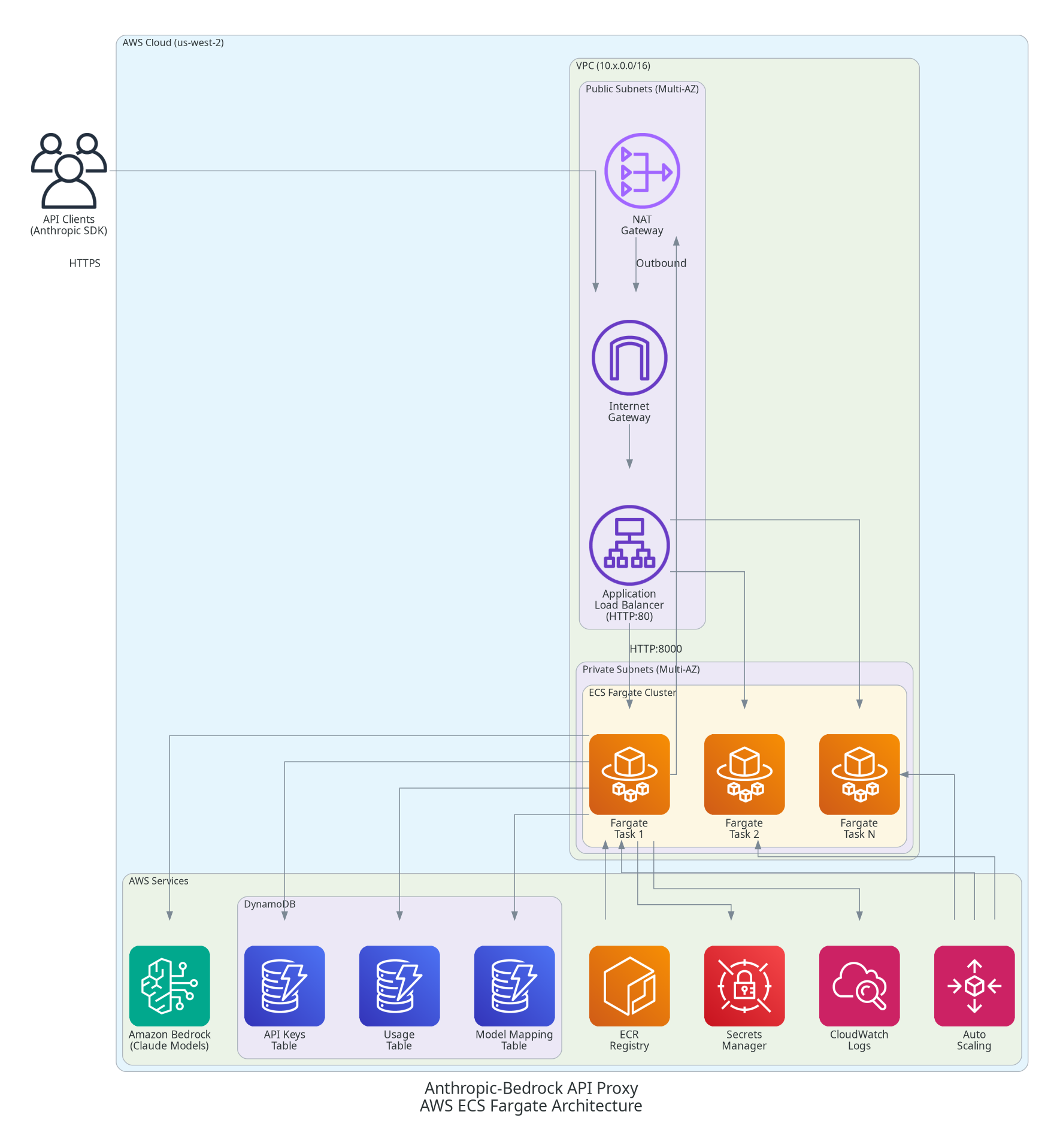
ECS Production Architecture
| Component | Description |
|---|---|
| VPC | Multi-AZ with public/private subnets |
| ALB | Receives external HTTP/HTTPS traffic |
| ECS Cluster | Fargate or EC2 in private subnets |
| CloudFront | Optional HTTPS termination |
| DynamoDB | API Keys, Usage, Model Mapping (PAY_PER_REQUEST) |
| Auto Scaling | CPU/memory-based (min 2, max 10) |
Documentation
| Document | Description |
|---|---|
| Configuration Reference | All environment variables and settings |
| CDK Deployment Guide | Full ECS deployment instructions |
| CloudFront HTTPS | HTTPS encryption setup |
| OpenTelemetry Tracing | LLM observability with Langfuse/Jaeger |
| Service Tier | Cost/latency tier configuration |
| Architecture Details | Conversion flows, streaming, DynamoDB schemas |
| Features | Detailed feature documentation |
| Troubleshooting | Common errors and debugging |
| Model Mapping | Model ID mapping reference |
| AgentCore Search MCP Server | Standalone MCP server for AgentCore Gateway WebSearch (中文, agent install steps) |
Security
Best Practices
- Use environment variables or Secrets Manager for API keys
- Use IAM roles on AWS (ECS task role)
- Enable CloudFront for HTTPS encryption
- Configure rate limits per API key
- Use VPC endpoints for AWS services in production
Required IAM Permissions
{
  "Version": "2012-10-17",
  "Statement": [
    {
      "Effect": "Allow",
      "Action": [
        "bedrock:InvokeModel",
        "bedrock:InvokeModelWithResponseStream",
        "bedrock:ListFoundationModels",
        "bedrock:GetFoundationModel"
      ],
      "Resource": "*"
    },
    {
      "Effect": "Allow",
      "Action": [
        "dynamodb:PutItem",
        "dynamodb:GetItem",
        "dynamodb:UpdateItem",
        "dynamodb:Query",
        "dynamodb:Scan",
        "dynamodb:DeleteItem"
      ],
      "Resource": ["arn:aws:dynamodb:*:*:table/anthropic-proxy-*"]
    }
  ]
}
Development
# Tests
uv run pytest                           # all tests
uv run pytest --cov=app --cov-report=html  # with coverage
uv run pytest -m integration            # integration only

# Code quality
black app tests && ruff check app tests && mypy app
Contributing
Contributions are welcome! Please fork, create a feature branch, add tests, and submit a pull request.
License
MIT-0
⭐ If this project is useful to you, please consider starring the repo — it helps others discover it.
Installing Agentcore Search
This server has no published package — it is built from source. Open the repository and follow its README.
▸ github.com/aws-samples/sample-bedrock-api-proxyFAQ
Is Agentcore Search MCP free?
Yes, Agentcore Search MCP is free — one-click install via Unyly at no cost.
Does Agentcore Search need an API key?
No, Agentcore Search runs without API keys or environment variables.
Is Agentcore Search hosted or self-hosted?
Self-hosted: the server runs locally on your machine via the install command above.
How do I install Agentcore Search in Claude Desktop, Claude Code or Cursor?
Open Agentcore Search on unyly.org, pick your client tab (Claude Desktop, Claude Code, Cursor) and press Install — the config is generated automatically, no JSON editing.
Related MCPs
GitHub
PRs, issues, code search, CI status
 by GitHub
Filesystem
Secure file operations with configurable access controls.
Memory
Knowledge graph-based persistent memory system.

Unyly Deploy
Deploy sites and MCP servers to Unyly straight from your AI agent
 by Unyly
Amap Maps Mcp Server
MCP server for using the AMap Maps API
 by duxiaohui
PayMCP
Lightweight payments layer for MCP servers: turn tools into paid endpoints with a two-line decorator. [PyPI](https://pypi.org/project/paymcp/) · [npm](https://w
 by blustAI
Server For Power BI
Enables exploring Microsoft Fabric / Power BI workspaces and semantic models, and executing ad-hoc DAX queries.
 by Mitsubishi-Fuso
Template MCP Server
A CLI tool to create a new Model Context Protocol server project with TypeScript support, dual transport options, and an extensible structure
 by mcpdotdirect
Supabase
Database, auth and storage
 by Supabase
Everything
Reference / test server with prompts, resources, and tools.
Compare Agentcore Search with
Not sure what to pick?
Find your stack in 60 seconds
Author?
Embed badge for your README
Browse similar
All development MCPs