
Ashlr Plugin
FreeNot checkedToken-efficiency plugin for Claude Code and Codex: MCP tools and hooks that replace high-volume Read/Grep/Edit/Bash calls with compact equivalents, powered by @

About
Token-efficiency plugin for Claude Code and Codex: MCP tools and hooks that replace high-volume Read/Grep/Edit/Bash calls with compact equivalents, powered by @ashlr/core-efficiency.
README
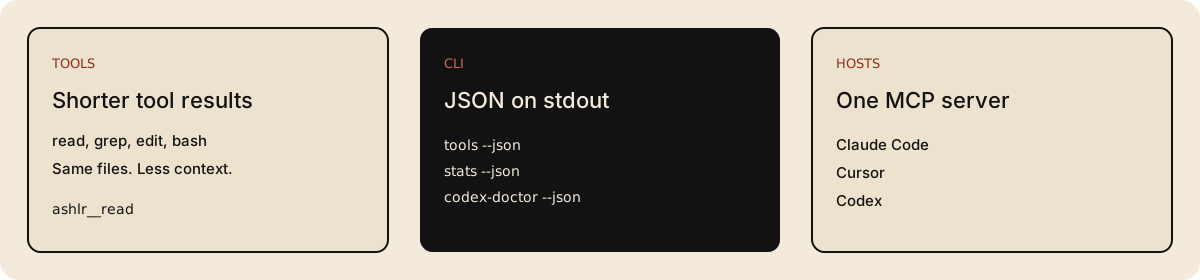
Install with npm, call the CLI with --json, and register the ashlr-mcp server.
ashlr-plugin is an open source efficiency layer for coding agents. It gives Claude Code, Codex, Cursor, and other MCP hosts shorter file, search, edit, and shell results, then records the difference in a local ledger.
Agents spend their context on tool output. Shorter results leave more room for the task. On the 2026-10-17 reference run, reads were about 75% smaller and greps about 27% smaller per call. That is not a whole-session total. The same run's per-repo means were about 60% on vercel/ai, about 63% on pandas, and about 55% on tokio. Reproduce it with bun run scripts/run-benchmark.ts --compare. Methodology.
The local plugin is MIT licensed. No account required. Telemetry is off unless you opt in (ASHLR_TELEMETRY=on): opt-in telemetry only. It ships 54 MCP tools and the full slash-command catalog.
Agent index: llms.txt. Runnable reference: llms-full.txt. Rendered docs: llms.txt and llms-full.txt.
CI (Linux · macOS · Windows) License: MIT GitHub stars
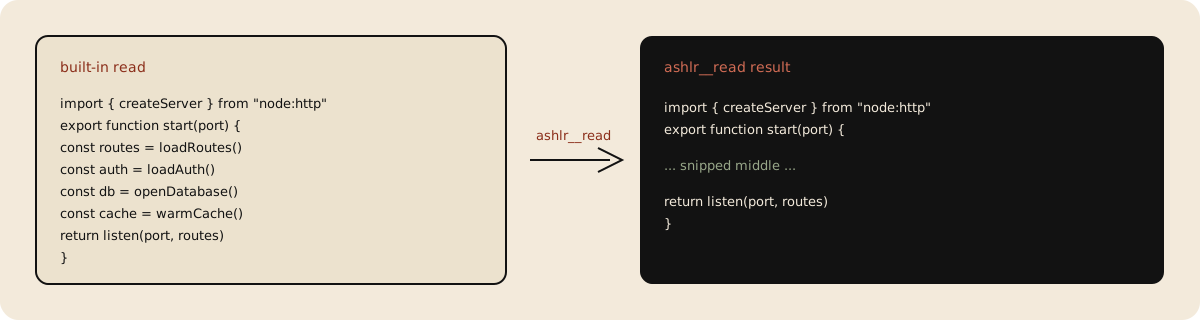
This illustrates one read mode. By default, large supported JavaScript and TypeScript files can instead return an AST skeleton; other reads may return compacted or summarized content. mode: "snip" selects head-and-tail compaction. See the tool catalog.
Install
Requires Bun 1.3 or newer. No account required. One command installs the CLI and the MCP server:
npm install -g [email protected]
Confirm the install, list the tools, and read the local ledger. Each command prints JSON on stdout:
ashlr-plugin --ashlr-handshake
ashlr-plugin tools --json
ashlr-plugin stats --json
ashlr-plugin codex-doctor --json
ashlr-plugin codex-install --dry-run --json
To diagnose a prospective recut using local Git refs, run ashlr-plugin recut-plan --base origin/main [--head HEAD] from the repository. It prints a JSON plan with the resolved commits, merge base, status, conflicting paths, and a suggested next step. The head defaults to HEAD; fetch missing refs separately before retrying. A clean or conflicting diagnosis exits 0, while unavailable refs or a missing common ancestor exit 2. The command does not change branches or the working tree.
codex-doctor reports invalid JSON separately from missing configuration files; its JSON report includes parse errors. ashlr-plugin version prints the version as text. ashlr-plugin mcp starts the stdio router. From a checkout of this repo, the same commands are bun run scripts/cli.ts <subcommand>. The handshake is answered by the ashlr-plugin program, not by cli.ts.
Claude Code plugin (slash commands, redirects, and the status line). This clones the plugin into the Claude marketplace cache. It does not install the global npm bin:
curl -fsSL https://plugin.ashlr.ai/install.sh | bash
Then, inside Claude Code:
/plugin marketplace add ashlrai/ashlr-plugin
/plugin install ashlr@ashlr-marketplace
/reload-plugins
Codex plugin:
codex plugin marketplace add ashlrai/ashlr-plugin
codex plugin add ashlr@ashlr-marketplace
ashlr-plugin codex-doctor --json
Windows (PowerShell):
irm https://raw.githubusercontent.com/ashlrai/ashlr-plugin/main/docs/install.ps1 | iex
MCP server
After the npm install, ashlr-mcp is on PATH. Paste one snippet. Do not edit a path.
Claude Code, project file .mcp.json:
{
  "mcpServers": {
    "ashlr": {
      "command": "ashlr-mcp",
      "args": [],
      "env": {
        "ASHLR_MCP_HOST": "claude-code"
      }
    }
  }
}
Cursor, project file .cursor/mcp.json:
{
  "mcpServers": {
    "ashlr": {
      "command": "ashlr-mcp",
      "args": [],
      "env": {
        "ASHLR_MCP_HOST": "cursor"
      }
    }
  }
}
Codex, add this block to ~/.codex/config.toml. It matches ashlr-plugin codex-install --dry-run --json:
[mcp_servers.ashlr]
command = "ashlr-mcp"
args = []
cwd = "."
env = { ASHLR_MCP_HOST = "codex-cli", ASHLR_CODEX_HOOK_MODE = "nudge" }
Goose and other hosts: ports/README.md and docs/multi-host-mcp.md.
How it works

- The host starts
ashlr-mcpover stdio. - The agent calls
ashlr__read,ashlr__grep,ashlr__edit, orashlr__bashinstead of the noisy built-in. - The tool performs its operation and returns a compact result. File and search tools operate within the allowed project roots;
ashlr__greprequires ripgrep (rg) on PATH. - Recorded savings are written to
~/.ashlr/stats.json. Read them withashlr-plugin stats --jsonorashlr__savings.
On Claude Code the PreToolUse hooks redirect built-in tools by default; set ASHLR_HOOK_MODE=nudge for suggestions only or off to disable them. Codex nudges and does not force a redirect. Cursor calls the MCP tools directly.
Tool calls
Arguments below match the tool catalog. Run them only after the MCP server is connected. ashlr__read and ashlr__grep do not modify files.
Read this README:
{
  "name": "ashlr__read",
  "arguments": {
    "path": "README.md"
  }
}
Search the server source:
{
  "name": "ashlr__grep",
  "arguments": {
    "pattern": "registerTool",
    "cwd": "servers"
  }
}
Read the ledger:
{
  "name": "ashlr__savings",
  "arguments": {}
}
ashlr__edit takes path, search, and replace. It writes the file. Use it when you mean to change that file. The full catalog is site/content/docs/tools and, on the web, plugin.ashlr.ai/docs/tools.
Features
| Need | Call |
|---|---|
| Read a large file | ashlr__read |
| Search | ashlr__grep |
| Edit without echoing the file | ashlr__edit |
| Shell output | ashlr__bash |
| Long-running shell commands | ashlr__bash_start, ashlr__bash_tail, ashlr__bash_stop, ashlr__bash_list |
| Repo map | ashlr__tree or ashlr__orient |
| Tests and diffs | ashlr__test or ashlr__diff_semantic |
| Edit a notebook cell | ashlr__notebook_edit |
| GitHub PRs and issues | ashlr__pr or ashlr__issue |
| Savings | ashlr__savings or ashlr-plugin stats --json |
54 MCP tools are registered by default. One experimental tool, ashlr__pipe, stays off until ASHLR_PIPE_ENABLE=1.
FAQ
Does an agent need an account?
No account required. npm install -g and the MCP snippet are enough for local tools and the ledger.
Where do file contents go?
The MCP server runs on the machine that started it. Tool results go back to the host, the same way a built-in read would. Telemetry is off unless ASHLR_TELEMETRY=on. The contract is docs/telemetry.md.
What does a savings number mean?
It is the difference for one tool call, not the cost of a whole session. The published reference run is docs/benchmarks.md. Your own ledger is ashlr-plugin stats --json.
Which hosts get slash commands?
Claude Code gets slash commands, hook redirects, and the status line. Codex gets the plugin, skills, nudge hooks, and the CLI. Cursor gets the MCP server. The matrix is docs/multi-host-mcp.md.
What is Pro?
The local plugin is the free product. Pro ($12/month or $120/year) adds cloud summarization and cross-machine stats. Team ($24/user/month, or $20/user/month billed annually, minimum 3) adds a shared encrypted genome. Prices and limits: docs/pricing.md.
Star
If this saved context on a real task, star the repo so other people and agents can find it: github.com/ashlrai/ashlr-plugin.
Releasing
Automatic releases
Merge a version bump (package.json) to main on green. auto-tag.yml waits for every required check on that exact commit, creates v<version> with the ashlr-release App token, and release.yml tests and publishes it. No designated caller and no manual step.
Manual, one command each:
gh workflow run auto-tag.yml -R ashlrai/ashlr-plugin
gh workflow run release.yml -R ashlrai/ashlr-plugin -f version=X.Y.Z
The first tags the current main version if its tag is missing and checks are green. The second builds and publishes an existing vX.Y.Z tag.
Release notes
Version history lives in CHANGELOG.md.
Status-line
The Claude Code status bar shows savings and other session information.
Install:
bun run scripts/install-status-line.ts
With the sparkline and tips disabled, examples include:
| Example output | Meaning |
|---|---|
ashlr · ctx: 50% · session +0 ≈$0.00 · lifetime +1.5K (est.) |
No session savings yet; the lifetime total is estimated. |
ashlr · ctx: 92% · session +0 ≈$0.00 |
Context usage is available from Claude Code input; the lifetime segment is absent when its selected total is zero. |
Fields are separated by ·; + denotes saved tokens. Counts use K for thousands and M for millions. Optional fields depend on settings, available data and terminal width.
| Field | Meaning |
|---|---|
ashlr |
Identifies the status line. |
Heartbeat and 7d sparkline |
The heartbeat animates briefly after a save when animation is enabled. Seven cells show daily tokens saved, oldest to newest, for the current and preceding six UTC days, scaled to the largest day. The 7d label appears above 100 columns. |
ctx: 50% |
Context used as a percentage of the limit supplied by Claude Code; hidden when usable input is unavailable. |
session ↑+12.3K |
Tokens saved across matching current-session buckets. ↑ (or ASCII +) marks a save in the last four seconds; without stats the line may say waiting for first tool call, or collecting… during early zero-savings use. |
≈$0.01 |
Estimated session savings in US dollars, using the detected summarizer's input price, an ASHLR_PRICING_MODEL override, or main-model pricing when the detected price is zero and no override is set. Values below one cent display as ≈$0.00. |
lifetime +1.2M (est.) |
Local lifetime tokens saved. After ten measured calls, (API-measured) instead shows only the measured-call total, which can be lower than the overall estimate. |
* 3d streak |
Stored current streak of active days; shown from three days. |
☁ 2 machines |
Machine count from the cached cross-machine aggregate for Pro; the cache can be stale. |
brief: concise |
Active user-level brief setting; hidden when off. |
last: ashlr__read +5.0K [2s ago] |
Age of the latest session save and the highest-saving tool entry in a matching session bucket. The count is that entry's accumulated savings, so the tool and count are a proxy, not necessarily the last call. Shown for up to 60 seconds. |
tip: … or ↑: … |
A rotating usage tip, or an upgrade hint when an apparently free user has saved at least 50,000 session tokens. |
On narrow terminals, fields can be omitted or the line truncated; an absent field does not imply a zero value. See the status-line documentation for visibility rules, fallback behavior and stale data.
The optional statusLine settings live under the ashlr key in ~/.claude/settings.json. Omitted booleans use the defaults shown here.
| Field | Default | Effect |
|---|---|---|
statusLine |
true |
Master switch; false hides the status line. |
statusLineSession |
true |
Show the current session's saved-token count and cost estimate. |
statusLineLifetime |
true |
Show lifetime saved-token count when it is greater than zero. |
statusLineTips |
true |
Add a rotating tip, or an eligible upgrade nudge, when it fits. |
statusLineSparkline |
true |
Show the 7-day activity sparkline and heartbeat. |
statusLineUpgradeNudge |
true |
Allow the free-tier 50K-session-savings upgrade nudge; set false to silence it. |
For example, to hide tips and lifetime totals while keeping session savings:
{
  "ashlr": {
    "statusLineTips": false,
    "statusLineLifetime": false
  }
}
The status line is Claude Code-specific. Codex users can inspect savings with ashlr-plugin stats --json or the ashlr__savings MCP tool.
Provider base URLs
The plugin's own provider calls (the summarizer and token-count calls to Anthropic, the genome reachability probes for Anthropic and OpenAI, and the Ollama checks in /ashlr-ollama-setup and genome-init) read the usual environment variables and keep their old defaults when none is set:
| Variable | Default | Form |
|---|---|---|
ANTHROPIC_BASE_URL |
https://api.anthropic.com |
root, without /v1 |
OPENAI_BASE_URL |
https://api.openai.com/v1 |
includes /v1 |
OLLAMA_HOST |
http://localhost:11434 |
host, host:port, :port or a full URL |
Trailing slashes are trimmed. Pointing these at a gateway such as a LiteLLM proxy or a Phantom proxy is therefore possible, because the plugin just sends its requests to whatever URL you set. Only the URL handling is covered by tests here; the plugin has not been tested against any specific gateway, and what a gateway does with your keys and requests is documented by that gateway. Not covered: the Ollama probe in the session greeting and the optional ASHLR_EMBED_URL embedding endpoint, which keep their own settings.
Under a Phantom session these variables are set for you; see Plugs into Phantom Secrets.
Plugs into Phantom Secrets
Phantom Secrets swaps the real keys in a project for scoped phm_ placeholders and swaps them back at an authenticated local proxy: the agent can use the key but never sees it. The plugin runs inside that boundary with no extra wiring. phantom exec hands the child phm_ placeholders and points ANTHROPIC_BASE_URL and OPENAI_BASE_URL at http://127.0.0.1:<port>/<route>/_phantom/<token>/; the plugin sends whatever key and base URL it is given, so the placeholder flows through unchanged and the proxy does the swap.
# Hosts run inside the Phantom boundary
phantom exec -- claude
phantom exec -- codex

# Plugin scripts work the same way
phantom exec -- bun run scripts/doctor.ts
phantom exec -- bun run scripts/run-benchmark.ts --validate-tokenizer
Inside a session:
/ashlr-doctorreports it. Aphantom execline shows the proxy port, which provider keys holdphm_placeholders, and which base URLs point at the session's proxy (session token redacted). It warns when aphm_placeholder sits outside a session, when a placeholder's base URL does not point at the proxy, or when a key is aphm:reference. The doctor also lists whether thephantomCLI is installed and its version; it runs onlyphantom --versionand never reads or reveals secret values.- Optional preflight.
ASHLR_PHANTOM_PREFLIGHT=1(orstrict) makes the doctor also run Phantom's value-freephantom agent doctor --jsonand report its verdict as aphantom preflightline. See docs/phantom-preflight.md. - Benchmarks adapt.
run-benchmark --validate-tokenizerskips its API sample when the key would not work from that process, and says why. - Hard guarantees. Detection uses variable names, the
phm_/phm:prefixes, and the base URL host and port only. The plugin never resolvesphm:references, never runsphantom reveal, and never prints key values.
The Phantom fleet mod in mods/ goes further on Claude Code 2.1.309+ with a pinned Locus binding and compatible Phantom/Locus CLIs: governed model routing (phm router select), a /top fleet pane, /peers, and person-acknowledged /send. /ashlr-fleet explains it inside a session. It ships from the git plugin only (the npm package omits mods/), and some of its CLI contracts are still proposals upstream: mods/README.md marks what is verified.
The full phantom exec contract, including LiteLLM notes and the strict-gateway variables, lives in docs/PHANTOM-USAGE.md. Session detection and the doctor line are covered by __tests__/phantom-exec.test.ts and __tests__/doctor-phantom.test.ts; the plugin has not been tested against a live Phantom session here.
Commands
Use ashlr-plugin in a terminal and slash commands inside Claude Code. MCP hosts call tools through ashlr-mcp.
| Task | Terminal | Claude Code |
|---|---|---|
| Start here | ashlr-plugin codex-doctor for Codex diagnostics | /ashlr-start |
| Check savings | ashlr-plugin stats --json | /ashlr-savings or /ashlr-dashboard |
| Inspect tools | ashlr-plugin tools | /ashlr-help |
| Preview Codex setup | ashlr-plugin codex-install --dry-run | See multi-host setup |
| Refresh changed genome files | ashlr-plugin genome-refresh | /ashlr-genome-loop to inspect the automatic loop |
| Decode the status line | See status-line setup | /ashlr-legend |
See the complete command reference for every shipped slash command, terminal command, aliases, and source links. Claude Code slash commands are not terminal subcommands. The CLI executable is ashlr-plugin; ashlr belongs to Ashlr Hub.
Free vs Pro
The free tier is the product: 54 MCP tools, the full slash-command catalog, the full genome scribe loop, and every benchmark included. No account required.
Pro ($12/mo, 7-day trial) adds cloud infrastructure for developers who need it: cross-machine stats sync, hosted embedding retrieval, cloud LLM summarizer (no local Ollama required), and a live auto-updating savings badge. Team ($24/user/mo, min 3) adds shared encrypted team genome, org savings dashboard, policy packs, and SSO.
Run /ashlr-upgrade to upgrade, or see plugin.ashlr.ai/docs/pro/pricing for the full comparison.
Architecture
See plugin.ashlr.ai/docs/contributing/architecture for how the tools, hooks, and genome scribe loop fit together. Internal notes: docs/architecture.md.
Changelog
See CHANGELOG.md for version history.
Part of the Ashlr ecosystem
The Ashlr plugin is one of the open-source tools from Ashlr, a forward-deployed engineering company. Its siblings: Lexicon, Locus, Phantom Secrets, Ashlr Stack, Ashlr Markdown.
Contributing
Issues and PRs are welcome. Look for good first issue to get started, and read CONTRIBUTING.md. Report security problems privately per SECURITY.md.
License
MIT: LICENSE.
Installing Ashlr Plugin
This server has no published package — it is built from source. Open the repository and follow its README.
▸ github.com/ashlrai/ashlr-pluginFAQ
Is Ashlr Plugin MCP free?
Yes, Ashlr Plugin MCP is free — one-click install via Unyly at no cost.
Does Ashlr Plugin need an API key?
No, Ashlr Plugin runs without API keys or environment variables.
Is Ashlr Plugin hosted or self-hosted?
Self-hosted: the server runs locally on your machine via the install command above.
How do I install Ashlr Plugin in Claude Desktop, Claude Code or Cursor?
Open Ashlr Plugin on unyly.org, pick your client tab (Claude Desktop, Claude Code, Cursor) and press Install — the config is generated automatically, no JSON editing.
Related MCPs
GitHub
PRs, issues, code search, CI status
 by GitHub
Filesystem
Secure file operations with configurable access controls.
Memory
Knowledge graph-based persistent memory system.
Template MCP Server
A CLI tool to create a new Model Context Protocol server project with TypeScript support, dual transport options, and an extensible structure
 by mcpdotdirect
Server Sequential Thinking
MCP server for sequential thinking and problem solving
 by GitHub Actions

Unyly Deploy
Deploy sites and MCP servers to Unyly straight from your AI agent
 by Unyly
Amap Maps Mcp Server
MCP server for using the AMap Maps API
 by duxiaohui
PayMCP
Lightweight payments layer for MCP servers: turn tools into paid endpoints with a two-line decorator. [PyPI](https://pypi.org/project/paymcp/) · [npm](https://w
 by blustAI
Server For Power BI
Enables exploring Microsoft Fabric / Power BI workspaces and semantic models, and executing ad-hoc DAX queries.
 by Mitsubishi-Fuso
Gpt Image 2 Mcp
RunAPI GPT Image 2 MCP server for image generation: create tasks, poll results, and check pricing across 1 model from Claude Code, Codex, Cursor, and VS Code.
 by runapi-ai
Compare Ashlr Plugin with
Not sure what to pick?
Find your stack in 60 seconds
Author?
Embed badge for your README
Browse similar
All development MCPs