
Auto Browser
FreeNot checkedHuman-in-the-loop automation framework. Log them in, watch them run.

About
Human-in-the-loop automation framework. Log them in, watch them run.
README
CI PyPI License: MIT MCP Server Local First Open in GitHub Codespaces
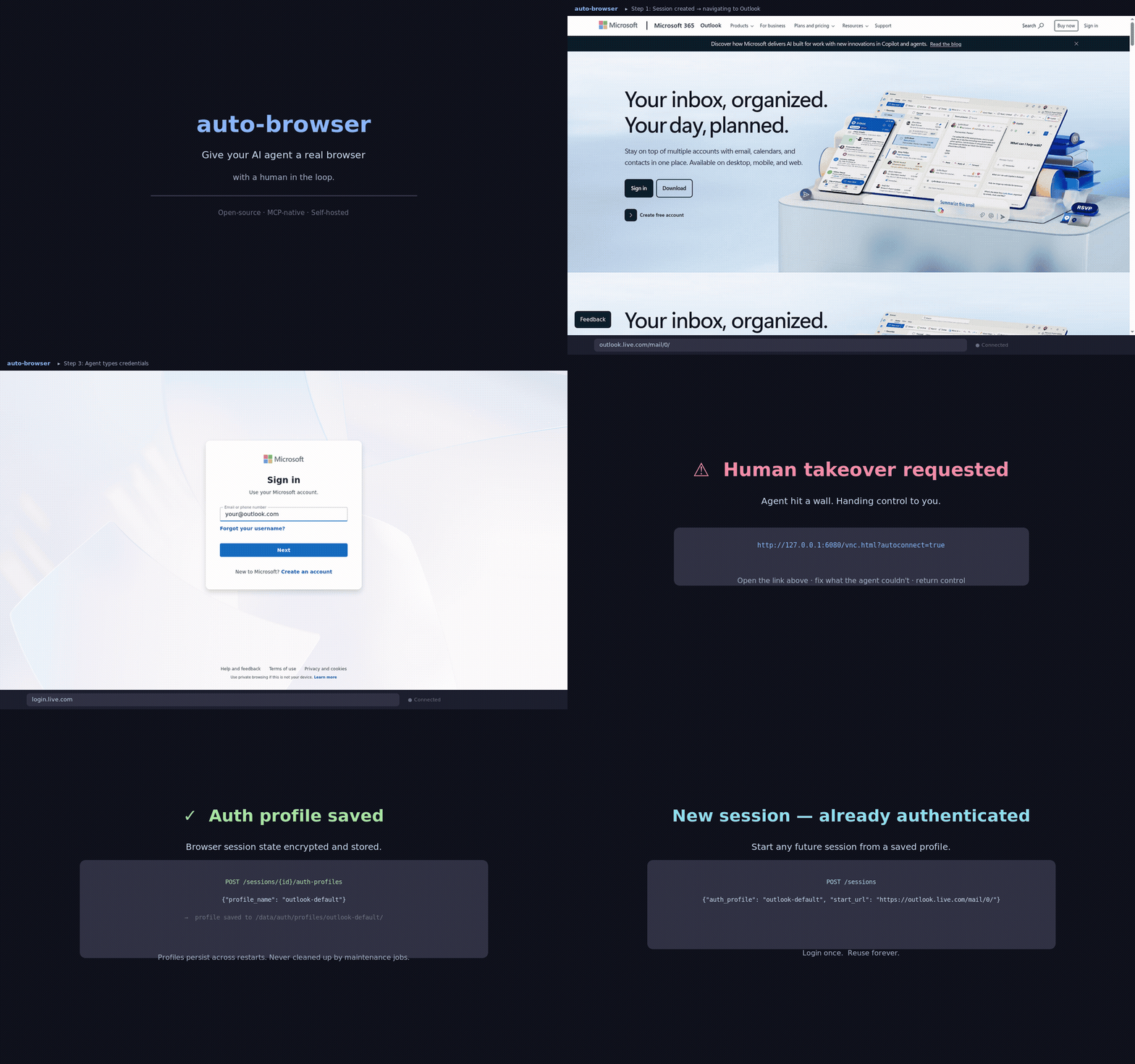
Give your AI agent a real browser, with a human in the loop.
Auto Browser is an MCP-native browser control plane for authorized workflows. It gives MCP clients, LLM agents, and operators a shared Playwright browser with human takeover, reusable auth profiles, approvals, audit trails, and local-first deployment.
Works with:
- Claude Desktop
- Cursor
- any MCP client that can talk HTTP or stdio
- direct REST callers when you want curl-first control
Why Auto Browser
- MCP-native from day one. The browser surface is already packaged as an MCP server instead of bolted on after the fact.
- Human takeover when the web gets brittle. noVNC keeps the same live session available when a person needs to step in.
- Login once, reuse later. Save named auth profiles and reopen fresh sessions that are already signed in.
- Local-first by default. Run the full stack on your own box with Docker Compose, or use Codespaces for a quick hosted demo.
- Safety rails built in. Approvals, operator identity, PII scrubbing, Witness receipts, and policy presets are all part of the product surface.
- Evidence you can hand to someone else. Witness receipt chains are Ed25519-signed, and an exported bundle verifies with scripts/verify_witness_bundle.py — which imports nothing from this project, so a recipient need not run or trust this controller to check it.
- We audit ourselves in public. docs/audits/2026-08-execution-audit.md documents an adversarial audit of this repo that found safety controls which reported success while doing nothing, with reproductions, the fixes, and the gates that close the class.
- Governed skill induction. Verified browser traces can become staged skill candidates with provenance that is signed when a mesh identity is configured — and checked on read, not just produced — plus verifier adapters and review-only graduation — agents that prove they can repeat themselves correctly, not just act once.
Release Highlights (v1.5.0)
- Read a page without paying for pixels. The new
textobservation preset returns the accessibility outline, extracted text, and interactables with no screenshot and no OCR — the cheapest way for an agent to read a page. SetPERCEPTION_PRESET_DEFAULT=textto make it a deployment-wide default. - Find a string on the page in one call.
browser.find_elementsnow takes aquery(plain text or regex, case-insensitive) instead of a CSS selector and returns each match with surrounding context — no full observe needed to check one value. - Errors agents can act on. Invalid tool arguments report field-level details, handler messages pass through instead of a generic failure, and the MCP bridge's cold-start error now says exactly how to start the controller.
- Any OpenAI-compatible model can drive the browser. A single generic adapter serves every model reachable over an OpenAI
/chat/completionsendpoint. New providers:openrouter(one key → ~every frontier model),xai(Grok),deepseek,minimax, andopenai_compatible(custom base URL for self-hosted Ollama / vLLM / LM Studio, Azure, Together, Groq, Fireworks, …). Vision + function-calling with a content-parse fallback for endpoints that ignoretool_choice. browser://audit/eventsMCP resource. List and read recent audit events across sessions directly over MCP.- Playwright pin parity enforced in CI. The controller (pip) and browser-node (npm) Playwright versions must match exactly — a single-side bump can no longer merge and crash-loop compose deployments.
- On PyPI.
pip install auto-browser-clientfor the SDK,pip install auto-browser-langchainfor the LangChain/LangGraph/CrewAI adapters, anduvx auto-browser-mcpto run the MCP stdio bridge with zero setup. Releases publish via PyPI trusted publishing (OIDC) on tag push.
Since v1.3.0
browser_manager.pyis now a pure facade + composition root (1,284 → 769 lines), with domain logic extracted intoapp/browser/services/.- Fork state exports are encrypted at rest and shadow-browse state never touches disk.
- Download capture tasks can no longer be garbage-collected mid-flight, shadow-browse failures roll back cleanly, and page listeners survive object-id reuse.
- Release gates in CI enforce dependency audits, fixture evals, client tests, Python wheel builds, and the 80% controller coverage gate on Python 3.11 and 3.14.
See CHANGELOG.md for the full release history.
Good Fits
- internal dashboards and admin tools
- operator-assisted QA and browser debugging
- login-once, reuse-later account workflows
- brittle sites where a human may need to recover the flow
- MCP-powered agent workflows that need a real browser, not just HTML fetches
Not the Goal
- CAPTCHA solving
- unauthorized scraping or account automation
- deceptive identity shaping or bypass tooling
What You Get
| Browser Control | Operator Safety | Deployment and Integration |
|---|---|---|
| Playwright-backed sessions with screenshots, DOM summaries, OCR excerpts, tab controls, downloads, and network inspection | approval gates, operator identity headers, audit events, PII scrubbing, Witness receipts, and protection profiles | MCP over HTTP, bundled stdio bridge, REST API, Docker Compose, Codespaces, auth profiles, and optional per-session isolation |
Quickstart
git clone https://github.com/LvcidPsyche/auto-browser.git
cd auto-browser
docker compose up --build
That is enough for local development with the default settings.
Optional:
cp .env.example .env
make doctor
Run make doctor from a normal terminal with local Docker access and permission to open localhost sockets.
Open:
- API docs:
http://127.0.0.1:8000/docs - Operator dashboard:
http://127.0.0.1:8000/dashboard - Visual takeover:
http://127.0.0.1:6080/vnc.html?autoconnect=true&resize=scale
All published ports bind to 127.0.0.1 by default.
Try It in Codespaces
Codespaces provisions the stack automatically. The dashboard and noVNC tabs are usually ready in about 90 seconds.
First Useful Demo
The highest-signal flow in this repo is:
- create a session
- log in manually if the site needs a human
- save the session as a named auth profile
- open a new session from that auth profile
- continue work without reauthing
Start here:
Minimal session creation:
curl -s http://127.0.0.1:8000/sessions \
  -X POST \
  -H 'content-type: application/json' \
  -d '{"name":"demo","start_url":"https://example.com"}' | jq
Minimal observation:
curl -s http://127.0.0.1:8000/sessions/<session-id>/observe | jq
MCP Clients
Auto Browser exposes:
- an HTTP MCP endpoint at
http://127.0.0.1:8000/mcp - convenience endpoints at
http://127.0.0.1:8000/mcp/toolsandhttp://127.0.0.1:8000/mcp/tools/call - a stdio bridge:
uvx auto-browser-mcpfrom PyPI, or scripts/mcp_stdio_bridge.py in a repo checkout
The default MCP tool profile is curated, which keeps the browser surface compact for better tool selection. If you want the full internal tool surface, set:
MCP_TOOL_PROFILE=full
Raw tool-call example:
curl -s http://127.0.0.1:8000/mcp/tools/call \
  -X POST \
  -H 'content-type: application/json' \
  -d '{
    "name":"browser.create_session",
    "arguments":{
      "name":"demo",
      "start_url":"https://example.com"
    }
  }' | jq
Client setup guides:
- docs/mcp-clients.md
- examples/claude-desktop-setup.md
- examples/cursor-mcp-setup.md
- examples/claude_desktop_config.json
For resource listing, resource reads, and subscription-style update examples, see docs/mcp-clients.md#resources-and-subscriptions.
Convergence Harness
Auto Browser ships a Stage 0 convergence harness for Agent Skill Induction. It runs a structured task contract, records tamper-checked traces, verifies completion, and writes a staged skill candidate carrying provenance. With a mesh identity configured that provenance is signed, and the registry verifies the signature before serving a candidate — a candidate that fails the check, or that was dropped into the staging directory unsigned, is refused. Candidates induced from a mock run are marked simulated so they cannot pass as converged. Generated skills are staged only — promotion stays explicit and reviewed.
Read-only inspection tools (harness.list_runs, harness.get_status, harness.get_trace) are exposed in the default curated MCP tool profile so agents can introspect harness state without elevated access. Convergence runs, drift checks, candidate management, and graduation require MCP_TOOL_PROFILE=full, or can be invoked directly over REST.
Start with docs/convergence-harness.md. A deterministic local smoke is:
python -m controller.harness.run --contract evals/contracts/example_read.json --mock-final-url https://example.com --mock-final-text "Example Domain"
For MCP clients, set MCP_TOOL_PROFILE=full to expose the harness.* tools.
Security and Compliance
For a real private deployment, set at least:
APP_ENV=production
API_BIND_SCOPE=exposed
API_BEARER_TOKEN=<strong-random-secret>
REQUIRE_OPERATOR_ID=true
AUTH_STATE_ENCRYPTION_KEY=<44-char-fernet-key>
REQUIRE_AUTH_STATE_ENCRYPTION=true
REQUEST_RATE_LIMIT_ENABLED=true
METRICS_ENABLED=true
STEALTH_ENABLED=false
COMPLIANCE_TEMPLATE can apply a preconfigured posture at startup:
| Preset | Auth Encryption | Operator ID | PII Scrub | Isolation | Max Session Age |
|---|---|---|---|---|---|
strict |
required | required | all layers | docker_ephemeral |
4h |
balanced |
- | required | network + text | shared | 24h |
Both presets require upload approvals and enable Witness receipts. Startup writes the applied policy to /data/compliance-manifest.json. The legacy names (HIPAA, SOC2, GDPR, PCI-DSS) still work as deprecated aliases and emit a warning at startup.
Example:
COMPLIANCE_TEMPLATE=strict docker compose up
For deployment details, hosted Witness notes, CLI auth modes, and reverse-SSH guidance, see:
Architecture at a Glance
flowchart LR
    User[Human operator] -->|watch / takeover| noVNC[noVNC]
    LLM[Any model: OpenAI / Claude / Gemini / OpenRouter / Grok / DeepSeek / MiniMax / local] -->|shared tools| Controller[Controller API]
    Controller -->|Playwright protocol| Browser[Browser node]
    noVNC --> Browser
    Browser --> Artifacts[(screenshots / traces / auth state)]
    Controller --> Artifacts
    Controller --> Policy[Allowlist + approval gates]
Model providers
First-class adapters for OpenAI, Claude, and Gemini (API or CLI). Beyond those,
a single generic OpenAI-compatible adapter drives any model reachable over an OpenAI
/chat/completions endpoint — set an API key to enable it:
| Provider | Reaches |
|---|---|
openrouter |
one key → ~every frontier model (Claude, GPT, Gemini, Grok, DeepSeek, Llama, Mistral, Qwen, …) |
xai |
Grok |
deepseek |
DeepSeek (text-only; driven from the DOM/accessibility outline) |
minimax |
MiniMax |
openai_compatible |
any custom base URL — self-hosted Ollama / vLLM / LM Studio, Azure OpenAI, Together, Groq, Fireworks, … |
Vision (screenshots) is used for every provider except text-only ones. See .env.example for
the *_API_KEY / *_BASE_URL / *_MODEL settings.
Core components:
browser-node/runs Chromium, Xvfb, x11vnc, and noVNCcontroller/exposes the FastAPI controller, MCP transport, policy rails, and orchestration endpointsdata/holds runtime artifacts, auth state, approvals, audit logs, and optional CLI cachesscripts/contains local helpers for doctor, smoke tests, bridges, and release checks
Repo Guide
| Path | What It Contains |
|---|---|
| controller/ | controller API, MCP transport, tests, and packaging |
| browser-node/ | browser runtime and Playwright connection layer |
| examples/ | copy-paste flows and MCP client setup |
| integrations/langchain/ | LangChain, LangGraph, and CrewAI adapters |
| docs/ | architecture, deployment, hardening, and launch docs |
| scripts/ | doctor, smoke harnesses, stdio bridge, and auth helpers |
| ops/ | supporting service templates and operational assets |
Common Commands
| Command | Purpose |
|---|---|
make help |
list available repo commands |
make lint |
run Ruff checks on app, tests, and helper scripts |
make test |
run controller tests in Docker |
make test-local |
run controller tests on host Python 3.10+ |
make eval |
run deterministic provider/profile eval scoring |
make doctor |
run the local readiness smoke |
make release-audit |
run the fuller release-validation pass |
make smoke-isolation |
verify per-session Docker isolation |
make smoke-reverse-ssh |
verify reverse-SSH remote access |
Documentation Map
| If You Want To... | Start Here |
|---|---|
| understand the system shape | docs/architecture.md |
| connect Claude Desktop or Cursor | docs/mcp-clients.md |
| run the curl-first examples | examples/README.md |
| deploy on a trusted host | docs/deployment.md |
| review production constraints | docs/production-hardening.md |
| run the convergence harness | docs/convergence-harness.md |
| inspect release history | CHANGELOG.md |
| see where the project is headed | ROADMAP.md |
Contributing
If you want to help, start with:
If Auto Browser is useful, a star helps other people find it. Sponsorship and tip options live in TIPS.md.
Installing Auto Browser
This server has no published package — it is built from source. Open the repository and follow its README.
▸ github.com/LvcidPsyche/auto-browserFAQ
Is Auto Browser MCP free?
Yes, Auto Browser MCP is free — one-click install via Unyly at no cost.
Does Auto Browser need an API key?
No, Auto Browser runs without API keys or environment variables.
Is Auto Browser hosted or self-hosted?
Self-hosted: the server runs locally on your machine via the install command above.
How do I install Auto Browser in Claude Desktop, Claude Code or Cursor?
Open Auto Browser on unyly.org, pick your client tab (Claude Desktop, Claude Code, Cursor) and press Install — the config is generated automatically, no JSON editing.
Related MCPs
Playwright
Browser automation, scraping, screenshots
 by Microsoft
Puppeteer
Browser automation and web scraping.
 by modelcontextprotocol
Higgsfield Unlimited
MCP server for Higgsfield AI that enables unlimited-mode image, video, audio generation, uploads, and job management via multiple parallel accounts, using brows
 by nukIeer
opentabs-dev/opentabs
Plugin-based MCP server + Chrome extension that gives AI agents access to web applications through the user's authenticated browser session. 100+ plugins with a
 by opentabs-dev
robhunter/agentdeals
1,500+ developer infrastructure deals, free tiers, and startup programs across 54 categories. Search deals, compare vendors, plan stacks, and track pricing chan
 by robhunter
hlydecker/ucsc-genome-mcp
MCP server to interact with the UCSC Genome Browser API, letting you find genomes, chromosomes, and more.
 by hlydecker
34892002/bilibili-mcp-js
A MCP server that supports searching for Bilibili content. Provides LangChain integration examples and test scripts.
 by 34892002
achiya-automation/safari-mcp
Native Safari browser automation for AI agents with 80+ tools. No Chrome dependency, optimized for Apple Silicon with 60% less CPU overhead.
 by achiya-automation
agent-infra/mcp-server-browser
Browser automation capabilities using Puppeteer, both support local and remote browser connection.
 by bytedance
aparajithn/agent-scraper-mcp
Web scraping MCP server for AI agents. 6 tools: clean content extraction, structured scraping with CSS selectors, full-page screenshots via Playwright, link ext
 by aparajithn
Compare Auto Browser with
Not sure what to pick?
Find your stack in 60 seconds
Author?
Embed badge for your README
Browse similar
All browse MCPs