
Chutes Build
FreeMaintainedPrivacy-first, open-source coding agent for the Chutes ecosystem

About
Privacy-first, open-source coding agent for the Chutes ecosystem
README
A Chutes-native terminal coding agent
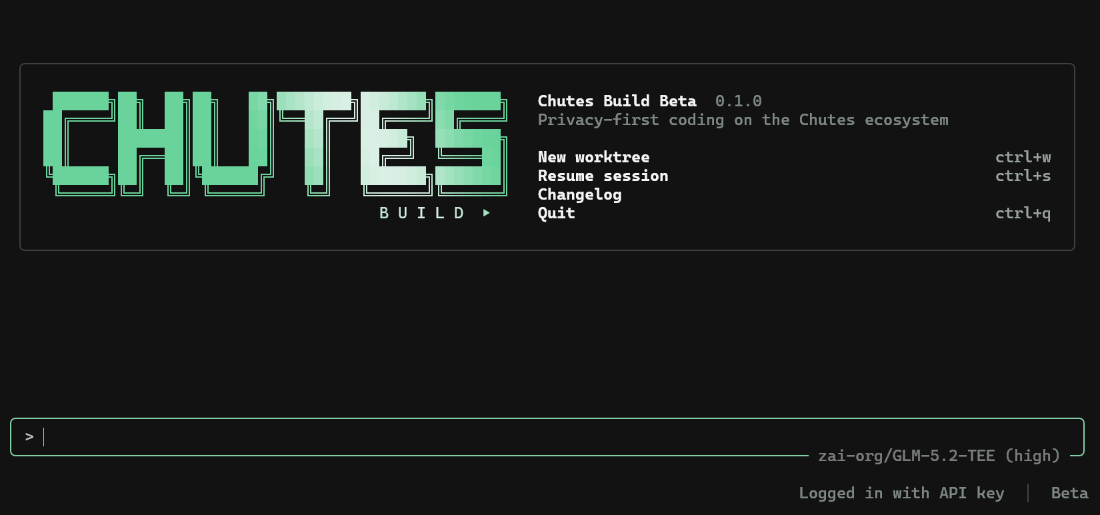
Chutes Build is a terminal-based AI coding agent for the Chutes ecosystem. It runs as a full-screen TUI (terminal user interface) that understands a codebase, edits files, executes shell commands, searches the web, and manages long-running tasks, interactively, headlessly for scripts and CI, or embedded in editors through the Agent Client Protocol (ACP). It is an independent, unofficial fork of xai-org/grok-build with Chutes-native inference, model routing, media and account endpoints, and it is not affiliated with or endorsed by xAI.
Contents
- Install
- Quick start
- Features
- Requirements
- Configuration
- Privacy and security
- Troubleshooting
- Development
- Support
- Contributing
- License
Install
Install the npm launcher, which resolves the native binary for the current platform:
npm install -g chutes-build
chutes-build --version
Run it once without installing:
npx chutes-build
Each release also publishes the six platform executables (macOS, Linux and Windows, x64 and arm64) as downloadable assets on the releases page. Older releases carry release notes only, so use npm for those.
There is no automatic self-update: chutes-build never checks for updates on its own. chutes-build update contacts the Chutes release channel only when you run it (--check reads just the channel pointer) and installs nothing unless you ask for a specific version. CHANGELOG.md records what changed in each release.
Quick start
- Create a Chutes API key at chutes.ai/app/settings/api-keys.
- Provide the key once with
chutes-build login, paste it on the welcome screen, or exportCHUTES_API_KEYfor the current process. An explicit environment key wins over a saved one. - Run
chutes-buildfrom the repository you want the agent to inspect. Start with/help,/modeland/docs.
chutes-build login
cd path/to/your/repository
chutes-build
Headless runs use the same binary:
chutes-build -p "Summarize this repository" --output-format plain
chutes-build -p "Return the package list" --output-format json
Headless-only controls such as --max-turns, --tools, --disallowed-tools and --json-schema require a headless prompt.
Full documentation lives in the repository: the documentation hub links the getting started guide, configuration reference, CLI reference and slash-command reference. The in-binary user guide at crates/codegen/chutes-pager/docs/user-guide/ covers keyboard shortcuts, theming, MCP servers, skills, plugins, hooks, sessions, sandboxing, headless mode and more. There is no separate documentation site.
Features
- Chutes-native inference and routing: requests go to Chutes, the model catalog is Chutes', and the default route is Chutes' native routing, either the saved
defaultpool or an inline pool set withCHUTES_ROUTING_POOL. - Automatic equivalent-model fallback when a chute is unavailable, with an ordered
CHUTES_FALLBACK_MODELSchain andCHUTES_STRICT_MODEL=1to disable it. - Full-screen TUI with file edits, shell commands, code search, plan mode, rewind and undo, sessions, and long-running background tasks.
- Headless mode for scripts and CI, plus the Agent Client Protocol (ACP) for editor integrations.
- Chutes ecosystem tools the agent calls on its own: image generation and editing, video and music generation, speech-to-text and text-to-speech, PDF and document extraction, OCR, text embeddings, and Context7 documentation lookup.
- Isolated browser automation over the DevTools protocol, with a temporary profile and loopback-only DevTools, plus automatic vision delegation for text-only models.
- Privacy boundaries compiled in rather than configured out: telemetry, remote error reporting, upload, session sharing, remote workspace exposure and self-update are disabled at build time and their endpoints are deadened. See PRIVACY.md.
- Permission prompts, a sandbox, local memory, MCP servers, skills, plugins and hooks, documented in the user guide.
Requirements
- Windows, macOS or Linux, on x64 or arm64.
- Node.js 18 or newer for the npm launcher.
- A Chutes API key. It is the only credential; there is no browser login.
- For a source build: Git, a Rust toolchain (pinned in rust-toolchain.toml, installed automatically by
rustup), and the platform C/C++ toolchain used by Rust. - DotSlash on
PATHbefore building, so hermetic tools under bin/ such as bin/protoc can run. protocfor proto code generation, resolved through DotSlash or aprotoconPATHor in$PROTOC. On Windows use the vendoredprotocfallback, because the DotSlash wrapper inbin/protocis not executable from a build script there.
Configuration
Configuration layers command-line arguments, environment variables, user configuration, project configuration and project instructions. chutes-build inspect --json shows the effective non-secret structure, and docs/configuration.md is the full reference.
| Setting | Purpose | Default |
|---|---|---|
CHUTES_API_KEY |
Ambient Chutes API credential, sent only to allowlisted official HTTPS endpoints | Unset; prompted or saved by chutes-build login |
CHUTES_BUILD_HOME |
Relocates the complete user state tree, including credentials, sessions, logs and plugins | ~/.chutes-build |
CHUTES_BUILD_DEFAULT_MODEL |
Default model id, or a native routing string such as default or an inline pool |
Chutes native routing (default) |
CHUTES_ROUTING_POOL |
Inline routing pool of comma-separated catalogue ids | Unset |
CHUTES_ROUTING_STRATEGY |
Routing strategy for a pool: sequential, latency or throughput |
sequential |
CHUTES_FALLBACK_MODELS |
Ordered comma-separated fallback chain | Unset |
CHUTES_STRICT_MODEL |
Set to 1 to disable automatic fallback |
Disabled |
CHUTES_EXTRA_CA_BUNDLE |
PEM bundle of extra TLS roots for networks that intercept TLS | Unset; no file is read |
Environment variables are read from the process environment; .env files are not loaded automatically. Endpoint overrides fail closed unless they use an allowlisted Chutes HTTPS host with no URL credentials and the default port, and ambient credentials are never inherited by arbitrary custom endpoints.
Privacy and security
Sessions, memory, configuration, logs, traces and generated artifacts stay local unless a documented feature needs a provider request. Telemetry, remote error reporting, trace upload, session sharing, remote workspace exposure, managed remote configuration and automatic updates stay off regardless of inherited configuration values. PRIVACY.md is the authoritative statement of the data boundaries.
Report vulnerabilities privately through SECURITY.md, never in a public issue.
Troubleshooting
Missing CHUTES_API_KEY
On first launch Chutes Build asks for a key created at chutes.ai/app/settings/api-keys; it also reads CHUTES_API_KEY from the process environment. If requests fail with authentication errors, check that the variable is exported in the launching shell: .env files are not loaded automatically. Never commit a real key; use your shell, your CI platform or a secret manager, and run chutes-build inspect --json to verify the effective non-secret configuration.
Model-pool routing errors
The default route is Chutes' native routing: the saved default pool (managed at chutes.ai/app, Model Routing) or an inline pool from CHUTES_ROUTING_POOL. When the default alias cannot resolve and no dashboard pool is saved, the built-in fallback chain steps down to a live inline pool from the current catalogue; a saved dashboard pool takes priority once configured. Check the saved pool, set CHUTES_ROUTING_POOL explicitly, review CHUTES_FALLBACK_MODELS ordering, and pick a strategy with CHUTES_ROUTING_STRATEGY.
Windows blocks saving the API key
If the welcome screen or chutes-build login reports permission denied (os error 5) for
C:\Users\<you>\.chutes-build\api_key, Windows Controlled folder access is blocking the
unsigned binary; the directory itself is writable. Allow chutes-build.exe through
Windows Security → Virus & threat protection → Ransomware protection → Allow an app through
Controlled folder access, or point CHUTES_BUILD_HOME at a folder the protection does not
cover.
Windows console shows wrong glyphs
The TUI degrades decorative glyphs on the legacy Windows console: arrows, checkmarks, diamonds and spinners fall back to ASCII or CP437-safe stand-ins. This is expected on legacy ConHost; for full rendering use Windows Terminal, the VS Code terminal or another modern emulator.
Browser or media tools unavailable
Browser automation needs Chrome or Edge, or an explicit CHUTES_BROWSER_EXECUTABLE. Video inspection needs FFmpeg, or an explicit CHUTES_FFMPEG_EXECUTABLE; install it and restart the process.
Development
Clone the repository and build with the pinned toolchain:
git clone https://github.com/TheStreamCode/chutes-build.git
cd chutes-build
cargo run -p chutes-build              # build and launch the TUI
cargo build -p chutes-build --release  # release binary: target/release/chutes-build
cargo check --workspace                # fast validation
Run checks on the crates you touched instead of the whole workspace:
cargo test -p chutes-config   # per-crate tests
cargo clippy -p <crate>         # lint configuration: clippy.toml at the repository root
The binary artifact is named chutes-build. The root Cargo.toml is generated and read-only: change the owning crate manifest or the generator source, and prefer per-crate Cargo.toml files. Cargo.lock is committed, and the npm launcher is a thin resolver for prebuilt native binaries: it never compiles Rust and has no install lifecycle script.
Upstream synchronization from xai-org/grok-build is frozen at 2.0.0. The total rebrand renamed every crate, module and the local wire, so an upstream diff no longer applies mechanically; ports are manual and recorded in docs/upstream-sync.md, and the crate and module names stay chutes-*.
Repository layout
| Path | Contents |
|---|---|
crates/chutes-build-core |
Chutes-owned product policy and integrations |
crates/codegen/chutes-build |
Composition-root package chutes-build; builds the binary |
crates/codegen/chutes-pager |
The TUI: scrollback, prompt, modals, rendering |
crates/codegen/chutes-shell |
Agent runtime and leader, stdio and headless entry points |
crates/codegen/chutes-tools |
Tool implementations (terminal, file edit, search, media, browser) |
crates/codegen/chutes-workspace |
Host filesystem, VCS, execution and checkpoints |
crates/codegen/... |
The rest of the CLI crate closure (config, MCP, markdown, sandbox) |
third_party/ |
Vendored upstream source, including the Mermaid diagram stack |
Support
See SUPPORT.md and GitHub Discussions for usage questions. Bug reports belong in GitHub Issues; security problems follow SECURITY.md and never a public issue.
Contributing
External contributions are not accepted. See CONTRIBUTING.md for the licensing terms that apply to this source.
License
First-party code in this repository is licensed under the Apache License, Version 2.0; see LICENSE. The project is derived from xai-org/grok-build, used under Apache-2.0; the upstream attribution is preserved in NOTICE.
Third-party and vendored code remains under its original licenses:
- THIRD-PARTY-NOTICES lists crates.io and git dependencies, bundled UI themes, and in-tree source ports, including the openai/codex and sst/opencode tool implementations.
- crates/codegen/chutes-tools/THIRD_PARTY_NOTICES.md is the crate-local notice for the codex and opencode ports, with license texts and the Apache section 4(b) change notice.
- third_party/NOTICE is the vendored Mermaid-stack index.
Maintained by Michael Gasperini (Mikesoft). If this project is useful to you, consider sponsoring its maintenance.
Install Chutes Build in Claude Desktop, Claude Code & Cursor
unyly install chutes-buildInstalls into Claude Desktop, Claude Code, Cursor & VS Code — handles npx, uvx and build-from-source repos for you.
First time? Get the CLI: curl -fsSL https://unyly.org/install | sh
Or configure manually
Run in your terminal:
claude mcp add chutes-build -- npx -y chutes-buildStep-by-step: how to install Chutes Build
FAQ
Is Chutes Build MCP free?
Yes, Chutes Build MCP is free — one-click install via Unyly at no cost.
Does Chutes Build need an API key?
No, Chutes Build runs without API keys or environment variables.
Is Chutes Build hosted or self-hosted?
Self-hosted: the server runs locally on your machine via the install command above.
How do I install Chutes Build in Claude Desktop, Claude Code or Cursor?
Open Chutes Build on unyly.org, pick your client tab (Claude Desktop, Claude Code, Cursor) and press Install — the config is generated automatically, no JSON editing.
Changes
Versions and requested access over time.
- New version published
- New version published
- New version published
- New version published
- New version published
- New version published
- New version published
- New version published
Related MCPs
Opencode Omniroute Plugin
OpenCode plugin for the OmniRoute AI Gateway. Drives dynamic model discovery, /connect auth flow, and multi-instance OmniRoute providers via the official @openc
 by GitHub Actions
Roblox Studio
Enables AI coding tools to control Roblox Studio for workspace exploration, instance manipulation, and script management. It provides tools for playtesting, sce
 by paralov
Antigravity Drawio
MCP server that enables AI assistants to create, parse, render, and validate Draw.io diagrams programmatically.
 by S-SUJAN-S
Fetch
Web content fetching and conversion for efficient LLM usage.
AWS KB Retrieval
Retrieval from AWS Knowledge Base using Bedrock Agent Runtime.
 by modelcontextprotocol
Spring AI MCP Server
Provides auto-configuration for setting up an MCP server in Spring Boot applications.
llm-analysis-assistant
A very streamlined mcp client that supports calling and monitoring stdio/sse/streamableHttp, and can also view request responses through the /logs page. It also
 by xuzexin-hz
MCP-Agent
A simple, composable framework to build agents using Model Context Protocol by [LastMile AI](https://www.lastmileai.dev)
 by lastmile-ai
Spring AI MCP Client
Provides auto-configuration for MCP client functionality in Spring Boot applications.
mcp.natoma.ai
A Hosted MCP Platform to discover, install, manage and deploy MCP servers by [Natoma Labs](https://www.natoma.ai)
Compare Chutes Build with
Not sure what to pick?
Find your stack in 60 seconds
Author?
Embed badge for your README
Browse similar
All ai MCPs