
Cloudflare Docs Search
FreeNot checkedSemantic search over Cloudflare developer documentation with 28,000+ indexed chunks on Cloudflare Workers.

About
Semantic search over Cloudflare developer documentation with 28,000+ indexed chunks on Cloudflare Workers.
README
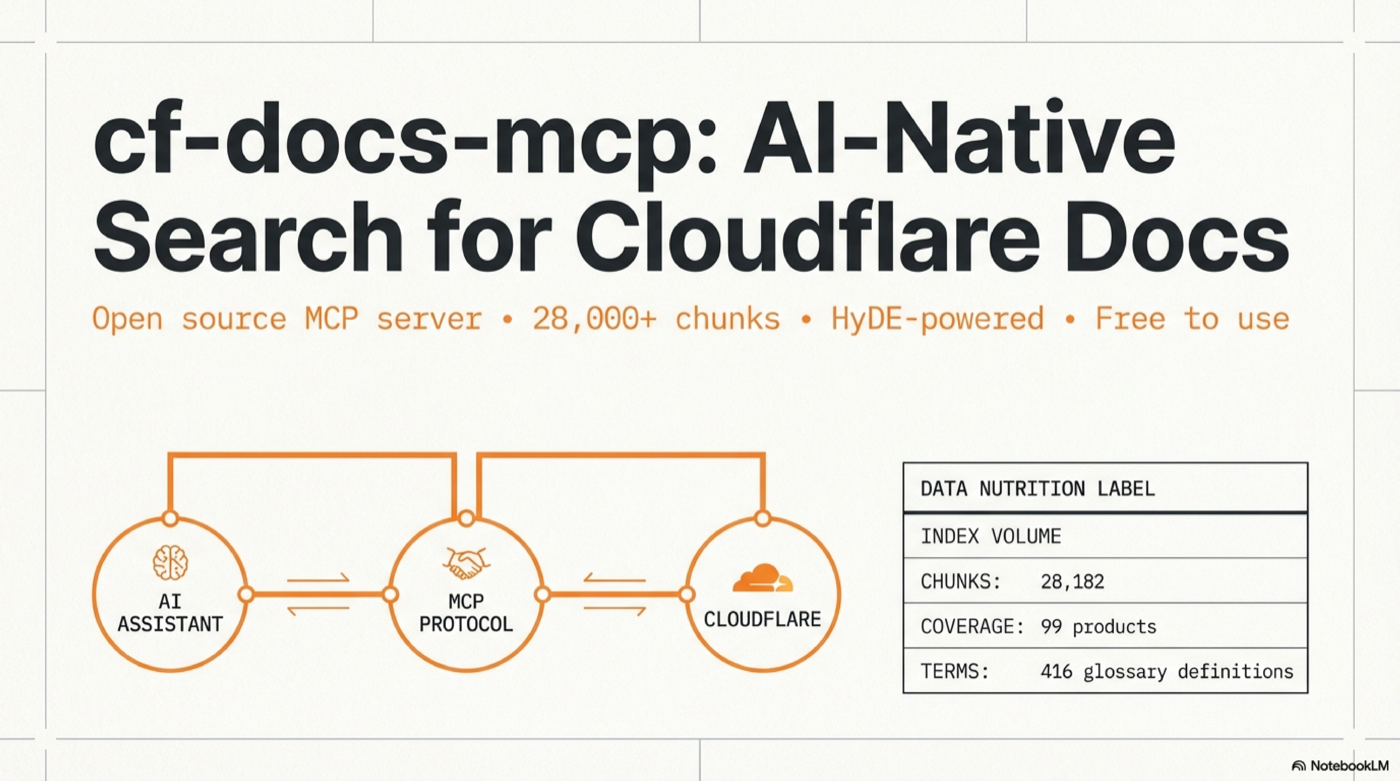
A remote MCP server that provides semantic search over the entire Cloudflare developer documentation. Connect it to any AI coding tool and get instant, high-quality documentation search — no API keys required for the hosted version.
MCP (Model Context Protocol) lets AI tools call external data sources as "tools". This server speaks Streamable HTTP transport — most modern clients support it natively.
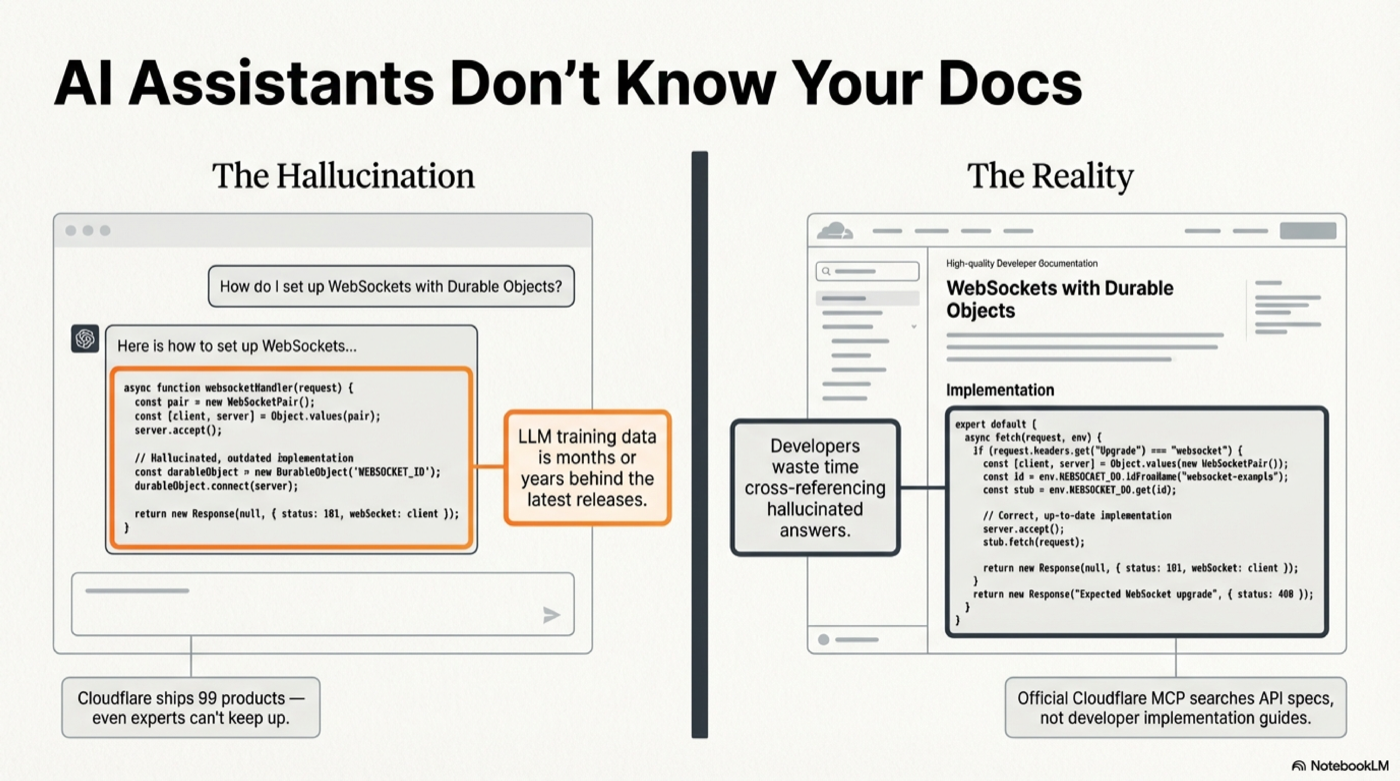
Try it in 30 seconds
This project is in super alpha. There is no authentication yet. Future plans: auth will be added — probably within the day. The public demo endpoint below will likely only stay up for a limited time so people can try it out. After that, deploy your own (4 steps, see below).
Claude Code:
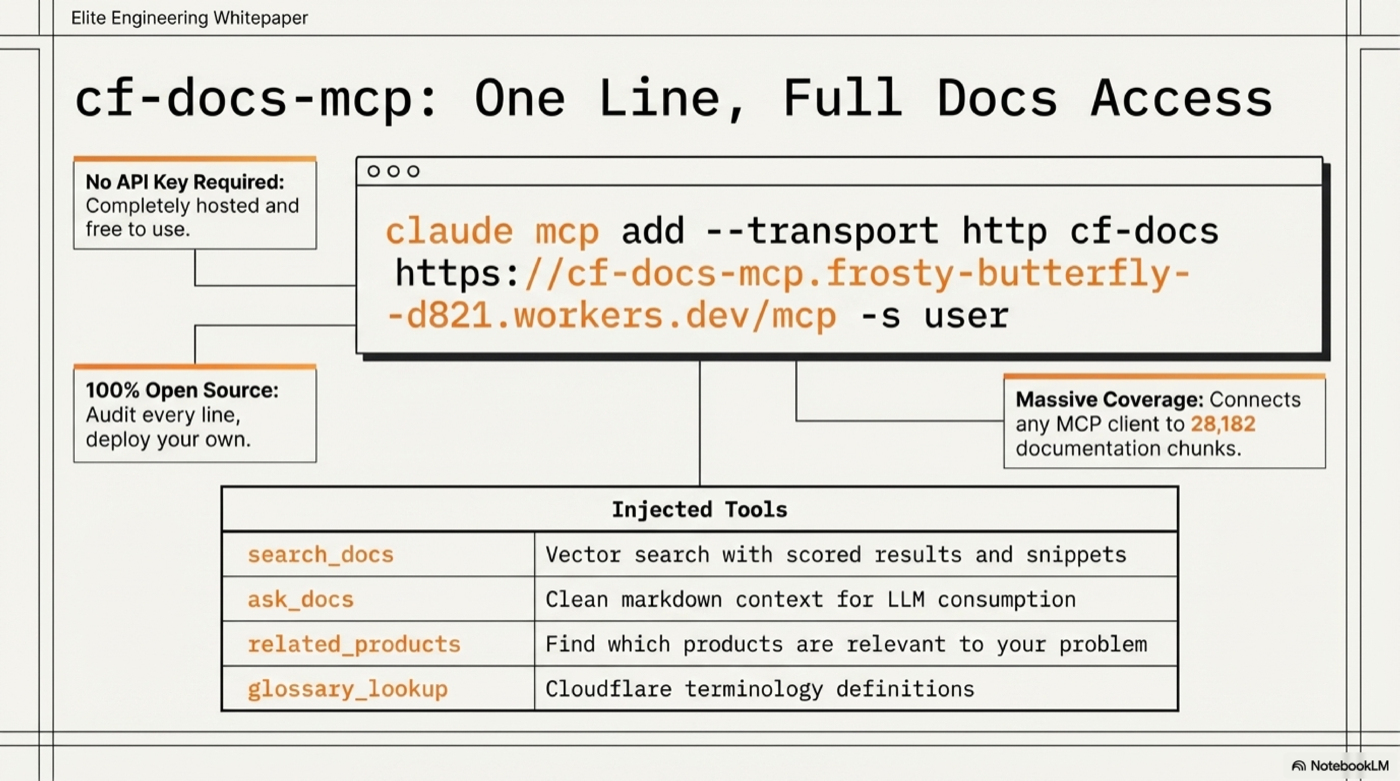
claude mcp add --transport http cf-docs https://cf-docs-mcp.frosty-butterfly-d821.workers.dev/mcp -s user
Then ask: "How do I use Durable Objects with WebSockets?" — your AI assistant now searches 28,000+ Cloudflare doc chunks with vector embeddings.
Connect Your Client
All configs point to: https://cf-docs-mcp.frosty-butterfly-d821.workers.dev/mcp
Claude Code (CLI)
claude mcp add --transport http cf-docs https://cf-docs-mcp.frosty-butterfly-d821.workers.dev/mcp -s user
Claude Desktop
File: ~/Library/Application Support/Claude/claude_desktop_config.json (macOS) or %APPDATA%\Claude\claude_desktop_config.json (Windows)
{
  "mcpServers": {
    "cf-docs": {
      "url": "https://cf-docs-mcp.frosty-butterfly-d821.workers.dev/mcp"
    }
  }
}
Cursor
File: ~/.cursor/mcp.json
{
  "mcpServers": {
    "cf-docs": {
      "url": "https://cf-docs-mcp.frosty-butterfly-d821.workers.dev/mcp"
    }
  }
}
Windsurf
File: ~/.windsurf/mcp.json
{
  "mcpServers": {
    "cf-docs": {
      "serverUrl": "https://cf-docs-mcp.frosty-butterfly-d821.workers.dev/mcp"
    }
  }
}
Cline (VS Code)
File: VS Code settings or ~/Library/Application Support/Code/User/globalStorage/saoudrizwan.claude-dev/settings/cline_mcp_settings.json
{
  "mcpServers": {
    "cf-docs": {
      "url": "https://cf-docs-mcp.frosty-butterfly-d821.workers.dev/mcp",
      "disabled": false
    }
  }
}
Continue.dev
File: ~/.continue/config.json
{
  "experimental": {
    "mcpServers": {
      "cf-docs": {
        "transport": "http",
        "url": "https://cf-docs-mcp.frosty-butterfly-d821.workers.dev/mcp"
      }
    }
  }
}
Zed
File: ~/.config/zed/settings.json
{
  "context_servers": {
    "cf-docs": {
      "settings": {
        "url": "https://cf-docs-mcp.frosty-butterfly-d821.workers.dev/mcp"
      }
    }
  }
}
Any MCP client (curl)
curl -X POST https://cf-docs-mcp.frosty-butterfly-d821.workers.dev/mcp \
  -H "Content-Type: application/json" \
  -H "Accept: application/json, text/event-stream" \
  -d '{"jsonrpc":"2.0","id":1,"method":"tools/call","params":{"name":"search_docs","arguments":{"query":"R2 presigned URLs"}}}'
Example Output
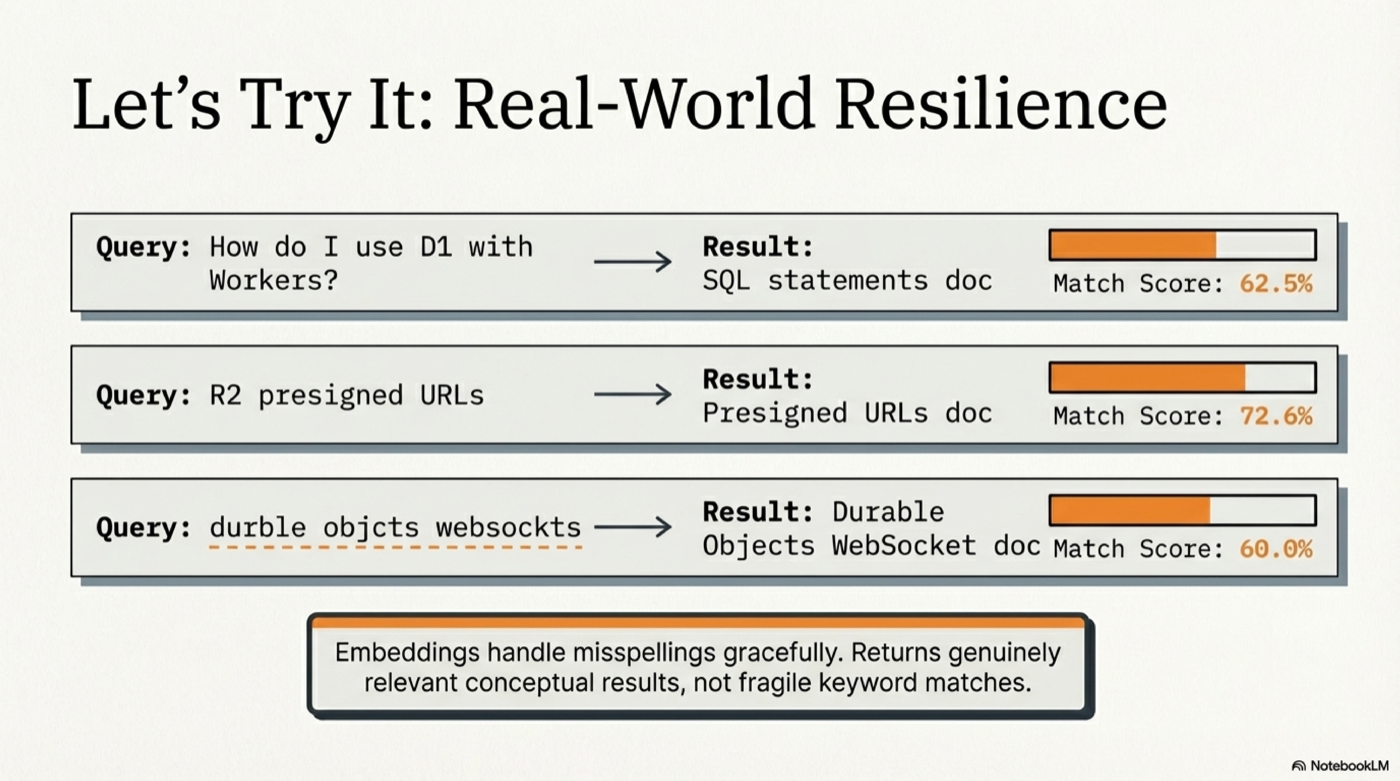
Query: "How do I use D1 with Workers?"
Found 10 results (searched 28182 chunks, HyDE: yes, 0ms)

## Glossary Matches

**D1** (Workers) — score: 0.679
D1 is Cloudflare's managed, serverless database with SQLite's SQL semantics.

## Documentation Results

### [62.5%] SQL statements
Section: [d1] SQL statements
Product: d1 | URL: https://developers.cloudflare.com/d1/...

### [62.4%] Query a database
Section: [d1] Query a database > Use SQL to query D1
Product: d1 | URL: https://developers.cloudflare.com/d1/...
Tools
| Tool | Description |
|---|---|
search_docs |
Vector search with scored results, titles, URLs, and content snippets |
ask_docs |
Clean markdown context for LLM consumption |
related_products |
Find which Cloudflare products are relevant to your problem |
glossary_lookup |
Look up Cloudflare terminology definitions |
Example prompts
- "How do I deploy a Worker?"
- "R2 presigned URL expiration settings"
- "Difference between KV, D1, and R2"
- "Durable Objects WebSocket hibernation"
- "Migrate from AWS Lambda to Workers"
- "Zero Trust SAML SSO configuration"
Hosted Server — Always Up to Date
The hosted instance is actively maintained. As Cloudflare updates their documentation, the enrichment pipeline is re-run to keep the search index current. You don't need to deploy anything to benefit from this.
- No API key required to search
- Rate limited to 30 requests/minute per IP
- ~1-2 second response time (dominated by embedding API call; cached queries are instant)
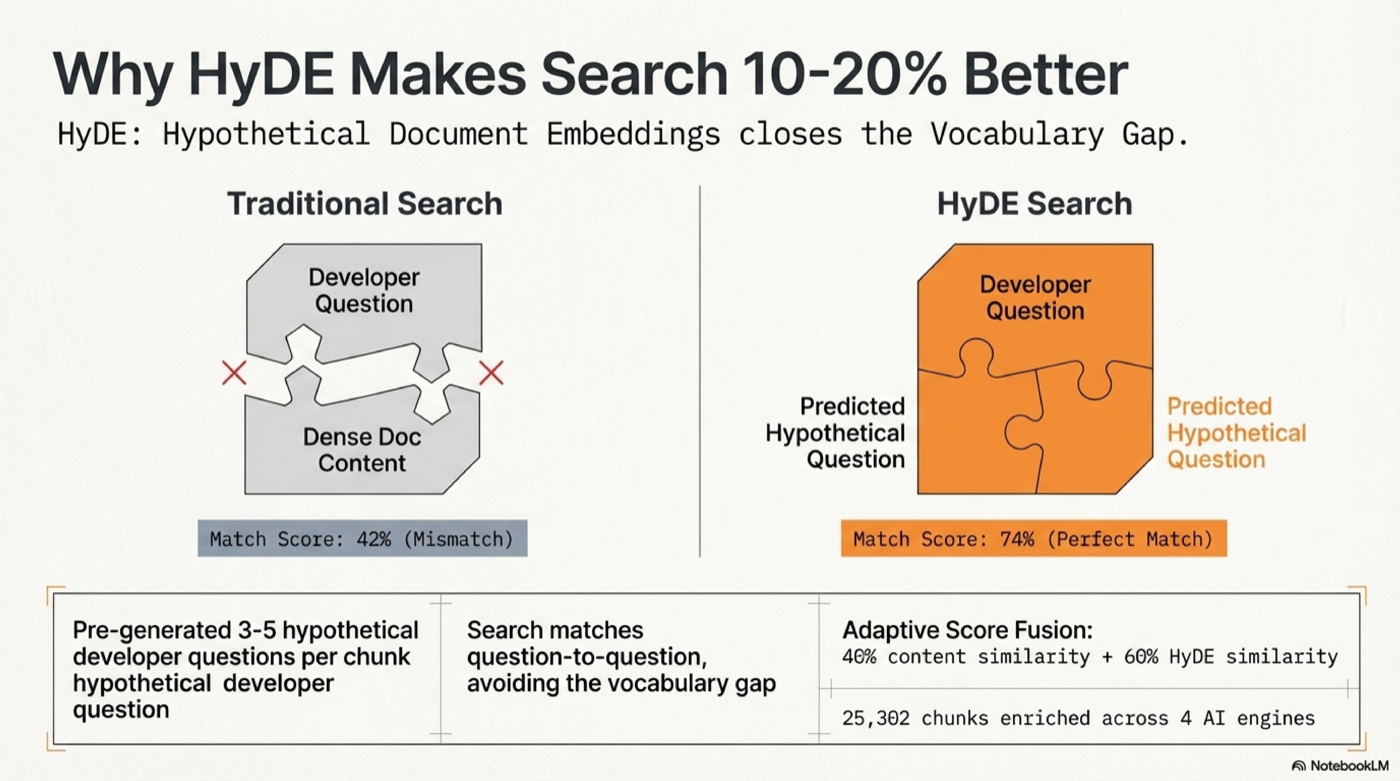
How It Works
Query → Synonym expansion → OpenAI embedding (cached) → Durable Object SQLite
  → Cosine similarity (content × 0.4 + HyDE × 0.6, adaptive weighting)
  → Title/heading boost → MMR diversity dedup → Ranked results
- 28,182 chunks from 6,225 MDX files across 99 Cloudflare products
- 25,302 HyDE-enriched chunks with hypothetical developer questions
- 416 glossary terms with definitions
- text-embedding-3-large (3072 dimensions) for maximum retrieval quality
- 41 synonym mappings — "lambda" → Workers, "s3" → R2, "sqlite" → D1, etc.
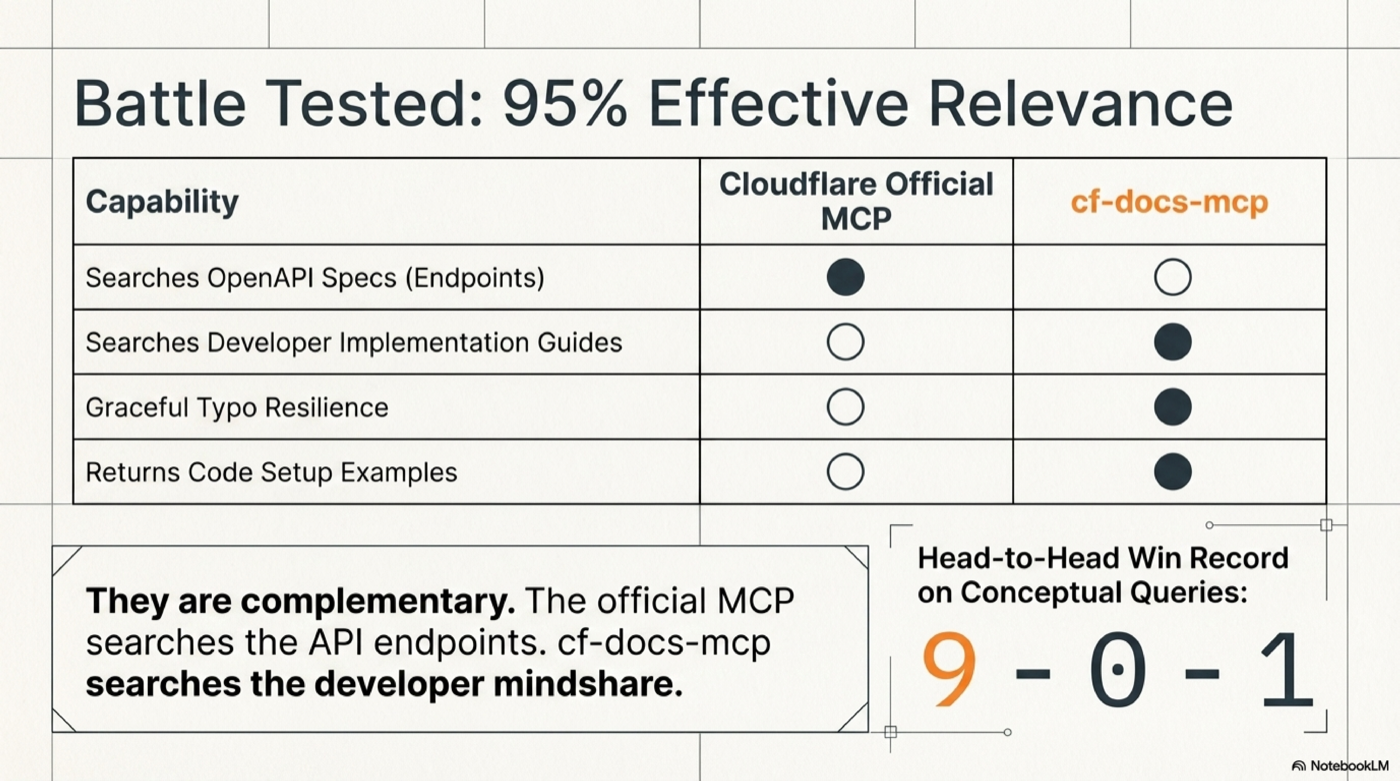
Why this beats Cloudflare's official MCP
Cloudflare's official MCP server at mcp.cloudflare.com searches the OpenAPI spec (API endpoints). This server searches the developer documentation (guides, tutorials, concepts, examples).
Battle-tested head-to-head: cf-docs wins 9-0-1 on documentation queries. They're complementary — use both.
Architecture
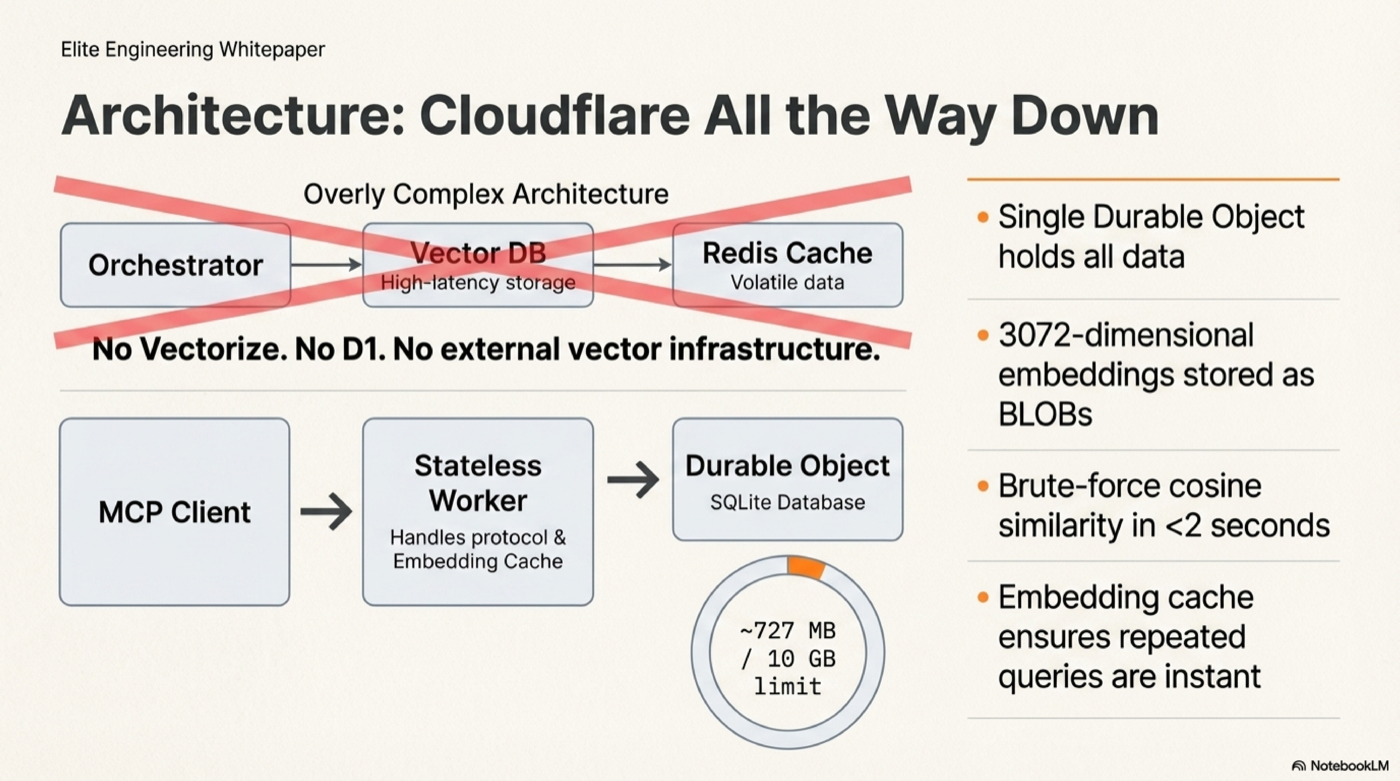
┌─────────────────────┐     ┌──────────────────────────────────────┐
│   MCP Client        │     │   Cloudflare Worker                  │
│   (Claude, Cursor)  │────▶│   createMcpHandler (stateless)       │
│                     │     │     ↓                                │
│                     │◀────│   OpenAI embed (cached 30min LRU)    │
│                     │     │     ↓                                │
│                     │     │   Durable Object (CfDocsMcp)         │
│                     │     │     └─ SQLite: 28k chunks + BLOBs   │
│                     │     │     └─ Brute-force cosine sim        │
│                     │     │     └─ Score fusion + MMR dedup      │
└─────────────────────┘     └──────────────────────────────────────┘
No Vectorize, no D1, no external vector DB. All data lives in one Durable Object's SQLite (~727 MB, well within the 10 GB limit). Brute-force cosine similarity over 28k chunks in <2 seconds.
Deploy Your Own
Prerequisites
- Node.js v20+
- A Cloudflare account (Workers Paid plan for DO storage)
- An OpenAI API key (for query-time embedding)
Step 1: Clone and deploy
git clone https://github.com/AdrianWilliamsGH/cf-docs-mcp.git
cd cf-docs-mcp/worker
npm install
npx wrangler deploy
Step 2: Set your OpenAI API key
npx wrangler secret put OPENAI_API_KEY
Step 3: Seed with pre-built data
The entire enriched dataset is included in the repo as plain-text NDJSON files in data/. No external downloads, no compressed formats — every line is inspectable JSON you can audit.
node scripts/seed-from-data.mjs --url https://cf-docs-mcp.YOUR.workers.dev
Takes ~10 minutes to upload all 28,182 chunks + embeddings.
Step 4: Verify
curl -s https://cf-docs-mcp.YOUR.workers.dev/health
# {"status":"ok","service":"cf-docs-mcp","version":"2.0.0"}

curl -s https://cf-docs-mcp.YOUR.workers.dev/admin/status
# {"chunks":28182,"embedded":28182,"hyde":25302,"glossary":416}
Alternative: Build the index from scratch (~$3.27, ~47 min)
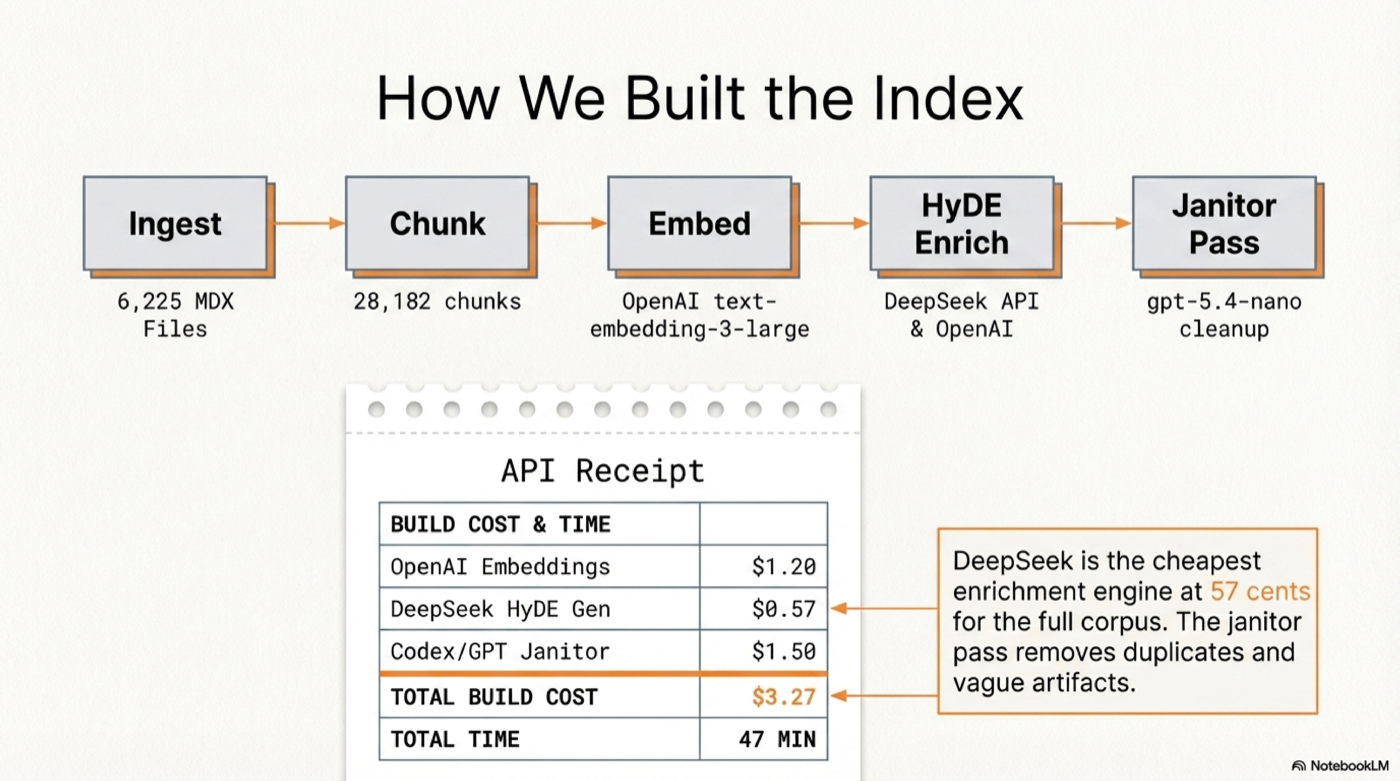
If you want to build your own index from the raw Cloudflare docs:
# Install the CLI
cd ../cli
npm install
npm link

# Clone Cloudflare docs
git clone --depth 1 --filter=blob:none --sparse \
  https://github.com/cloudflare/cloudflare-docs.git /tmp/cloudflare-docs
cd /tmp/cloudflare-docs
git sparse-checkout set src/content/docs

# Set your OpenAI key
mkdir -p ~/.cf-docs
echo "OPENAI_API_KEY=sk-your-key-here" > ~/.cf-docs/.env

# Run the pipeline
cf-docs ingest /tmp/cloudflare-docs/src/content/docs  # Parse + chunk
cf-docs embed                                          # Embed (~$1.40)
cf-docs enrich-deepseek --api-key YOUR_KEY             # HyDE questions (~$0.57)
cf-docs janitor-openai                                 # Cleanup (~$0.10)
cf-docs embed-hyde                                     # Embed HyDE (~$1.20)
cf-docs status                                         # Verify

# Seed the Worker
cd ../../worker
node scripts/seed.mjs --url https://cf-docs-mcp.YOUR.workers.dev
Keeping Your Index Fresh
cd /tmp/cloudflare-docs && git pull
cf-docs ingest /tmp/cloudflare-docs/src/content/docs
cf-docs embed
cf-docs enrich-deepseek --api-key YOUR_KEY
cf-docs embed-hyde
node scripts/seed-from-data.mjs --url https://your-worker.workers.dev
The hosted server is refreshed regularly so you don't have to.
Data Format
The data/ directory contains the full enriched dataset as plain-text NDJSON (one JSON object per line). Each line contains:
{
  "id": 1,
  "product": "workers",
  "file_path": "workers/get-started/guide.mdx",
  "title": "Get started",
  "heading_hierarchy": "Get started > CLI",
  "content": "Set up and deploy your first Worker...",
  "chunk_index": 0,
  "url": "https://developers.cloudflare.com/workers/get-started/guide/",
  "pcx_content_type": "get-started",
  "embedding": "<base64 Float32Array, 3072 dims>",
  "hyde_questions": "[\"How do I create my first Cloudflare Worker?\", ...]",
  "hyde_embedding": "<base64 Float32Array, 3072 dims>"
}
15 shard files (47-65MB each), all under GitHub's 100MB file limit. No compression — fully auditable.
Troubleshooting
| Issue | Fix |
|---|---|
| MCP not showing up in client | Restart the client after adding config |
| "Rate limit exceeded" | Wait 60 seconds (30 req/min per IP) |
| Slow first query (~2s) | Normal — Durable Object cold start + OpenAI embedding. Subsequent cached queries are instant. |
| No results returned | Try broader terms, or use ask_docs instead of search_docs |
| Seed script EPIPE errors | Normal on long uploads — script retries automatically |
Project Structure
cf-docs-mcp/
├── data/                   # Pre-built enriched dataset (plain NDJSON)
│   ├── chunks-001.ndjson   # 2000 chunks per shard
│   ├── ...                 # 15 shards total
│   ├── glossary.ndjson     # 416 glossary terms
│   └── manifest.json       # Shard index
├── cli/                    # Local CLI for building the search index
│   ├── bin/cf-docs.mjs
│   └── src/
│       ├── cli.mjs         # Command routing
│       ├── db.mjs          # SQLite storage
│       ├── embed.mjs       # OpenAI embedding pipeline
│       ├── enrich.mjs      # HyDE enrichment (DeepSeek, OpenAI, Codex)
│       ├── ingest.mjs      # MDX parsing + chunking
│       ├── search.mjs      # Local vector search
│       └── format.mjs      # Terminal output
├── worker/                 # Cloudflare Worker MCP server
│   ├── src/
│   │   ├── index.ts        # DO + MCP tools + admin endpoints
│   │   ├── search.ts       # Vector search + score fusion
│   │   ├── synonyms.ts     # CF synonym map
│   │   └── types.ts
│   ├── scripts/
│   │   ├── seed.mjs        # Seed from local SQLite
│   │   └── seed-from-data.mjs  # Seed from repo data/
│   └── wrangler.jsonc
├── scripts/
│   └── export-data.mjs     # Export SQLite → NDJSON shards
└── README.md
License
MIT
Installing Cloudflare Docs Search
This server has no published package — it is built from source. Open the repository and follow its README.
▸ github.com/ajwcontreras/cf-docs-mcpFAQ
Is Cloudflare Docs Search MCP free?
Yes, Cloudflare Docs Search MCP is free — one-click install via Unyly at no cost.
Does Cloudflare Docs Search need an API key?
No, Cloudflare Docs Search runs without API keys or environment variables.
Is Cloudflare Docs Search hosted or self-hosted?
Self-hosted: the server runs locally on your machine via the install command above.
How do I install Cloudflare Docs Search in Claude Desktop, Claude Code or Cursor?
Open Cloudflare Docs Search on unyly.org, pick your client tab (Claude Desktop, Claude Code, Cursor) and press Install — the config is generated automatically, no JSON editing.
Related MCPs
Notion
Read and write pages in your workspace
 by Notion
Linear
Issues, cycles, triage — from Claude
 by Linear
Google Drive
Search and read your Drive files
 by Google
mindsdb/mindsdb
Connect and unify data across various platforms and databases with [MindsDB as a single MCP server](https://docs.mindsdb.com/mcp/overview).
 by mindsdb
fulcradynamics/fulcra-context-mcp
Access personal health and biometric data (sleep stages, heart rate, HRV, glucose, workouts), calendar and location via the Fulcra Life API.
 by fulcradynamics
rinadelph/Agent-MCP
Framework for building multi-agent systems that coordinate over MCP, with task management, shared context and RAG.
 by rinadelph
WhenLabs-org/when
Developer toolkit: stack detection for AI context files, port conflicts, .env schema validation, docs drift, dependency license audits and task timing.
 by WhenLabs-org
Beltran12138/wecom-docs-mcp-server
WeCom (Enterprise WeChat) document operations via MCP: create, read, and edit Docs and Smartsheets (9 tools). Fills the doc-CRUD gap — existing WeCom MCP server
 by Beltran12138
freema/mcp-gsheets
Google Sheets API integration for reading, writing, formatting and sheet management.
 by freema
mattijsdp/dbt-docs-mcp
dbt-core (OSS) project metadata, model and column-level lineage, and dbt documentation.
 by mattijsdp
Compare Cloudflare Docs Search with
Not sure what to pick?
Find your stack in 60 seconds
Author?
Embed badge for your README
Browse similar
All productivity MCPs