
Discord Bot
FreeNot checkedA local MCP server that lets AI clients control a Discord bot via Discord's REST API, offering messaging, administration, and moderation tools. Includes safety

About
A local MCP server that lets AI clients control a Discord bot via Discord's REST API, offering messaging, administration, and moderation tools. Includes safety features such as guild scoping, allowlists, and opt-in write permissions.
README
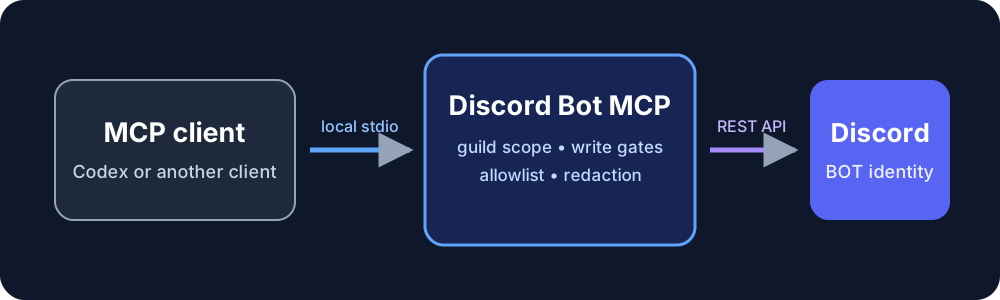
A local Model Context Protocol (MCP) server that lets an MCP client operate your Discord bot through Discord's REST API. It provides focused messaging tools, grouped administration tools, guild scoping, opt-in writes, and secret redaction.
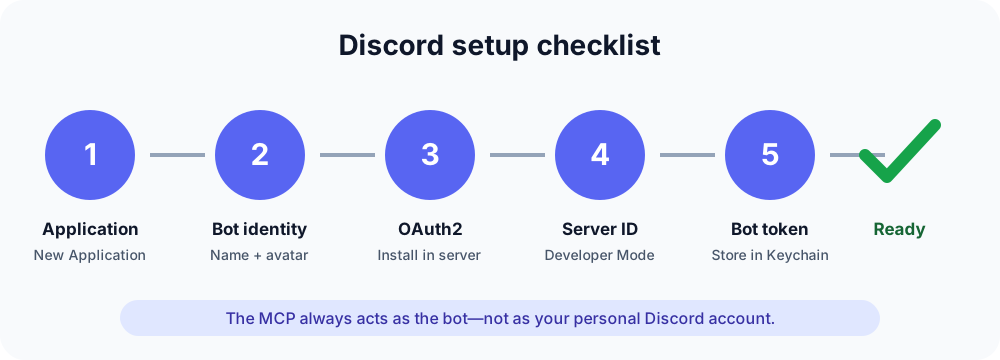
[!IMPORTANT] This is a wrapper around Discord bot capabilities. It does not sign in as you, impersonate your personal Discord account, or send messages from your user identity. Every action is performed by the bot account you create, with that bot's name, avatar, roles, and Discord permissions.
What it can do
The server exposes 20 MCP tools:
| Area | Tools and capabilities |
|---|---|
| Everyday use | Get the server, list channels, read/send messages, create threads, add reactions |
| Server structure | Server settings, channels, categories, permission overwrites, roles |
| Community administration | Members, bans, timeouts, scheduled events, AutoMod, emojis, stickers |
| Content administration | Edit/delete/pin messages, threads and membership, invites, webhooks |
| Oversight | Audit-log queries and a guarded raw Discord REST request tool |
See TOOLS.md for every tool, operation, and safety gate.
Safety model
- One instance is pinned to one
DISCORD_GUILD_ID. - An optional channel allowlist narrows ordinary channel-scoped operations.
- Writes are off unless
DISCORD_ALLOW_WRITES=true. - Destructive/admin mutations additionally require
DISCORD_ALLOW_DESTRUCTIVE_ADMIN=true. - Cross-guild raw API paths, full URLs, and traversal are rejected.
- Token-, secret-, and password-like response fields are redacted.
- Outgoing messages disable automatic
@everyone, role, and user mention parsing. - Credentials stay in each operator's environment or macOS Keychain.
Guild-wide administration tools are intentionally guild-wide; for example, listing roles or members is not filtered by a channel allowlist. These controls supplement Discord permissions rather than replacing them. Give the bot only the Discord role permissions it actually needs.
Start here: macOS + Codex
1. Install prerequisites
- Node.js 20 or newer
- pnpm
- A Discord server where you can add a bot
- An MCP-capable client such as Codex
Check the command-line tools:
node --version
pnpm --version
2. Create your Discord application and bot
- Open the Discord Developer Portal → Applications.
- Select New Application, give it a recognizable name, and create it.
- Open Bot in the left sidebar. Discord creates the bot user for the app.
- Set the bot's username and avatar. This is the identity people will see.
- Under Privileged Gateway Intents, enable only intents your use case requires. This MCP currently uses the REST API, so most installations do not need privileged gateway intents.
Useful official references:
3. Install the bot in your server
- In the Developer Portal, open OAuth2 → URL Generator.
- Select the
botscope. - Select the smallest required bot permissions.
- Open the generated URL, choose your server, and authorize the bot.
For ordinary use, start with View Channels, Read Message History, Send Messages, Create Public Threads, and Add Reactions. Add Manage Channels, Manage Roles, Manage Messages, or other permissions only when you intend to use those admin operations. Administrator is convenient for a private test server but is not the recommended default.
Review Discord's permissions reference before granting administration rights.
4. Copy the server ID
In Discord, open User Settings → Advanced and enable Developer Mode.
Then right-click the server icon and select Copy Server ID. Discord calls a
server a guild in its API, so this value becomes DISCORD_GUILD_ID.
Discord's official guide to copying IDs
5. Store the bot token safely
On the application's Bot page, select Reset Token and copy the new token once. Never paste it into a chat, README, issue, Codex configuration, or Git repository.
On macOS, store it in Keychain without echoing it to the terminal:
security add-generic-password \
  -U \
  -s discord-bot-mcp-my-bot \
  -a "$USER" \
  -w
The command prompts for the token. Each teammate uses a different Keychain entry and preferably their own Discord bot; sharing this repository never shares a bot identity or token.
If a token is exposed, immediately reset it in the Developer Portal. Deleting the text later does not make the old token safe.
6. Clone and build
git clone https://github.com/diocata/discord-bot-mcp.git
cd discord-bot-mcp
pnpm install --frozen-lockfile
pnpm verify
pnpm verify type-checks the code, runs unit and MCP integration tests, and
builds dist/index.js.
7. Register it with Codex
Find the absolute paths you will use:
which node
pwd
Add the following to ~/.codex/config.toml, replacing the example paths, guild
ID, Keychain service, and macOS account:
[mcp_servers.discord]
command = "/absolute/path/from/which/node"
args = ["/absolute/path/to/discord-bot-mcp/dist/index.js"]

[mcp_servers.discord.env]
DISCORD_GUILD_ID = "your_server_id"
DISCORD_KEYCHAIN_SERVICE = "discord-bot-mcp-my-bot"
DISCORD_KEYCHAIN_ACCOUNT = "your-macos-account-name"
DISCORD_ALLOW_WRITES = "false"
DISCORD_ALLOW_DESTRUCTIVE_ADMIN = "false"
DISCORD_ALLOWED_CHANNEL_IDS = ""
Restart Codex or open a new task so the MCP tools are discovered. Start in read-only mode and ask it to list the Discord server and channels. After that works, opt into ordinary writes:
DISCORD_ALLOW_WRITES = "true"
Only enable destructive administration when you intentionally need it:
DISCORD_ALLOW_DESTRUCTIVE_ADMIN = "true"
8. Try it
Example requests to your MCP client:
List the Discord channels you can access.
Read the latest 10 messages in #general.
Send “Hello from my bot” in #bot-testing.
Create a thread called “MVP feedback” in #product.
Use a dedicated test channel first. Confirm in Discord that messages show the
bot's name and BOT badge—not your personal user identity.
Other operating systems and clients
On Linux, Windows, containers, or CI, inject DISCORD_BOT_TOKEN into the MCP
process through the platform's secret manager. Do not put a real token in a
tracked .env file. All other variables are identical.
The server uses standard MCP over stdio and is not tied to Codex. Configure the same executable and environment variables in any MCP client that supports a local stdio server.
Configuration reference
| Variable | Required | Default | Meaning |
|---|---|---|---|
DISCORD_GUILD_ID |
Yes | — | The only Discord server this instance may operate |
DISCORD_KEYCHAIN_SERVICE |
macOS option | — | Keychain service containing the token |
DISCORD_KEYCHAIN_ACCOUNT |
No | — | Narrows the Keychain lookup to one account |
DISCORD_BOT_TOKEN |
Non-Keychain option | — | Bot token supplied by the process environment |
DISCORD_ALLOW_WRITES |
No | false |
Enables messaging and other ordinary mutations |
DISCORD_ALLOW_DESTRUCTIVE_ADMIN |
No | false |
Enables admin/destructive and raw non-GET operations |
DISCORD_ALLOWED_CHANNEL_IDS |
No | all guild channels | Comma-separated IDs for ordinary channel-scoped tools |
If DISCORD_KEYCHAIN_SERVICE is set, the Keychain token takes precedence over
DISCORD_BOT_TOKEN.
Development and tests
pnpm check             # TypeScript without emitting files
pnpm test:unit         # HTTP behavior and security boundaries
pnpm test:integration  # Real MCP client/server protocol interaction
pnpm test:live         # Optional read-only test against your configured bot
pnpm build             # Production JavaScript and declarations
pnpm verify            # All gates above
The integration suite uses in-memory MCP transports and a mock Discord API. It does not require a real token and never sends a live Discord message. CI runs the complete verification matrix on Node.js 20, 22, and 24.
pnpm test:live is an optional, read-only smoke test. It requires the same
Discord environment variables as the MCP server and verifies the configured
bot can retrieve exactly one guild and its allowed channels. It forcibly
disables writes regardless of the supplied write flags.
Troubleshooting
DISCORD_GUILD_ID is required— add the server ID to the MCP environment.- No token was found in macOS Keychain — make the service and account match
the
security add-generic-passwordcommand exactly. Missing Access/Missing Permissions— give the bot's Discord role the specific permission needed and ensure its role is high enough in the role list.- Writes are disabled — set
DISCORD_ALLOW_WRITES=trueand restart the MCP client. - Destructive administration is disabled — enable its separate flag only for the operation, then turn it off again.
- Tools do not appear — run
pnpm build, verify both absolute paths, and restart the MCP client.
License
Installing Discord Bot
This server has no published package — it is built from source. Open the repository and follow its README.
▸ github.com/diocata/discord-bot-mcpFAQ
Is Discord Bot MCP free?
Yes, Discord Bot MCP is free — one-click install via Unyly at no cost.
Does Discord Bot need an API key?
No, Discord Bot runs without API keys or environment variables.
Is Discord Bot hosted or self-hosted?
Self-hosted: the server runs locally on your machine via the install command above.
How do I install Discord Bot in Claude Desktop, Claude Code or Cursor?
Open Discord Bot on unyly.org, pick your client tab (Claude Desktop, Claude Code, Cursor) and press Install — the config is generated automatically, no JSON editing.
Related MCPs
Gmail
Read, send and search emails from Claude
 by Google
Slack
Send, search and summarize Slack messages
 by Slack
Runbear
No-code MCP client for team chat platforms, such as Slack, Microsoft Teams, and Discord.
Discord Server
A community discord server dedicated to MCP by [Frank Fiegel](https://github.com/punkpeye)
Klavis AI
Open Source MCP Infra. Hosted MCP servers and MCP clients on Slack and Discord.
Work90210/APIFold
Turn any REST API into a hosted MCP server. 18 free public servers (GitHub, Stripe, Slack, OpenAI, Notion, and more) — no setup required, bring your own API key
 by Work90210
arikusi/deepseek-mcp-server
MCP server for DeepSeek AI with chat, reasoning, multi-turn sessions, function calling, thinking mode, and cost tracking.
 by arikusi
hashgraph-online/hashnet-mcp-js
MCP server for the Registry Broker. Discover, register, and chat with AI agents on the Hashgraph network.
 by hashgraph-online
profullstack/mcp-server
A comprehensive MCP server aggregating 20+ tools including SEO optimization, document conversion, domain lookup, email validation, QR generation, weather data,
 by profullstack
WayStation-ai/mcp
Seamlessly and securely connect Claude Desktop and other MCP hosts to your favorite apps (Notion, Slack, Monday, Airtable, etc.). Takes less than 90 secs.
 by waystation-ai
Compare Discord Bot with
Not sure what to pick?
Find your stack in 60 seconds
Author?
Embed badge for your README
Browse similar
All communication MCPs