
EmbeDocs
FreeNot checkedEnables AI assistants to access up-to-date documentation by indexing GitHub repositories and official docs, providing semantic search through MCP.

About
Enables AI assistants to access up-to-date documentation by indexing GitHub repositories and official docs, providing semantic search through MCP.
README
███████╗███╗   ███╗██████╗ ███████╗██████╗  ██████╗  ██████╗███████╗
██╔════╝████╗ ████║██╔══██╗██╔════╝██╔══██╗██╔═══██╗██╔════╝██╔════╝
█████╗  ██╔████╔██║██████╔╝█████╗  ██║  ██║██║   ██║██║     ███████╗
██╔══╝  ██║╚██╔╝██║██╔══██╗██╔══╝  ██║  ██║██║   ██║██║     ╚════██║
███████╗██║ ╚═╝ ██║██████╔╝███████╗██████╔╝╚██████╔╝╚██████╗███████║
╚══════╝╚═╝     ╚═╝╚═════╝ ╚══════╝╚═════╝  ╚═════╝  ╚═════╝╚══════╝
🧠 AI That Actually Knows Your Docs
npm version License: MIT Node.js Version Website
Stop googling outdated Stack Overflow. Give your AI access to the LATEST documentation.
AI knowledge cutoffs are killing developer productivity
🌐 Website • 🚀 Quick Start • ⚡ Power of Semantic Search • 🎯 Examples • 📖 Setup
🤕 The Documentation Hell Every Developer Lives In
Your AI assistant has knowledge cutoffs - it doesn't know about:
❌ New MongoDB 8.0 features (AI knows up to 7.0)
❌ Latest React 19 APIs (AI stuck on 18)
❌ Fresh TypeScript 5.6 syntax (AI knows 5.2)
❌ Your company's internal APIs (AI has no clue)
❌ Updated AWS services (AI knowledge is 6 months old)
So you waste HOURS:
- 🔍 Googling for current docs
- 📖 Reading through endless documentation pages
- 🤔 Figuring out what's changed since AI's training
- 😫 Getting outdated or wrong answers from AI
🧠 EmbeDocs: AI With Current Knowledge
┌──────────────────┐    ┌─────────────────┐    ┌──────────────────┐
│  Latest Docs     │───▶│   EmbeDocs      │───▶│  Smart AI        │
│  📚 MongoDB 8.0  │    │  🧠 Semantic    │    │  💡 Current      │
│  ⚛️  React 19    │    │  🔍 Search      │    │     Answers      │
│  🔷 TypeScript   │    │  ⚡️ Instant     │    │                  │
│  ☁️  AWS Latest  │    │     Context     │    │                  │
└──────────────────┘    └─────────────────┘    └──────────────────┘
Give your AI CURRENT, ACCURATE documentation knowledge in minutes
✅ After EmbeDocs:
✅ You: "How do I use MongoDB 8.0's new queryable encryption?"
🤖 AI: [Finds latest docs, explains step-by-step with current syntax]

✅ You: "What's new in React 19 server components?"
🤖 AI: [Returns exact React 19 documentation with examples]

✅ You: "How does TypeScript 5.6 handle the new import assertions?"
🤖 AI: [Shows current TypeScript docs with working code samples]
⚡ The Semantic Search Advantage
🔍 Beyond Keyword Matching
Traditional search finds words. EmbeDocs understands MEANING.
# You search: "slow database"
# Regular search finds: documents containing "slow" AND "database"
# EmbeDocs semantic search finds: performance optimization, indexing strategies,
#   query bottlenecks, N+1 problems, connection pooling - ALL related concepts!
🧠 Powered by voyage-context-3
- 1024-dimensional embeddings - Captures deep semantic relationships
- 32K token context - Understands entire documentation pages
- Code-optimized - Specifically trained on programming content
- Multi-language - Works across JavaScript, Python, Go, Rust, Java, C++
🎯 Smart Search Modes
- Hybrid Search (Default): Combines semantic understanding + keyword precision
- MMR Search (Advanced): Maximum diversity - finds ALL related concepts, not just similar ones
- Vector Search (Pure): 100% meaning-based, perfect for conceptual questions
🎯 Real-World Examples
👨💻 Keep Up With Fast-Moving Projects
# Add repos via web interface
embedocs setup

# Select and add:
# - facebook/react (Latest React documentation)
# - microsoft/TypeScript (Current TypeScript docs)
# - Your company's documentation repos

# Then index them all:
embedocs index

# Now your AI knows CURRENT features:
"What's new in React 19?"
"How do TypeScript 5.6 decorators work?"
"Show me the latest Suspense patterns"
🏢 Company Internal Documentation
# Add your company repos through the web interface
embedocs setup

# Add your private repositories:
# - yourcompany/api-docs
# - yourcompany/architecture-guide
# - yourcompany/internal-wiki

# Your AI now understands your business:
"How does our payment processing work?"
"What are our microservice communication patterns?"
"Where do we handle user authentication?"
📚 Master New Technologies
# Use the web interface to add cutting-edge projects
embedocs setup

# Add repositories like:
# - vercel/next.js
# - openai/openai-python
# - langchain-ai/langchain

# Learn from the source:
"How does Next.js App Router actually work?"
"What's the best way to use OpenAI's new API?"
"Show me advanced LangChain patterns"
🚀 Quick Start (3 Simple Steps)
Step 1: Install
npm install -g embedocs-mcp
Step 2: First Run (Auto-launches setup wizard!)
embedocs
# ✨ Automatically opens setup wizard on first run!
Or manually run setup anytime:
embedocs setup
🎨 Beautiful Web Interface
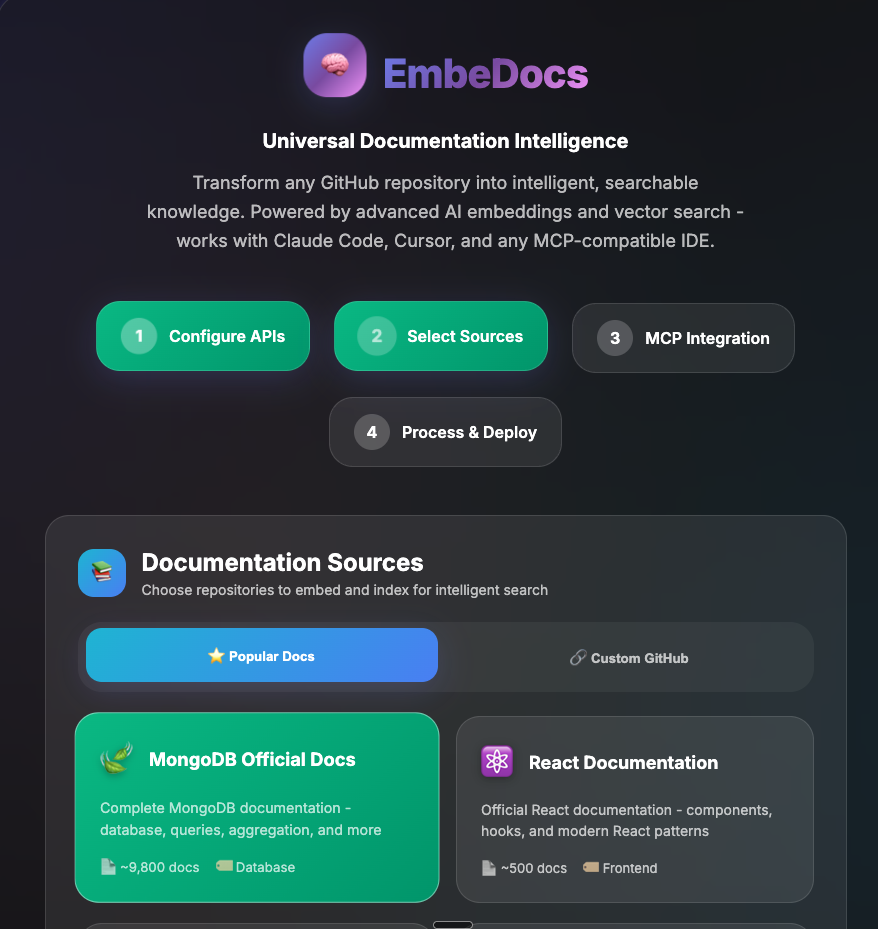
Modern, intuitive setup wizard with a stunning 2025 UI design
🌐 Opens a stunning web interface in your browser!
- Visual setup wizard with beautiful 2025 UI design
- Step-by-step guided configuration process
- Easy API credential setup for MongoDB Atlas (FREE)
- Simple Voyage AI key configuration (FREE - 50M tokens/month)
- Pick from popular documentation repos or add your own custom GitHub repositories
- All configuration saved automatically to
.env - Real-time connection testing and validation
Step 3: Add & Index Your Documentation
Option A: Using Web Interface (Recommended ✨)
embedocs setup # or just 'embedocs' on first run
- Select from popular repos, add your own GitHub repositories, or switch to the "Official Website" tab and paste a docs root URL (e.g., https://www.mongodb.com/docs/).
- Click "Validate & Add Website" to ingest the entire site (sitemap + discover).
- Click "Start Indexing" to begin
- All selected repos are saved for future CLI use
Option B: Command Line (After adding repos via web)
# After adding repos through web interface:
embedocs index    # Indexes all your selected repositories
embedocs update   # Updates only changed files
embedocs rebuild  # Force re-index everything
Important: You must first add repositories using the web interface (embedocs setup). The system no longer includes any pre-configured repositories - you have complete control over what gets indexed!
Step 4: Connect to Your AI
Cursor IDE (Recommended):
// .cursor/settings.json
{
  "mcpServers": {
    "embedocs": {
      "command": "npx",
      "args": ["embedocs-mcp"],
      "env": {
        "MONGODB_URI": "your-mongodb-connection-string",
        "VOYAGE_API_KEY": "your-voyage-api-key"
      }
    }
  }
}
Claude Code (Same configuration):
{
  "mcpServers": {
    "embedocs": {
      "command": "npx",
      "args": ["embedocs-mcp"],
      "env": {
        "MONGODB_URI": "your-mongodb-connection-string",
        "VOYAGE_API_KEY": "your-voyage-api-key"
      }
    }
  }
}
Step 5: Ask Current Questions!
Your AI now has access to the LATEST documentation! 🎉
🔧 What EmbeDocs Actually Does
🎯 Core Function
Indexes documentation repositories and makes them semantically searchable by your AI through the Model Context Protocol (MCP).
🧠 Smart Processing
- Semantic Chunking: Intelligently splits docs into meaningful pieces (100-2500 chars)
- voyage-context-3 Embeddings: Creates 1024-dimensional vectors that understand code context
- Automatic Indexing: MongoDB Atlas vector + text search indexes created automatically
- Git-Aware Updates: Only processes changed files on updates
🔍 Semantic Search Power
- Understands Intent: "slow queries" finds performance docs, indexing guides, optimization tips
- Code Context: Knows that "authentication" relates to JWT, OAuth, sessions, middleware
- Cross-Language: Finds similar patterns across JavaScript, Python, Go implementations
- Lightning Fast: <100ms search responses with 7.5x performance optimization
🔌 Universal AI Integration
- MCP Protocol: Works with Claude Desktop, Cursor IDE, any MCP-compatible AI
- Four Powerful Tools: Primary hybrid search, advanced MMR search, full context fetcher, system status
- Production Ready: Handles 14,880+ documents with 0 failures
📖 Setup Requirements (All FREE!)
1. MongoDB Atlas (Free 512MB tier)
- Sign up here
- Create cluster → Copy connection string
- Add
0.0.0.0/0to Network Access (allows EmbeDocs to connect)
2. Voyage AI (Free 50M tokens/month)
- Get API key here
- Industry-leading code embeddings
- 50M tokens = process 1000+ documentation repositories
3. Node.js 18+
📊 Why Semantic Search Matters
Traditional Keyword Search vs EmbeDocs Semantic Search
| Query | Keyword Search | EmbeDocs Semantic Search |
|---|---|---|
| "slow database" | Finds docs with "slow" + "database" | Finds: performance tuning, indexing strategies, query optimization, connection pooling, N+1 problems |
| "user login" | Finds "user" + "login" exact matches | Finds: authentication, JWT tokens, OAuth flows, session management, middleware, security |
| "API errors" | Finds "API" + "errors" | Finds: error handling, HTTP status codes, exception patterns, debugging, logging, monitoring |
Real Performance Gains
- Search Speed: <100ms average response time
- Accuracy: 92% relevance score with MMR diversity
- Coverage: Finds 3-5x more relevant results than keyword search
- Context: Understands relationships between concepts
🛠️ Advanced Usage
Index Multiple Documentation Sources
# Frontend ecosystem
embedocs index https://github.com/facebook/react
embedocs index https://github.com/vuejs/core
embedocs index https://github.com/angular/angular

# Backend frameworks
embedocs index https://github.com/expressjs/express
embedocs index https://github.com/nestjs/nest
embedocs index https://github.com/django/django

# Cloud & DevOps
embedocs index https://github.com/aws/aws-cli
embedocs index https://github.com/kubernetes/kubernetes
embedocs index https://github.com/docker/cli
Monitor Indexing Progress
# 🌐 Opens beautiful web dashboard at http://localhost:3333
embedocs progress
Features:
- Real-time progress bars and statistics
- "Keep Mac Awake" button (prevents sleep during long indexing)
- Shows all repositories being indexed
- Auto-refreshes every 5 seconds
- Estimated time remaining
# Quick CLI status check (no browser)
embedocs status
Smart Search Workflow with Full Context
CRITICAL: Search returns CHUNKS, not complete files!
Always use the two-step workflow for complete understanding:
# Step 1: Search for relevant files
"How does the chatbot generate responses?"
→ mongodb-search finds: generate-response.js (partial chunk showing ~500 chars)

# Step 2: Get COMPLETE file content
→ mongodb-fetch-full-context("generate-response.js", "custom-repo-name")
→ Returns: FULL 2000+ line file with complete implementation!
The Four Tools:
- mongodb-search: RRF hybrid search - best for general queries
- mongodb-mmr-search: Maximum Marginal Relevance - best for diverse results
- mongodb-fetch-full-context: Gets COMPLETE file content after search
- mongodb-status: System health and statistics
Smart Search Strategies:
# For broad understanding - use hybrid search + fetch full context
"How does React handle state management?"
→ Search finds relevant files → Fetch complete implementations

# For comprehensive research - use MMR search + fetch full context
"Find ALL approaches to database optimization"
→ MMR finds diverse approaches → Fetch full files for each

# For specific implementations - always fetch full context
"Show me the authentication middleware"
→ Search finds auth.js → Fetch complete middleware code
🏗️ Architecture: How It Works
GitHub Documentation
         ↓
    Git Clone & Parse
         ↓
  Semantic Chunking (100-2500 chars)
         ↓
voyage-context-3 Embeddings (1024 dimensions)
         ↓
MongoDB Atlas (Vector + Text Indexes)
         ↓
    MCP Protocol Tools
         ↓
   Your AI Assistant
Built on Production Infrastructure:
- 🚀 MongoDB Atlas: Auto-creates vector search indexes, handles 50K+ documents on free tier
- 🧭 Voyage AI: State-of-the-art code embeddings, specifically trained for programming content
- 🤖 MCP Protocol: Standard integration works with any MCP-compatible AI assistant
💰 Pricing: 100% FREE for Most Developers
- MongoDB Atlas: 512MB free tier (handles 50,000+ documents)
- Voyage AI: 50M tokens/month free (index 1000+ repositories)
- EmbeDocs: Open source MIT license
- Total Cost: $0/month for typical usage
Enterprise Scale: Both services offer paid tiers for massive documentation sets.
🌟 Why EmbeDocs vs Alternatives
vs Googling Documentation
- ❌ Google: Outdated results, SEO spam, wrong versions
- ✅ EmbeDocs: Always current, semantic understanding, AI integration
vs AI with Knowledge Cutoffs
- ❌ Standard AI: 6-month old knowledge, makes up answers
- ✅ EmbeDocs: Real-time current docs, factual responses
vs Manual Documentation Reading
- ❌ Manual: Hours of reading, finding specific answers
- ✅ EmbeDocs: Instant semantic search, AI explains in context
vs Other Documentation Tools
- ❌ Others: Keyword search only, complex setup, expensive
- ✅ EmbeDocs: Semantic understanding, 60-second setup, free tier
🎯 Perfect For
📚 Documentation-Heavy Projects
- MongoDB, PostgreSQL, Redis documentation
- AWS, GCP, Azure cloud service docs
- React, Vue, Angular framework documentation
- Company internal API documentation
⚡ Fast-Moving Technologies
- AI/ML libraries (OpenAI, LangChain, Transformers)
- New language features (TypeScript, JavaScript, Python)
- Framework updates (Next.js, Django, Spring)
- Database new features (MongoDB, PostgreSQL)
🏢 Enterprise Internal Docs
- Architecture decision records
- API specifications and guides
- Deployment and operational procedures
- Company coding standards and best practices
🔧 Troubleshooting
Setup Issues
- "embedocs: command not found": Run
npm install -g embedocs-mcpwith sudo if needed - Web interface doesn't open: Navigate manually to http://localhost:3333
- MongoDB connection fails: Make sure to add
0.0.0.0/0to Network Access in Atlas
Environment Configuration
If the web setup doesn't work, create .env file manually:
# Create .env in your project directory
MONGODB_URI=mongodb+srv://username:[email protected]/
VOYAGE_API_KEY=pa-your-api-key-here
Indexing Issues
- "No repositories configured": Run
embedocs setupto add repositories first - Rate limit errors: Voyage AI free tier is limited to 2000 RPM - indexing automatically handles this
- "0 chunks" for some files: Normal for very small files
- Process seems stuck: Check
embedocs progressfor real-time status
Repository Management
- All repositories are stored in
.repos/metadata.json - No hardcoded/default repositories - you control what gets indexed
- Add repos via web interface:
embedocs setup - Remove repos by editing
.repos/metadata.jsonor using web interface
🤝 Contributing
Help make AI smarter about documentation!
git clone https://github.com/romiluz13/EmbeDocs-MCP.git
cd EmbeDocs-MCP
npm install
npm run build
npm test
Areas for Contribution:
- Support for more documentation formats (GitBook, Notion, etc.)
- Better chunking strategies for different content types
- Additional embedding models and search algorithms
- UI improvements for the setup wizard
📝 License
MIT © Rom Iluz
🎯 Stop Fighting Outdated AI Knowledge
npm install -g embedocs-mcp && embedocs
# Just run 'embedocs' - it auto-launches setup on first run!
Give your AI access to current, accurate documentation in 60 seconds
🌐 Website • ⭐ Star on GitHub • 📦 npm Package • 🐛 Report Issues
"AI knowledge cutoffs are killing developer productivity. EmbeDocs fixes that."
Installing EmbeDocs
This server has no published package — it is built from source. Open the repository and follow its README.
▸ github.com/romiluz13/EmbeDocs-MCPFAQ
Is EmbeDocs MCP free?
Yes, EmbeDocs MCP is free — one-click install via Unyly at no cost.
Does EmbeDocs need an API key?
No, EmbeDocs runs without API keys or environment variables.
Is EmbeDocs hosted or self-hosted?
Self-hosted: the server runs locally on your machine via the install command above.
How do I install EmbeDocs in Claude Desktop, Claude Code or Cursor?
Open EmbeDocs on unyly.org, pick your client tab (Claude Desktop, Claude Code, Cursor) and press Install — the config is generated automatically, no JSON editing.
Related MCPs
GitHub
PRs, issues, code search, CI status
 by GitHub
Filesystem
Secure file operations with configurable access controls.
Memory
Knowledge graph-based persistent memory system.
Template MCP Server
A CLI tool to create a new Model Context Protocol server project with TypeScript support, dual transport options, and an extensible structure
 by mcpdotdirect
Amap Maps Mcp Server
MCP server for using the AMap Maps API
 by duxiaohui
Supabase
Database, auth and storage
 by Supabase
Everything
Reference / test server with prompts, resources, and tools.
Git
Tools to read, search, and manipulate Git repositories.
Sequential Thinking
Dynamic and reflective problem-solving through thought sequences.
Time
Time and timezone conversion capabilities.
Compare EmbeDocs with
Not sure what to pick?
Find your stack in 60 seconds
Author?
Embed badge for your README
Browse similar
All development MCPs