
Fyos Os
FreeNot checkedFYOS (For Your Own Sake): a personal operating system in the browser - desktop shell, MCP hub and installer. Runs entirely on your side.

About
FYOS (For Your Own Sake): a personal operating system in the browser - desktop shell, MCP hub and installer. Runs entirely on your side.
README
FLE Link: run an agent next to your model
Deutsch: README.de.md
FYOS — For Your Own Sake
A personal operating system in the browser that is built on an agent of your own and runs entirely on your side: a
desktop shell with windows and apps, an MCP hub that bundles tools and interfaces from plugins, and an agent (the
runner from fyos-agent) that works with these tools and asks before taking heavy steps.
This distribution contains only general-purpose parts. Whatever a particular home, account or person needs comes as a plugin from a repo of its own.
Plugins (one repo each)  fyos-plugin-…            personal, optional
fyos-os (this repo)      web/  hub/  deploy/  installer/
fyos-agent (foundation)  the agent: runner on pi-durable (image fyos-agent/runner)
What lives here
| Folder | Contents |
|---|---|
| web/ | Desktop shell (Astro with SolidJS): windows, dock, tiles, menu bar; shows hub apps (ui://) without any code of its own |
| hub/ | MCP hub (Python package fyos-hub, module mcp_hub): MCP at /mcp, REST at /hub/*, plugins via entry point |
| installer/ | Installer with a web assistant, a text interface and a command line; explains every building block with pictures |
deploy/compose/ |
Single-machine setup with Docker Compose (docker-compose.yml, env.example, agent-runner.json, hub-config.yaml) |
deploy/k8s/base/ |
Kubernetes base installation (Kustomize); an overlay sets images and namespace |
tools/sauber.py |
Cleanliness check: no private networks, addresses, secrets or forbidden words in the repo |
tools/doku_pruefen.py |
Docs check: links, named paths and fixed sections of the Markdown files match the repo |
tools/claude-code/ |
Mods for Claude Code: fyos-ansicht opens views that the agent built (plugin gui) in the terminal's side panel |
docs/ |
Architecture, Hub contract, Extending, ITSM (tickets and approvals in the core), Rebuild (plan: run every capability yourself), Night work (the agent works at night, in the morning the shell reports "done"), Glossary (German identifiers and the English words for them) |
| CHANGELOG.md, RELEASE.md | What changed in each version; the steps for maintainers to publish a version |
Getting started
The easy way is the installer. It asks for building blocks (core, agent, plugins), shows what they turn into, and generates the delivery for Docker Compose or Kubernetes.
pip install ./installer        # Python 3.11 or newer
fyos-install                   # web assistant in the browser; --tui for the text interface
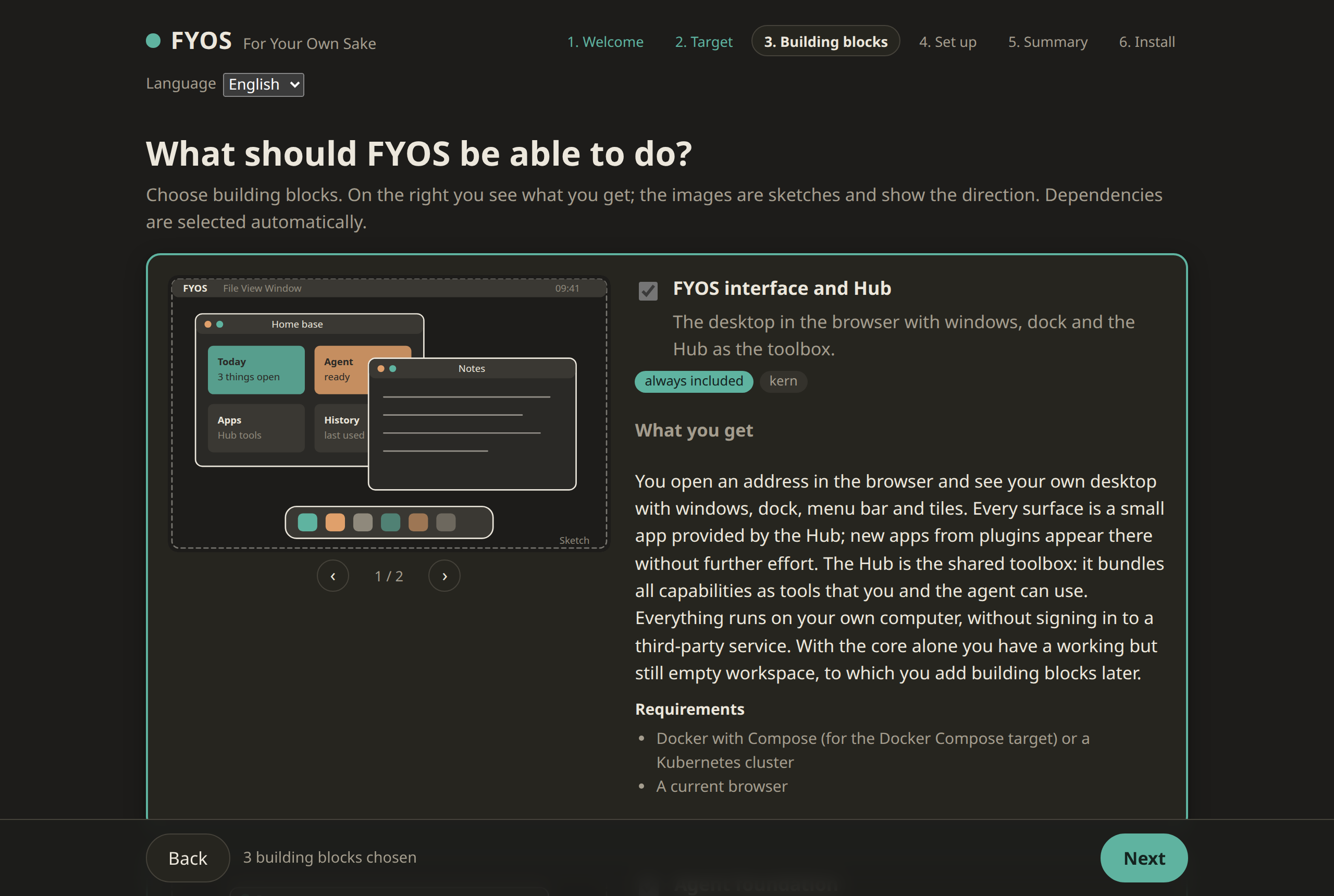
All steps with pictures: installer/README.md.
Without the installer, with Docker Compose:
cd deploy/compose
cp env.example .env            # enter images, model and agent token
docker compose up -d           # then http://localhost:8080
The images are built by the CI of this repo (<registry>/fyos-os/web, <registry>/fyos-os/hub) and by that of
fyos-agent (<registry>/fyos-agent/runner). Published images live at ghcr.io/sirfyyn (tags v<version> and latest).
Without further settings the installer uses them at its own version; FYOS_REGISTRY=<host>/<owner> points it at your
own registry, FYOS_BILD_TAG picks another tag. The template deploy/compose/env.example, by contrast, points to the
example address registry.example.com, which can never be resolved: if you use it by hand, enter the images yourself,
otherwise startup fails visibly instead of pulling foreign images.
Any OpenAI-compatible provider serves as the model (for example a llama.cpp server, Ollama or vLLM), locally or on your own network.
The first chat. The agent window (dock on the right or the app "Agent") talks to the runner via /api/agent/; the
shell sets the token (FYOS_AGENT_TOKEN from .env, in Kubernetes the secret fyos-agent-token) itself, the browser
never sees it. If you expose the shell beyond your own network, put a login in front of it (web/README.md).
Extending
A plugin is a Python package with the entry point mcp_hub.plugins. It can bring tools, an interface, skills for the
agent and an entry in the installer catalog. The starting point is the repo fyos-plugin-vorlage; the complete guide
with examples is in docs/EXTENDING.md: Hub plugin, app, skills, agent behaviour, shell, catalog,
companion services, testing and delivery.
Packages with uv, your own index first. FYOS installs plugin packages with uv
instead of pip: in the hub image, in the Dockerfile generated by the installer and in the sample plugin. If the plugins
live in an index of your own, its address goes before PyPI via --index (as the build argument FYOS_INDEX_URL; the
installer reads it from FYOS_PAKETINDEX). In addition, --index-strategy first-index is set explicitly in the
command: uv takes a package only from the first index that carries it. A package of the same name on PyPI therefore
cannot displace a plugin from your own index (dependency confusion); with pip --extra-index-url it could, because pip
takes the highest version from all indexes. The version of uv is pinned in the Dockerfiles. More in
docs/EXTENDING.md, section 10.3.
Developing
python3 tools/sauber.py .                                         # must be silent
python3 tools/doku_pruefen.py                                     # docs match the repo
pip install -e "hub[test]" && python -m pytest hub/tests -q
pip install -e "installer[test]" && python -m pytest installer/tests -q
cd web && npm ci && npx vitest run && npx astro build
The commands for developing and testing this repo use pip because it is available everywhere; with uv pip install
they work the same.
The CI (.gitea/workflows/ci.yml) checks every pull request and every push to main the same way (branches through
their pull request, one run per commit). On main it uploads fyos-hub as a development build (X.Y.Z.devN) to the
package index of the Git server and builds the images web and hub with the tags main and commit.
On GitHub the same checks run as .github/workflows/tests.yml, plus a secret scan with gitleaks. On a v* tag,
.github/workflows/pypi.yml publishes the packages fyos-hub and fyos-installer to PyPI (Trusted Publishing, no
stored token) and .github/workflows/bilder.yml pushes the images to ghcr.io.
The CI also runs the docs check every night and on demand (.gitea/workflows/doku-nachts.yml). It checks all Markdown
files: links and anchors, paths in code snippets (web/src/lib/hub.ts) and the fixed sections of the READMEs. What the
docs name but what does not live in this repo (files of fyos-agent or from plugin repos, examples, files that only
come into being in operation) is listed with a reason in .doku/ausserhalb.txt.
Many identifiers in code and configuration are German (tool names, keys, environment variables). They are part of the contract and stay as they are; docs/GLOSSARY.md lists the English words the docs use for them.
License
FYOS OS is licensed under the Apache License, Version 2.0 (SPDX identifier Apache-2.0).
Copyright 2026 sirfyyn and FYOS CONTRIBUTORS
The full license text is in LICENSE, the copyright notice in NOTICE.
Installing Fyos Os
This server has no published package — it is built from source. Open the repository and follow its README.
▸ github.com/sirfyyn/fyos-osFAQ
Is Fyos Os MCP free?
Yes, Fyos Os MCP is free — one-click install via Unyly at no cost.
Does Fyos Os need an API key?
No, Fyos Os runs without API keys or environment variables.
Is Fyos Os hosted or self-hosted?
Self-hosted: the server runs locally on your machine via the install command above.
How do I install Fyos Os in Claude Desktop, Claude Code or Cursor?
Open Fyos Os on unyly.org, pick your client tab (Claude Desktop, Claude Code, Cursor) and press Install — the config is generated automatically, no JSON editing.
Related MCPs
GitHub
PRs, issues, code search, CI status
 by GitHub
Filesystem
Secure file operations with configurable access controls.
Memory
Knowledge graph-based persistent memory system.
Template MCP Server
A CLI tool to create a new Model Context Protocol server project with TypeScript support, dual transport options, and an extensible structure
 by mcpdotdirect
Server Sequential Thinking
MCP server for sequential thinking and problem solving
 by GitHub Actions

Unyly Deploy
Deploy sites and MCP servers to Unyly straight from your AI agent
 by Unyly
Amap Maps Mcp Server
MCP server for using the AMap Maps API
 by duxiaohui
PayMCP
Lightweight payments layer for MCP servers: turn tools into paid endpoints with a two-line decorator. [PyPI](https://pypi.org/project/paymcp/) · [npm](https://w
 by blustAI
Server For Power BI
Enables exploring Microsoft Fabric / Power BI workspaces and semantic models, and executing ad-hoc DAX queries.
 by Mitsubishi-Fuso
Gpt Image 2 Mcp
RunAPI GPT Image 2 MCP server for image generation: create tasks, poll results, and check pricing across 1 model from Claude Code, Codex, Cursor, and VS Code.
 by runapi-ai
Compare Fyos Os with
Not sure what to pick?
Find your stack in 60 seconds
Author?
Embed badge for your README
Browse similar
All development MCPs