
Invokeai
FreeNot checkedEnables AI coding agents to control a local InvokeAI creative engine, supporting text-to-image, image-to-image, masked inpaint, upscaling, and full queue, model

About
Enables AI coding agents to control a local InvokeAI creative engine, supporting text-to-image, image-to-image, masked inpaint, upscaling, and full queue, model, gallery, board, and workflow management.
README
A bridge between AI coding agents (Claude, Cursor, opencode) and your local InvokeAI creative engine - text-to-image, image-to-image, masked inpaint, and upscaling on your own GPU, plus full queue, model, gallery, board, and workflow management, with a polished dark webapp.
What this wraps
This repo wraps InvokeAI, the open-source professional Stable Diffusion /
Flux creative engine (Apache-2.0, 27k+ stars). InvokeAI runs as a local web
server (default http://127.0.0.1:9090) and is installed separately through
its launcher - it is never bundled here. See docs/WRAPPEE.md.
Preview
| Dashboard | Generate |
|---|---|
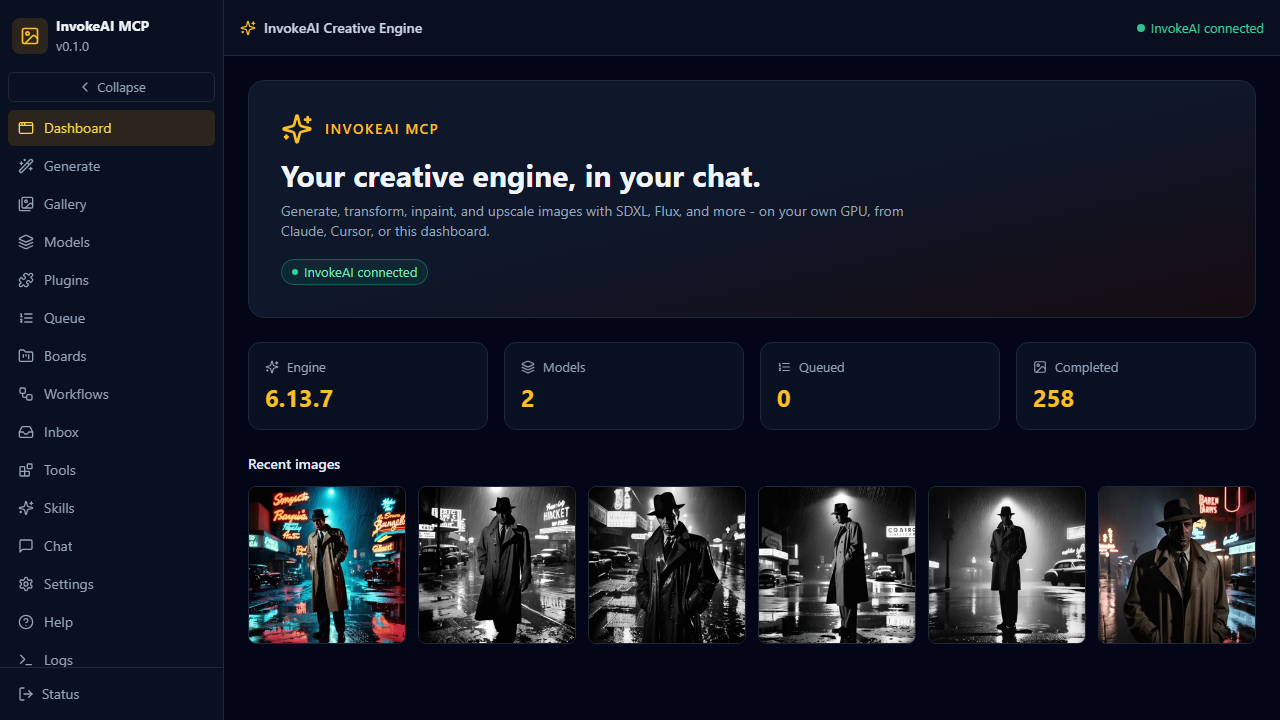 |
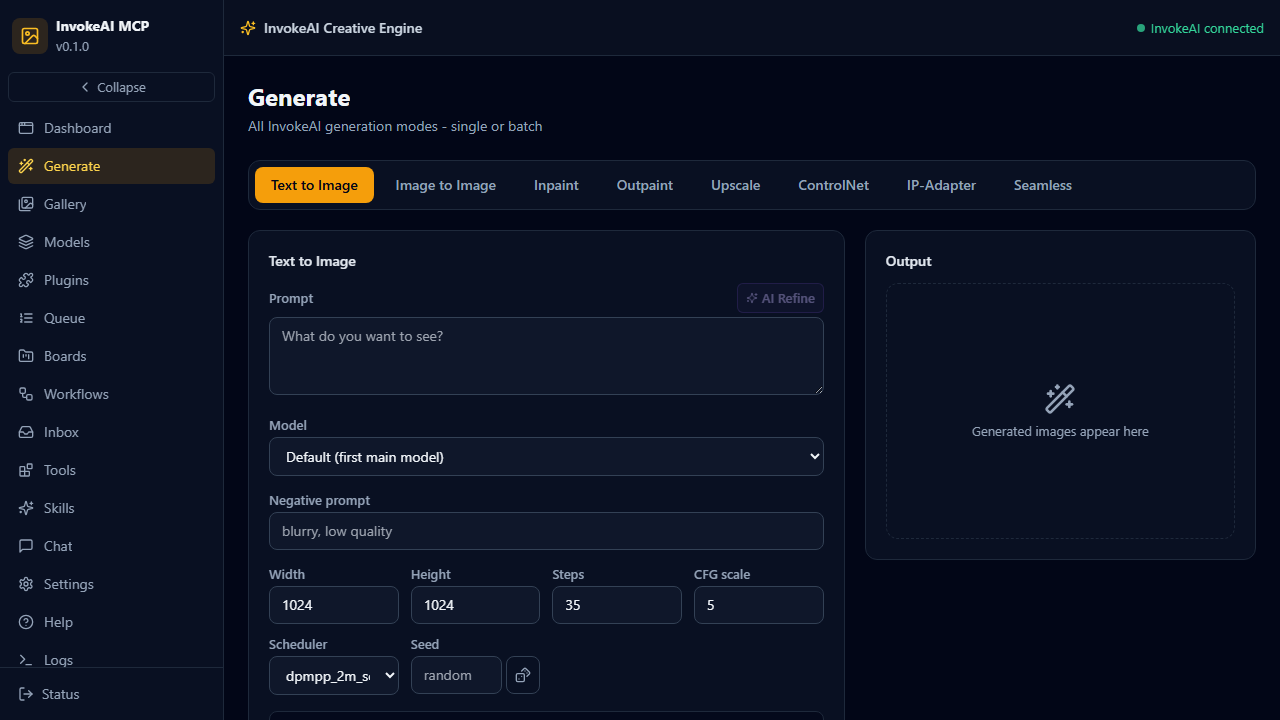 |
What You Can Do
How it runs: headless bridge - this MCP server talks to your running InvokeAI instance over its REST API. InvokeAI must be installed and running (launcher install, model download, first run). Nothing is bundled.
| Direction | Artifacts | Notes |
|---|---|---|
| Hands-in | prompts, negative prompts, images (img2img/inpaint), mask images, model sources | Text or uploaded images |
| Hands-out | generated PNGs, image URLs, local file paths, queue state | invokeai_queue result + gallery download |
- Generate SD1.5 / SDXL / Flux / SD3.5 / Qwen Image images on your RTX 4090
- 8 generation modes with horizontal tabs: txt2img, img2img, inpaint, outpaint, upscale, ControlNet, IP-Adapter, seamless tiling
- 60-style catalog + 24 material presets with select-all batch generation and live per-item progress
- AI prompt refiner (local LLM) that understands the selected style/material
- Plugin surface: install custom node packs from git, browse 250+ built-in engine nodes
- Transform existing images (img2img) and repair regions (masked inpaint)
- 4x RealESRGAN upscaling
- Install models from HuggingFace or Civitai without leaving the chat
- Full queue control: status, cancel, clear, resume, result polling
- Gallery search, boards, star/favorite organization; sort/filter by style, painter, franchise, board, starred; batch ops (star/unstar/delete/zip/move) with exact per-image attribution
- 76 curated styles + 23 franchise presets + 60 painters + 1321 A1111 community style pack entries - all batchable in any combination
- Workflow library management (save/load node workflows)
- Dark SOTA webapp: Generate, Gallery, Models, Queue, Boards, Workflows, Inbox, Tools, Skills, Chat (local LLM), Settings, Help, Logs
Supported models (engine catalog, 2026)
| Model | Family | VRAM (fp16) | License / gating | Notes |
|---|---|---|---|---|
| FLUX.1 Dev / Schnell | flux | 12-16 GB (fp8 ~7 GB) | Gated (token) / schnell Apache-2.0 | Schnell: 4-step, structural quality |
| FLUX.2 Dev / Klein 9B / 4B | flux2 | 18 GB / 9 GB / 4 GB | Gated (token) | Current flagship |
| SD 3.5 Large / Medium | sd-3 | 16 GB / 5 GB | License accept + token | Rivals FLUX.1-dev |
| SDXL + community (Juggernaut XL, RealVis) | sdxl | 8 GB | Mostly open | Default: Juggernaut XL v9 |
| CogView4-6B | cogview4 | 12 GB (fp8 ~7 GB) | Apache-2.0, no gating | Great text rendering, bilingual |
| Z-Image Turbo / Base | z-image | 12 GB (fp8 ~6 GB) | Permissive | Turbo is very fast |
| Qwen-Image 20B | qwen-image | ~40 GB (fp8 ~20 GB) | Apache-2.0, no gating | Best prompt adherence; too heavy for 24 GB with desktop apps |
| SD 1.5 / 2.x | sd-1 | 4 GB | Open | Legacy, fast iteration |
| Krea 2, Ideogram 4, Anima, ERNIE | external | varies | Closed / API | Engine supports; not self-hostable |
Graph builders ship for sd-1, sdxl, flux, cogview4 (verified against engine 6.13.7);
sd-3, qwen-image, z-image, flux2 wiring is mechanical follow-up on request.
Models install to N:\InvokeAI-models (configurable via models_dir in invokeai.yaml).
Quick Install
The fastest path is the MCPB bundle for Claude Desktop:
- Download
invokeai-mcp-0.1.0.mcpbfrom Releases - Open Claude Desktop and drag the file onto the window
- Complete onboarding (install InvokeAI, download a model) - see docs/ONBOARDING.md
Other methods (mcpb CLI, manual config, webapp dev stack) are in INSTALL.md.
Example Prompts
- "Generate a neon cyberpunk city at night, rain, cinematic lighting"
- "Use this image and make it a watercolor painting: [gallery image]"
- "What models do I have installed? Install SDXL base from HuggingFace"
- "Show me my recent images and download the last one to disk"
Documentation
| Doc | Contents |
|---|---|
| Installation | All install methods, prerequisites |
| Onboarding | First-timer InvokeAI setup, model downloads, pitfalls |
| Wrapped app | What InvokeAI is, official links, community |
| Architecture | System architecture, graph builders, ports |
| Configuration | Env vars, config options |
| Tool Reference | All available tools |
| Development | Contributing, local setup |
| Troubleshooting | Common issues |
Requirements
- InvokeAI installed and running (launcher install; models downloaded) - free, Apache-2.0
- GPU with 6-12 GB VRAM recommended (SD1.5: 4 GB, SDXL: 8 GB, Flux: 12 GB+)
- Engine install:
invokeai-webmanual install (uv venv+uv pip install invokeai) or the official launcher; the engine serves its full canvas GUI on 9090 - Claude Desktop (or any MCP client) for chat use; a browser for the webapp
- Python 3.12+ and uv for source installs; Node/Bun for the webapp
License
MIT
Installing Invokeai
This server has no published package — it is built from source. Open the repository and follow its README.
▸ github.com/sandraschi/invokeai-mcpFAQ
Is Invokeai MCP free?
Yes, Invokeai MCP is free — one-click install via Unyly at no cost.
Does Invokeai need an API key?
No, Invokeai runs without API keys or environment variables.
Is Invokeai hosted or self-hosted?
Self-hosted: the server runs locally on your machine via the install command above.
How do I install Invokeai in Claude Desktop, Claude Code or Cursor?
Open Invokeai on unyly.org, pick your client tab (Claude Desktop, Claude Code, Cursor) and press Install — the config is generated automatically, no JSON editing.
Related MCPs
ARA
Generate images, video and audio from any AI agent — one connector.
 by ARA
Omni Video
An MCP server that transforms LLM-enabled IDEs into professional video editors by pre-processing footage into text proxies, generating motion graphics via HTML/
 by buildwithtaza
YouTube
Transcripts, channel stats, search
 by YouTube
EverArt
AI image generation using various models.
 by modelcontextprotocol
gpu-bridge/mcp-server
GPU inference API for LLMs, image and video generation, TTS, Whisper, embeddings, reranking and OCR, paid per use via x402 or an API key.
 by gpu-bridge
merterbak/Grok-MCP
Access xAI's Grok API with agentic tool calling, image generation, vision and file support.
 by merterbak
SureScaleAI/openai-gpt-image-mcp
Image generation and editing with OpenAI's GPT image models.
 by SureScaleAI
YangLiangwei/PersonalizationMCP
Aggregate personal data from Steam, YouTube, Bilibili, Spotify, Reddit and other gaming, music, video and social platforms, with OAuth2 and token management.
 by YangLiangwei
AceDataCloud/MCPFlux
Flux image generation and editing from Black Forest Labs via the Ace Data Cloud API.
 by AceDataCloud
AceDataCloud/MCPNanoBanana
Nano Banana image generation and editing, including virtual try-on and product placement in realistic scenes.
by AceDataCloudCompare Invokeai with
Not sure what to pick?
Find your stack in 60 seconds
Author?
Embed badge for your README
Browse similar
All media MCPs