
Log Analyzer with CloudWatch Logs
FreeNot checkedProvides structured access to CloudWatch Logs data for searching, analyzing, and correlating logs across AWS services to help with troubleshooting and pattern i

About
Provides structured access to CloudWatch Logs data for searching, analyzing, and correlating logs across AWS services to help with troubleshooting and pattern identification.
README
A Model Context Protocol (MCP) server that provides AI assistants access to AWS CloudWatch Logs for analysis, searching, and correlation.
🏗️ Architecture
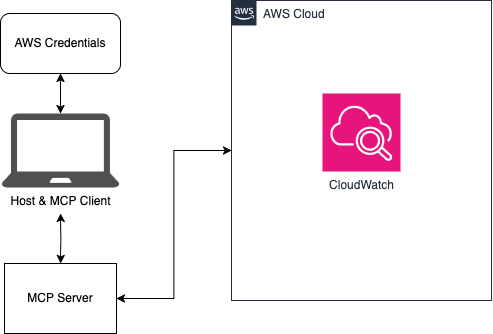
🔌 Model Context Protocol (MCP)
As outlined by Anthropic:
MCP is an open protocol that standardizes how applications provide context to LLMs. Think of MCP like a USB-C port for AI applications. Just as USB-C provides a standardized way to connect your devices to various peripherals and accessories, MCP provides a standardized way to connect AI models to different data sources and tools.
This repository is an example client and server that allows an AI assistant like Claude to interact with CloudWatch logs in an AWS account. To learn more about MCP, read through the introduction.
✨ Features
- Browse and search CloudWatch Log Groups
- Search logs using CloudWatch Logs Insights query syntax
- Generate log summaries and identify error patterns
- Correlate logs across multiple AWS services
- AI-optimized tools for assistants like Claude
🚀 Installation
Prerequisites
- The uv Python package and project manager (includes
uvx) - An AWS account with CloudWatch Logs
- Configured AWS credentials
🚦 Quick Start
Make sure to have configured your AWS credentials as described here
Update your
claude_desktop_config.jsonfile with the proper configuration outlined in the AI integration guideOpen Claude for Desktop and start chatting!
For more examples and advanced usage, see the detailed usage guide.
🤖 AI Integration
This project can be easily integrated with AI assistants like Claude for Desktop. See the AI integration guide for details.
📚 Documentation
🔒 Security
See CONTRIBUTING for more information.
📄 License
This project is licensed under the Apache-2.0 License.
Installing Log Analyzer with CloudWatch Logs
This server has no published package — it is built from source. Open the repository and follow its README.
▸ github.com/awslabs/log-analyzer-with-mcpFAQ
Is Log Analyzer with CloudWatch Logs MCP free?
Yes, Log Analyzer with CloudWatch Logs MCP is free — one-click install via Unyly at no cost.
Does Log Analyzer with CloudWatch Logs need an API key?
No, Log Analyzer with CloudWatch Logs runs without API keys or environment variables.
Is Log Analyzer with CloudWatch Logs hosted or self-hosted?
Self-hosted: the server runs locally on your machine via the install command above.
How do I install Log Analyzer with CloudWatch Logs in Claude Desktop, Claude Code or Cursor?
Open Log Analyzer with CloudWatch Logs on unyly.org, pick your client tab (Claude Desktop, Claude Code, Cursor) and press Install — the config is generated automatically, no JSON editing.
Related MCPs
GitHub
PRs, issues, code search, CI status
 by GitHub
Filesystem
Secure file operations with configurable access controls.
Memory
Knowledge graph-based persistent memory system.

Unyly Deploy
Deploy sites and MCP servers to Unyly straight from your AI agent
 by Unyly
Amap Maps Mcp Server
MCP server for using the AMap Maps API
 by duxiaohui
PayMCP
Lightweight payments layer for MCP servers: turn tools into paid endpoints with a two-line decorator. [PyPI](https://pypi.org/project/paymcp/) · [npm](https://w
 by blustAI
Server For Power BI
Enables exploring Microsoft Fabric / Power BI workspaces and semantic models, and executing ad-hoc DAX queries.
 by Mitsubishi-Fuso
Template MCP Server
A CLI tool to create a new Model Context Protocol server project with TypeScript support, dual transport options, and an extensible structure
 by mcpdotdirect
Supabase
Database, auth and storage
 by Supabase
Everything
Reference / test server with prompts, resources, and tools.
Compare Log Analyzer with CloudWatch Logs with
Not sure what to pick?
Find your stack in 60 seconds
Author?
Embed badge for your README
Browse similar
All development MCPs