
Comfy Ui Builder
FreeNot checkedEnables discovery of ComfyUI nodes and building/managing workflows with real-time execution via WebSocket. Provides 50+ tools for node discovery, workflow build

About
Enables discovery of ComfyUI nodes and building/managing workflows with real-time execution via WebSocket. Provides 50+ tools for node discovery, workflow building, template usage, model management, and batch/chain execution.
README
Control ComfyUI from Claude or Cursor — 50+ MCP tools for node discovery, dynamic workflow building, real-time WebSocket execution, and model management. No JSON editing required.

Tell your AI assistant what image to generate — it builds and runs the ComfyUI workflow for you.
Works with Claude Desktop, Cursor, and any MCP-compatible client.
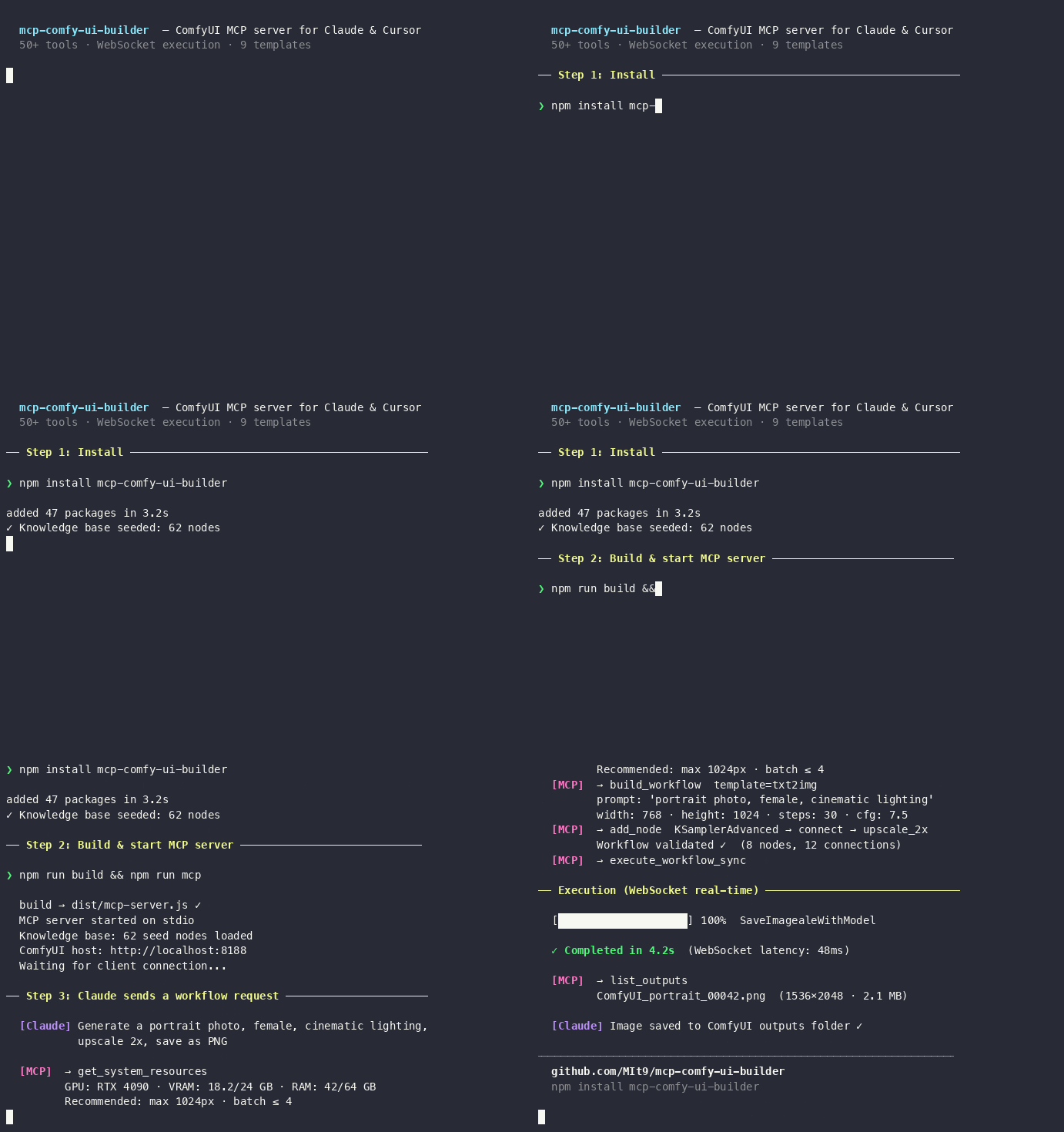
Publishable to the MCP Registry via server.json and mcpName.
What is this
- Knowledge base: Seed
knowledge/base-nodes.jsonandnode-compatibility.jsonfrom bundled data (62 seed nodes; 100–600+ after sync). No external services required for suggest/build. - Sync: Custom packs from ComfyUI-Manager; nodes from running ComfyUI via
sync-nodesCLI or on MCP startup. - MCP server (50+ tools): Node discovery, dynamic workflow builder, 9 templates (txt2img, txt2img_flux, img2img, …), WebSocket real-time execution, batch/chain, model management, plugin system.
- Real-time execution: Sub-second progress via WebSocket with automatic polling fallback; ~90% less network traffic for batch runs.
Install
npm install mcp-comfy-ui-builder
Or from source: git clone https://github.com/MIt9/mcp-comfy-ui-builder.git && cd mcp-comfy-ui-builder && npm install
Quick start
Build (postbuild fills knowledge from seed)
npm run build
npm run mcp
Use knowledge in code
import baseNodes from './knowledge/base-nodes.json' assert { type: 'json' };
Commands
| Command | Description |
|---|---|
npm run seed |
Fill knowledge from seed. Use --force to overwrite. |
npm run sync-manager |
Update custom packs list from ComfyUI-Manager |
npm run sync-nodes |
Sync nodes from running ComfyUI to knowledge base (requires COMFYUI_HOST) |
npm test |
Run tests (vitest) |
npm run mcp |
Start MCP server (after npm run build) |
Documentation
Single entry point — task-oriented navigation:
- doc/README.md — where to start, task-based navigation
- doc/INDEX.md — complete list of documents and links
- doc/QUICK-REFERENCE.md — commands, examples, troubleshooting
- doc/GETTING-STARTED.md — quick start
- doc/MCP-SETUP.md — connect MCP in Cursor/Claude
- doc/DOCKER-SETUP.md —
docker pull siniidrozd/mcp-comfy-ui-builder| docker-compose for MCP + ComfyUI - Knowledge base: knowledge/README.md, doc/knowledge-base-usage-guide.md
- Workflow Builder: doc/workflow-builder.md — templates, params, save/load, ComfyUI format
- Planning: ROADMAP.md, NEXT-STEPS.md, TODO.md — current v2.3.x, next Phase 10 (QoL)
- Contributing: CONTRIBUTING.md
- MCP Registry: server.json and
mcpNamein package.json; see MCP Registry quickstart to publish afternpm publish.
Requirements
- Node.js 18+
MCP Server (Cursor / Claude)
Server provides 50+ tools across 9 categories:
Core Features
Node Discovery:
- list_node_types, get_node_info, check_compatibility, suggest_nodes
- discover_nodes_live, search_nodes, sync_nodes_to_knowledge
Dynamic Workflow Builder:
- create_workflow, add_node, connect_nodes, validate_workflow
- Build workflows programmatically without JSON manipulation
Templates & Macros:
- list_templates, build_workflow — Pre-built templates (txt2img, img2img, inpainting, upscale, LoRA, ControlNet, batch)
- create_template, apply_template — Parameterized templates
- list_macros, insert_macro — Reusable sub-workflows
Real-time execution 📡
- execute_workflow_sync — Execute with WebSocket progress streaming (sub-second updates)
- execute_workflow_stream — Full event history collection (WebSocket-only)
- get_execution_progress — Real-time progress with node-level granularity
- execute_batch — Concurrent execution with 90% reduced network traffic
- execute_chain — Sequential workflows with data passing
Resources & Model Management:
- get_system_resources — GPU/VRAM/RAM + recommendations (max resolution, model size, batch size); call first before building workflows to avoid OOM
- list_models, check_model_exists, get_workflow_models
- Supports checkpoint, lora, vae, controlnet, upscale, embedding, clip
Outputs & Queue:
- list_outputs, download_output, download_all_outputs
- list_queue, interrupt_execution, clear_queue
Plugins:
- list_plugins, reload_plugins — Data-only plugin system
Install (requires COMFYUI_PATH):
- install_custom_node, install_model — Install nodes and models via ComfyUI-Manager
WebSocket features
- <100ms latency for progress updates (vs 1.5s polling)
- Node-level tracking: See exactly which node is executing with progress percentage
- Automatic fallback: Gracefully falls back to polling if WebSocket unavailable
- Shared connection: Single WebSocket for batch/chain execution (90% reduced traffic)
Set COMFYUI_HOST environment variable for execution/model/output tools:
export COMFYUI_HOST="http://localhost:8188"
See doc/MCP-SETUP.md for full tool list and doc/WEBSOCKET-GUIDE.md for real-time features.
Running MCP
From project root, first build the project, then start the server:
npm run build
npm run mcp
Or without npm: node dist/mcp-server.js. Server works via stdio (stdin/stdout). More details → doc/MCP-SETUP.md.
Connect MCP (Cursor / Claude)
What you need: Node.js 18+, one-time build (npm run build), absolute path to dist/mcp-server.js, restart after config change. If the server fails to start with «spawn node ENOENT», use the full path to node in command (run which node and put that path). See doc/MCP-SETUP.md → Troubleshooting.
Minimal config (knowledge and workflow tools only):
{
  "mcpServers": {
    "comfy-ui-builder": {
      "command": "node",
      "args": ["/ABSOLUTE/PATH/TO/mcp-comfy-ui-builder/dist/mcp-server.js"]
    }
  }
}
Use full path in command (e.g. "/opt/homebrew/bin/node") if Cursor/IDE reports «spawn node ENOENT».
With ComfyUI execution (execute_workflow, get_execution_status, list_outputs, etc.): add "env": { "COMFYUI_HOST": "http://127.0.0.1:8188" } to the server block. See doc/MCP-SETUP.md for full checklist, optional env vars (COMFYUI_PATH, COMFYUI_KNOWLEDGE_DIR), and troubleshooting.
Publish on GitHub
Create a new repository on GitHub: name
mcp-comfy-ui-builder, visibility Public (or Private). Do not initialize with README, .gitignore, or license (project already has them).Add remote and push:
git remote add origin https://github.com/MIt9/mcp-comfy-ui-builder.git
git branch -M main
git push -u origin main
If you fork this repo, replace
MIt9with your GitHub username in the URLs above.
Cursor: Settings → MCP; Claude Desktop: config file ~/Library/Application Support/Claude/claude_desktop_config.json (macOS). Replace the path with your absolute path to dist/mcp-server.js, then restart the app. Full guide: doc/MCP-SETUP.md.
License
MIT
Installing Comfy Ui Builder
This server has no published package — it is built from source. Open the repository and follow its README.
▸ github.com/MIt9/mcp-comfy-ui-builderFAQ
Is Comfy Ui Builder MCP free?
Yes, Comfy Ui Builder MCP is free — one-click install via Unyly at no cost.
Does Comfy Ui Builder need an API key?
No, Comfy Ui Builder runs without API keys or environment variables.
Is Comfy Ui Builder hosted or self-hosted?
Self-hosted: the server runs locally on your machine via the install command above.
How do I install Comfy Ui Builder in Claude Desktop, Claude Code or Cursor?
Open Comfy Ui Builder on unyly.org, pick your client tab (Claude Desktop, Claude Code, Cursor) and press Install — the config is generated automatically, no JSON editing.
Related MCPs
LibreOffice Tools
Enables AI agents to read, write, and edit Office documents via LibreOffice with token-efficient design. Supports multiple formats including DOCX, XLSX, PPTX, a
 by passerbyflutter
Figma
Extract design specs and assets
 by Figma
dannote/figma-use
Figma control: create shapes, text and components, and set styles, auto-layout, variables and exports.
 by dannote
Logo.dev
Search and retrieve company logos by brand or domain. Customize size, format, and theme to match your design needs. Accelerate design, prototyping, and content
 by NOVA-3951
Design Inspiration Server
Searches top design platforms like Dribbble and Behance to provide UI inspiration, color palettes, and layout patterns via the Serper API. It allows users to re
 by YonasValentin
PIX4Dmatic
Enables GUI automation for controlling PIX4Dmatic on Windows through MCP. Supports launching, focusing, capturing screenshots, sending hotkeys, clicking UI elem
 by jangjo123
mcp-dockmaster
An Open-Sourced UI to install and manage MCP servers for Windows, Linux and macOS.
ariekogan/ateam-mcp
Build, validate and deploy multi-agent AI solutions on the ADAS platform: design skills with tools and manage the solution lifecycle.
 by ariekogan
thinkchainai/mcpbundles
Create custom tool bundles, connect providers with OAuth or API keys, and use one MCP server across many integrations, with a UI for bundles and credentials.
 by thinkchainai
jau123/MeiGen-AI-Design-MCP
Image generation and editing with a curated prompt library, prompt enhancement and routing across local ComfyUI, MeiGen Cloud and OpenAI-compatible APIs.
 by jau123
Compare Comfy Ui Builder with
Not sure what to pick?
Find your stack in 60 seconds
Author?
Embed badge for your README
Browse similar
All design MCPs