
Filesystem
FreeNot checkedEnables natural language filesystem operations (create, list, delete directories/files) via Ollama local LLM and MCP protocol within allowed directories.

About
Enables natural language filesystem operations (create, list, delete directories/files) via Ollama local LLM and MCP protocol within allowed directories.
README
A simple Model Context Protocol (MCP) application that provides filesystem operations using Ollama local LLM. This project demonstrates the integration of local AI models with filesystem operations through a client-server architecture.
Architecture
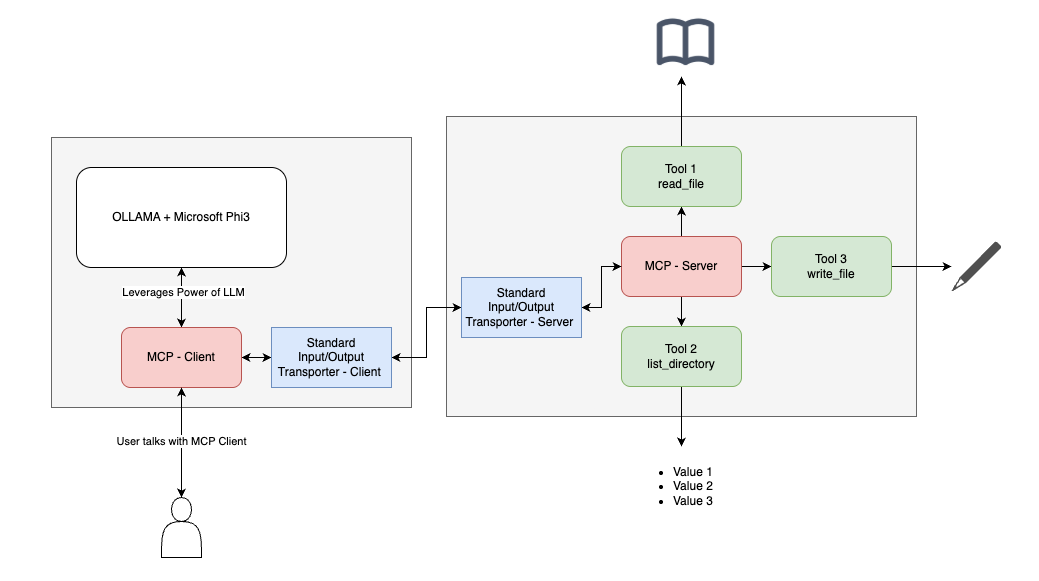
Features
- Client-server architecture using MCP protocol
- Integration with Ollama local LLM (Microsoft Phi-3 3.8b model)
- Directory creation capabilities
- Conversational CLI interface
- Secure file system operations within allowed directories
Prerequisites
- Node.js
- Ollama with Phi-3 3.8b model installed
- Basic understanding of terminal operations
Installation
- Clone the repository
- Install dependencies:
npm install
Configuration
The server accepts allowed directories as command-line arguments. These directories will be the only locations where the application can perform filesystem operations.
Usage
Start the server:
npm start
The client will automatically start the server and connect to Ollama. You can then interact with the system through natural language commands.
Example commands:
- "Create a directory named 'test'"
- "List the files in the current directory"
- "Delete the file 'test.txt'"
Project Structure
client.js: MCP client implementation with Ollama integrationserver.js: MCP server implementation with filesystem operations
Dependencies
- @modelcontextprotocol/sdk : Core MCP SDK
- Ollama : Local AI model for natural language processing
- Microsoft Phi-3 3.8b model : AI model for natural language processing
Installing Filesystem
This server has no published package — it is built from source. Open the repository and follow its README.
▸ github.com/hrushikeshkothem/simple-fs-mcpFAQ
Is Filesystem MCP free?
Yes, Filesystem MCP is free — one-click install via Unyly at no cost.
Does Filesystem need an API key?
No, Filesystem runs without API keys or environment variables.
Is Filesystem hosted or self-hosted?
Self-hosted: the server runs locally on your machine via the install command above.
How do I install Filesystem in Claude Desktop, Claude Code or Cursor?
Open Filesystem on unyly.org, pick your client tab (Claude Desktop, Claude Code, Cursor) and press Install — the config is generated automatically, no JSON editing.
Related MCPs
Fetch
Web content fetching and conversion for efficient LLM usage.
AWS KB Retrieval
Retrieval from AWS Knowledge Base using Bedrock Agent Runtime.
 by modelcontextprotocol
Spring AI MCP Server
Provides auto-configuration for setting up an MCP server in Spring Boot applications.
llm-analysis-assistant
A very streamlined mcp client that supports calling and monitoring stdio/sse/streamableHttp, and can also view request responses through the /logs page. It also
 by xuzexin-hz
MCP-Agent
A simple, composable framework to build agents using Model Context Protocol by [LastMile AI](https://www.lastmileai.dev)
 by lastmile-ai
Spring AI MCP Client
Provides auto-configuration for MCP client functionality in Spring Boot applications.
mcp.natoma.ai
A Hosted MCP Platform to discover, install, manage and deploy MCP servers by [Natoma Labs](https://www.natoma.ai)
MCPHub
Website to list high quality MCP servers and reviews by real users. Also provide online chatbot for popular LLM models with MCP server support.
MCP Servers Rating and User Reviews
Website to rate MCP servers, write authentic user reviews, and [search engine for agent & mcp](http://www.deepnlp.org/search/agent)
mkinf
An Open Source registry of hosted MCP Servers to accelerate AI agent workflows.
Compare Filesystem with
Not sure what to pick?
Find your stack in 60 seconds
Author?
Embed badge for your README
Browse similar
All ai MCPs