

About
Golang-based Kubernetes MCP Server. Built to be extensible.
README
Golang-based MCP server connecting to Kubernetes

MCP K8S Go
Features ⚙ Browse With Inspector ⚙ Use With Claude ⚙ Contributing ↗ ⚙ About MCP ↗




Features
MCP 💬 prompt 🗂️ resource 🤖 tool
- 🗂️🤖 List Kubernetes contexts
- 💬🤖 List Kubernetes namespaces
- 🤖 List, get, create and modify any Kubernetes resources
- includes custom mappings for resources like pods, services, deployments
- 🤖 List Kubernetes nodes
- 💬 List Kubernetes pods
- 🤖 Get Kubernetes events
- 🤖 Get Kubernetes pod logs
- 🤖 Run command in Kubernetes pod
Browse With Inspector
To use latest published version with Inspector you can run this:
npx @modelcontextprotocol/inspector npx @strowk/mcp-k8s
Use With Claude
Demo Usage
Following chat with Claude Desktop demonstrates how it looks when selected particular context as a resource and then asked to check pod logs for errors in kube-system namespace:
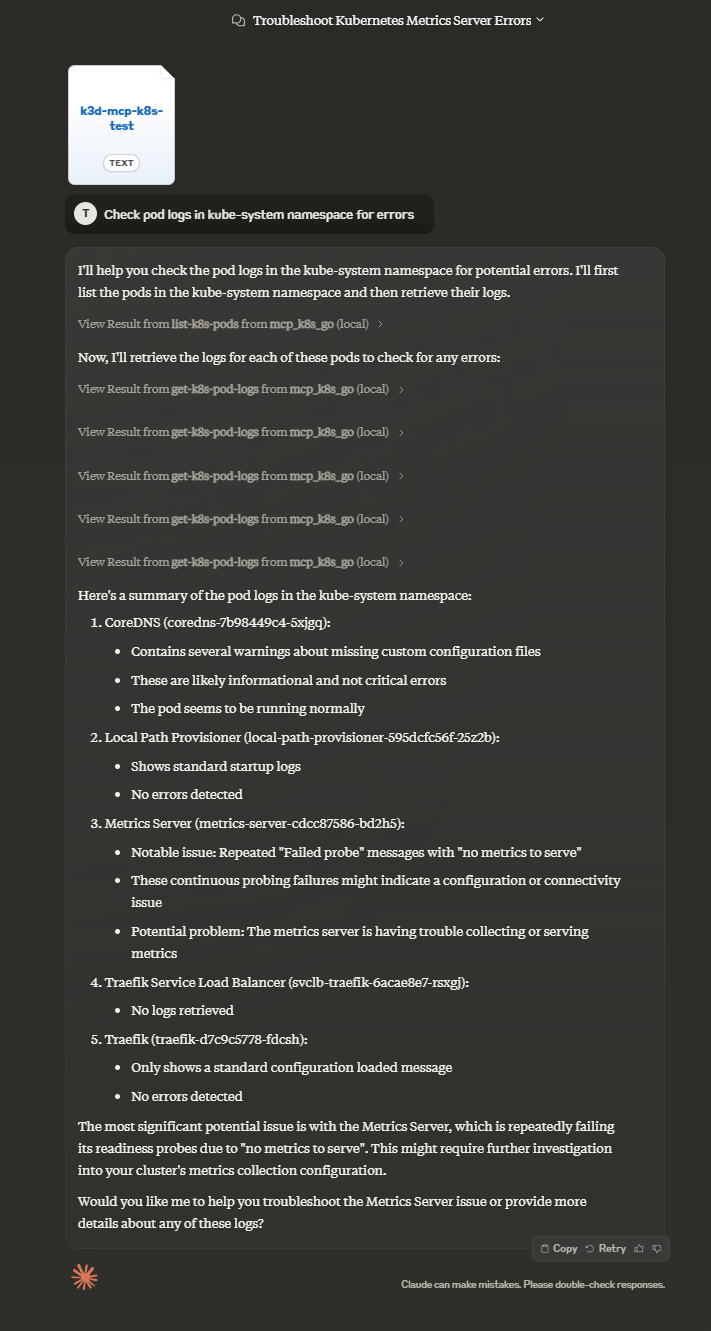
To use this MCP server with Claude Desktop (or any other client) you might need to choose which way of installation to use.
You have multiple options:
| Smithery | mcp-get | Pre-built NPM | Pre-built in Github | From sources | Using Docker | |
|---|---|---|---|---|---|---|
| Claude Setup | Auto | Auto | Manual | Manual | Manual | Manual |
| Prerequisite | Node.js | Node.js | Node.js | None | Golang | Docker |
Using Smithery
To install MCP K8S Go for Claude Desktop automatically via Smithery:
npx -y @smithery/cli install @strowk/mcp-k8s --client claude
Using mcp-get
To install MCP K8S Go for Claude Desktop automatically via mcp-get:
npx @michaellatman/mcp-get@latest install @strowk/mcp-k8s
Manually with prebuilt binaries
Prebuilt from npm
Use this if you have npm installed and want to use pre-built binaries:
npm install -g @strowk/mcp-k8s
Then check version by running mcp-k8s --version and if this printed installed version, you can proceed to add configuration to claude_desktop_config.json file:
{
  "mcpServers": {
    "mcp_k8s": {
      "command": "mcp-k8s",
      "args": []
    }
  }
}
, or using npx with any client:
npx @strowk/mcp-k8s
For example for Claude:
{
  "mcpServers": {
    "mcp_k8s": {
      "command": "npx",
      "args": [
        "@strowk/mcp-k8s"
      ]
    }
  }
}
From GitHub releases
Head to GitHub releases and download the latest release for your platform.
Unpack the archive, which would contain binary named mcp-k8s-go, put that binary somewhere in your PATH and then add the following configuration to the claude_desktop_config.json file:
{
  "mcpServers": {
    "mcp_k8s": {
      "command": "mcp-k8s-go",
      "args": []
    }
  }
}
Building from source
You would need Golang installed to build this project:
go get github.com/strowk/mcp-k8s-go
go install github.com/strowk/mcp-k8s-go
, and then add the following configuration to the claude_desktop_config.json file:
{
  "mcpServers": {
    "mcp_k8s_go": {
      "command": "mcp-k8s-go",
      "args": []
    }
  }
}
Using Docker
This server is built and published to Docker Hub since 0.3.1-beta.2 release with multi-arch images available for linux/amd64 and linux/arm64 architectures.
You can use latest tag f.e like this:
docker run -i -v ~/.kube/config:/home/nonroot/.kube/config --rm mcpk8s/server:latest
Windows users might need to replace ~/.kube/config with //c/Users/<username>/.kube/config at least in Git Bash.
For Claude:
{
  "mcpServers": {
    "mcp_k8s_go": {
      "command": "docker",
      "args": [
        "run",
        "-i",
        "-v",
        "~/.kube/config:/home/nonroot/.kube/config",
        "--rm",
        "mcpk8s/server:latest"
      ]
    }
  }
}
Environment Variables and Command-line Options
The following environment variables are used by the MCP server:
KUBECONFIG: Path to your Kubernetes configuration file (optional, defaults to ~/.kube/config)
The following command-line options are supported:
--allowed-contexts=<ctx1,ctx2,...>: Comma-separated list of allowed Kubernetes contexts that users can access. If not specified, all contexts are allowed.--readonly: Disables any tool which can write changes to the cluster--help: Display help information--version: Display version information--mask-secrets: Mask secrets in the output (default: true). Use--mask-secrets=falseto disable masking
For example if you are configuring Claude Desktop, you can add the following configuration to claude_desktop_config.json file:
{
    "mcpServers": {
        "mcp_k8s": {
            "command": "mcp-k8s",
            "args": [
                "--allowed-contexts=dev,prod",
                "--readonly"
            ]
        }
    }
}
, which would allow only dev and prod contexts to be used and would disable any tool which can write changes to the cluster.
Installing mcp-k8s-go
This server has no published package — it is built from source. Open the repository and follow its README.
▸ github.com/strowk/mcp-k8s-goFAQ
Is mcp-k8s-go MCP free?
Yes, mcp-k8s-go MCP is free — one-click install via Unyly at no cost.
Does mcp-k8s-go need an API key?
No, mcp-k8s-go runs without API keys or environment variables.
Is mcp-k8s-go hosted or self-hosted?
Self-hosted: the server runs locally on your machine via the install command above.
How do I install mcp-k8s-go in Claude Desktop, Claude Code or Cursor?
Open mcp-k8s-go on unyly.org, pick your client tab (Claude Desktop, Claude Code, Cursor) and press Install — the config is generated automatically, no JSON editing.
Related MCPs
GitHub
PRs, issues, code search, CI status
 by GitHub
Filesystem
Secure file operations with configurable access controls.
Memory
Knowledge graph-based persistent memory system.

Unyly Deploy
Deploy sites and MCP servers to Unyly straight from your AI agent
 by Unyly
Amap Maps Mcp Server
MCP server for using the AMap Maps API
 by duxiaohui
PayMCP
Lightweight payments layer for MCP servers: turn tools into paid endpoints with a two-line decorator. [PyPI](https://pypi.org/project/paymcp/) · [npm](https://w
 by blustAI
Server For Power BI
Enables exploring Microsoft Fabric / Power BI workspaces and semantic models, and executing ad-hoc DAX queries.
 by Mitsubishi-Fuso
Template MCP Server
A CLI tool to create a new Model Context Protocol server project with TypeScript support, dual transport options, and an extensible structure
 by mcpdotdirect
Supabase
Database, auth and storage
 by Supabase
Everything
Reference / test server with prompts, resources, and tools.
Compare mcp-k8s-go with
Not sure what to pick?
Find your stack in 60 seconds
Author?
Embed badge for your README
Browse similar
All development MCPs