
Minitask
FreeNot checkedLightweight CalDAV task manager desktop app (PySide6/Qt6) with built-in MCP Server

About
Lightweight CalDAV task manager desktop app (PySide6/Qt6) with built-in MCP Server
README



A lightweight CalDAV task manager desktop application built with PySide6 (Qt6) and python-caldav.
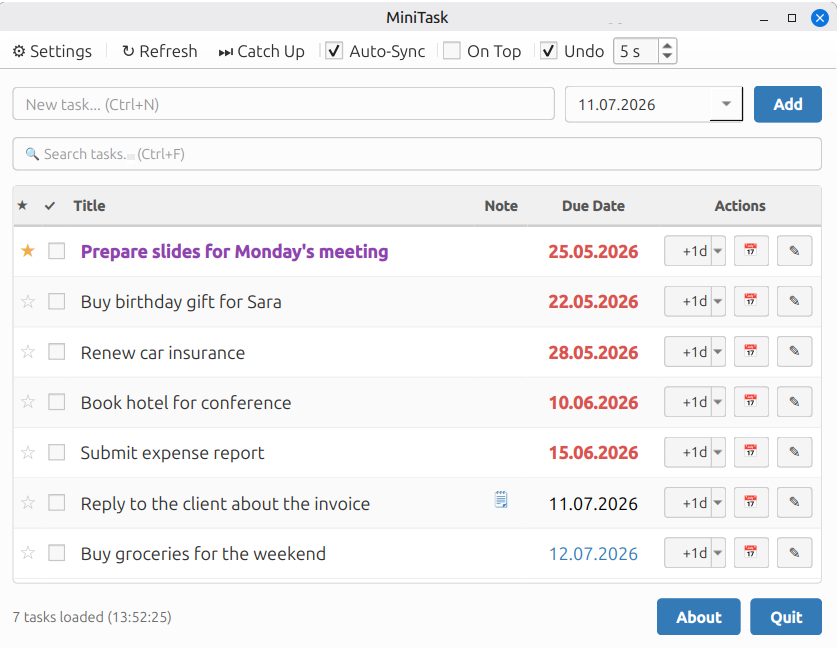
Features
- AI assistant support via the separate MiniTask MCP server — manage the same tasks in natural language from any MCP-compatible client
- Connect to any CalDAV server (e.g. Nextcloud, mailbox.org, Radicale)
- Create, edit, and complete tasks with due dates and free-text notes
- Calendar popup for date selection — click a task's due date in the list to change it directly
- Postpone tasks by +1 day, +1 week, or +1 month
- Set any task to today with one click
- "Catch Up" — set all overdue tasks to today at once
- Star/prioritize important tasks
- Color-coded due dates (overdue, today, future)
- Search and filter tasks
- Auto-sync every 60 seconds (toggleable)
- Undo completed (deleted) tasks — optional, with a configurable grace period (1–60 s)
- Keyboard shortcuts for fast workflow
- Always-on-top mode
- Secure credential storage via system keyring
- Remembers window position between sessions
- Single instance — launching MiniTask again brings the running window to the front instead of opening a second one
Requirements
- Python 3.12+
- A CalDAV server with task/todo support
Installation
git clone https://github.com/Stefan-Schmidbauer/minitask
cd minitask
Linux (Debian/Ubuntu)
MiniTask uses Quickstrap for installation and startup.
./install.py   # run once to set up the virtual environment
./start.sh     # start the app
./install.py interactively sets up a virtual environment and installs system dependencies (libgl1, libegl1) and Python packages (PySide6, caldav, icalendar, keyring). After that, use ./start.sh to launch the app.
Windows (manual)
The desktop app works on Windows, but there is no automated installer. Set up manually:
Install Python 3.12+
- Run the installer and make sure to check "Add Python to PATH" — without this, the
pythoncommand won't be recognized in the terminal - Verify the installation by opening a terminal (
Win+R→cmd) and runningpython --version
- Run the installer and make sure to check "Add Python to PATH" — without this, the
Open a terminal in the MiniTask directory and run:
python -m venv venv
venv\Scripts\pip install PySide6 caldav icalendar keyring
This installs Qt (via PySide6) along with all required libraries — no separate Qt installation needed. On Windows, PySide6 bundles everything including the Qt DLLs, unlike Linux where some system libraries (libgl1, libegl1) must be installed separately.
Note: During
python -m venv venvWindows may show an "Access Denied" dialog for a file calledlib64. This is a symlink Python tries to create but doesn't need on Windows — click Skip and the virtual environment will work fine. To prevent this dialog permanently, enable Developer Mode in Windows Settings → System → For developers.
Usage
Linux:
./start.sh
Windows:
venv\Scripts\python main.py
On first launch, you will be prompted to enter your CalDAV server credentials and select a calendar.
Only one MiniTask instance runs per user. Starting it again (from the menu, a launcher or ./start.sh) does not open a second window — the running one is restored and brought to the front.
Desktop Entry (Linux)
To start MiniTask from your application menu, create ~/.local/share/applications/MiniTask.desktop:
[Desktop Entry]
Type=Application
Name=MiniTask
Exec=/path/to/minitask/start.sh
Icon=/path/to/minitask/assets/minitask.png
Terminal=false
StartupNotify=true
StartupWMClass=MiniTask
StartupNotify=true matters on Wayland: compositors only let a window take focus with an activation token, which the launcher passes on only for entries with startup notification. MiniTask forwards this token to the already running instance — without it, the existing window may only be highlighted in the taskbar instead of coming to the front. On X11 it works either way.
Developer Mode (Linux)
source quickstrap/activate.sh
python main.py
Keyboard Shortcuts
| Shortcut | Action |
|---|---|
Ctrl+N |
Focus new task input |
Ctrl+F |
Focus search |
F5 |
Refresh tasks |
Ctrl+Z |
Undo last completion |
Escape |
Clear search |
Configuration
Settings are stored in:
- Linux:
~/.config/minitask/settings.json - Windows:
%APPDATA%/minitask/settings.json
Credential Storage
Passwords are stored securely in the system keyring and never written to the config file in plain text:
- Linux: GNOME Keyring or KWallet (accessed via subprocess to avoid Qt/D-Bus conflicts). A running keyring service is required (e.g.
gnome-keyring,kwallet). - Windows: Windows Credential Manager, accessed directly — no additional setup needed.
AI Assistant Integration (MCP)
MiniTask itself is a desktop app only. To manage your tasks in natural language from an AI assistant (Claude Code, Claude Desktop, Cowork or any other MCP-compatible client), use MiniTask MCP — a separate MCP server that works on the same CalDAV tasks and follows the same model as the app.
Moved: Earlier versions of MiniTask shipped the MCP server in this repository (
mcp_server.py,setup_credentials.py,MCP.mdand the.mcp.json.*.examplefiles). It now lives in its own repository, minitask-mcp, and runs as one shared instance on a server, reached over HTTPS — no longer as a local subprocess next to the desktop app.If you used the old setup:
- Remove the
minitaskentry pointing tomcp_server.pyfrom your.mcp.json— that file no longer exists here.- Set up MiniTask MCP as described in its README and connect your client to its HTTPS endpoint.
- The tools and their arguments are unchanged, but nothing is shared with the app any more: the CalDAV account is configured on the MCP server, not read from the desktop app's keyring.
- The
mcpPython package is no longer needed in MiniTask's virtual environment.
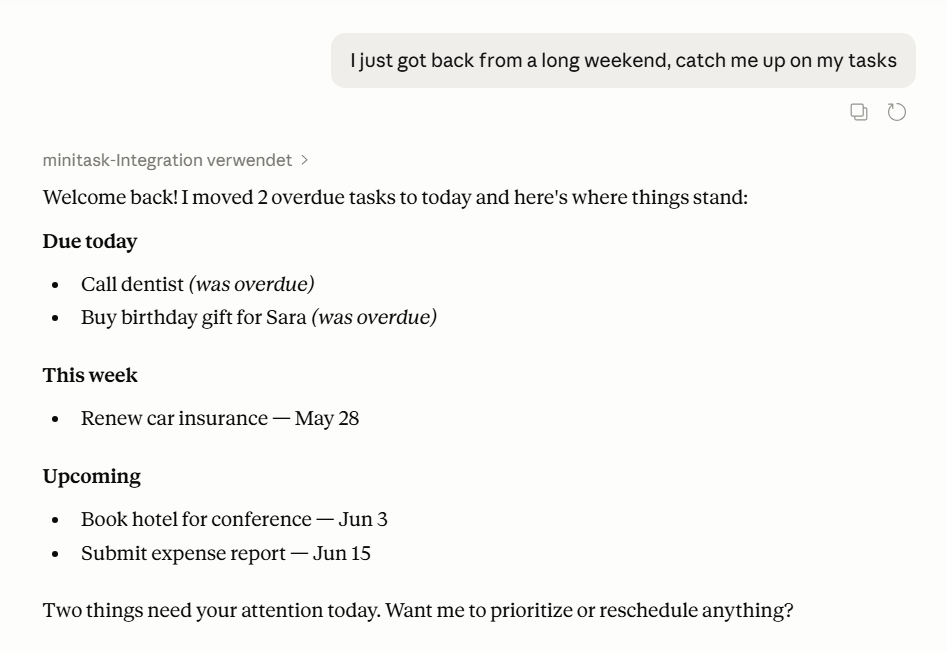 "Catch me up on my tasks" — Claude moves overdue items to today and returns a structured overview.
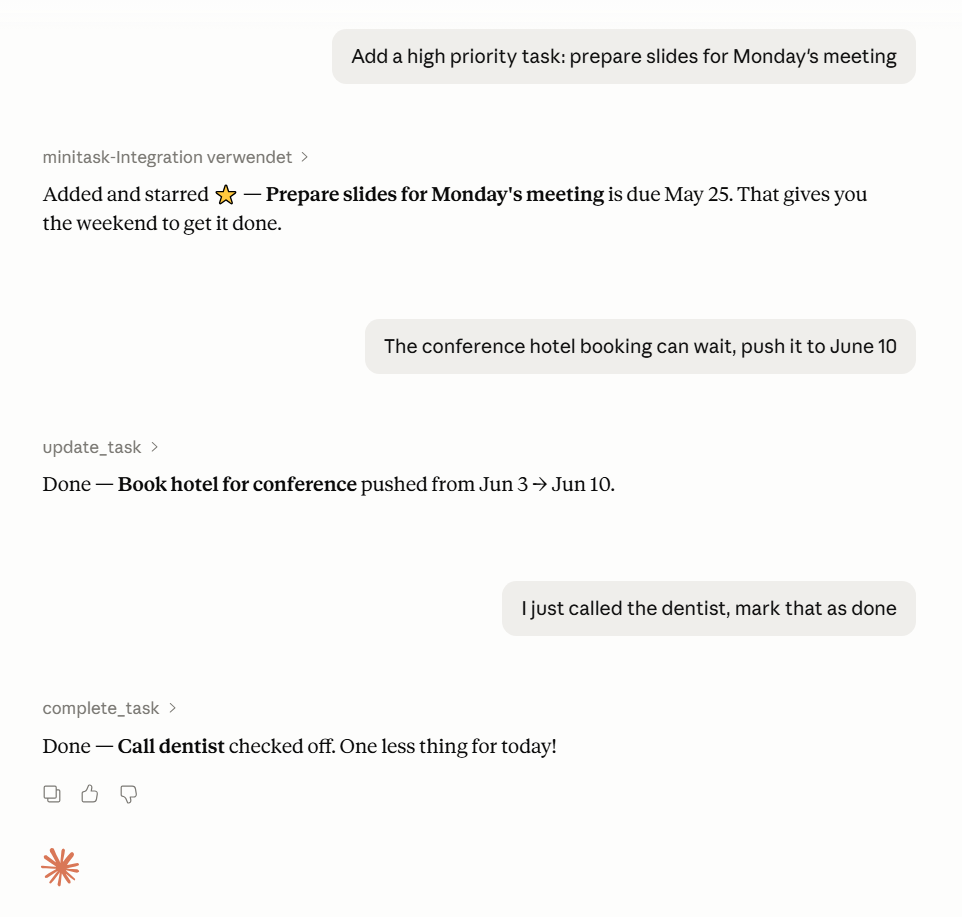 Add a starred task, push a deadline, mark one done — natural language, no context switching.
Third-party Libraries
MiniTask is built on the following open-source libraries:
| Library | Description | License |
|---|---|---|
| PySide6 | Qt6 bindings for Python — UI framework | LGPL-3.0 / GPL-2.0 / GPL-3.0 |
| caldav | CalDAV client library | MIT |
| icalendar | iCalendar format parser and generator | BSD |
| keyring | Secure credential storage via system keyring | MIT |
Contributing
Contributions are welcome! Feel free to open issues or submit pull requests.
License
MIT License - see LICENSE for details.
Authors
- Stefan Schmidbauer
- Claude (AI Assistant by Anthropic)
Installing Minitask
This server has no published package — it is built from source. Open the repository and follow its README.
▸ github.com/Stefan-Schmidbauer/minitaskFAQ
Is Minitask MCP free?
Yes, Minitask MCP is free — one-click install via Unyly at no cost.
Does Minitask need an API key?
No, Minitask runs without API keys or environment variables.
Is Minitask hosted or self-hosted?
Self-hosted: the server runs locally on your machine via the install command above.
How do I install Minitask in Claude Desktop, Claude Code or Cursor?
Open Minitask on unyly.org, pick your client tab (Claude Desktop, Claude Code, Cursor) and press Install — the config is generated automatically, no JSON editing.
Related MCPs
Notion
Read and write pages in your workspace
 by Notion
Linear
Issues, cycles, triage — from Claude
 by Linear
Google Drive
Search and read your Drive files
 by Google
mindsdb/mindsdb
Connect and unify data across various platforms and databases with [MindsDB as a single MCP server](https://docs.mindsdb.com/mcp/overview).
 by mindsdb
fulcradynamics/fulcra-context-mcp
Access personal health and biometric data (sleep stages, heart rate, HRV, glucose, workouts), calendar and location via the Fulcra Life API.
 by fulcradynamics
rinadelph/Agent-MCP
Framework for building multi-agent systems that coordinate over MCP, with task management, shared context and RAG.
 by rinadelph
WhenLabs-org/when
Developer toolkit: stack detection for AI context files, port conflicts, .env schema validation, docs drift, dependency license audits and task timing.
 by WhenLabs-org
Beltran12138/wecom-docs-mcp-server
WeCom (Enterprise WeChat) document operations via MCP: create, read, and edit Docs and Smartsheets (9 tools). Fills the doc-CRUD gap — existing WeCom MCP server
 by Beltran12138
freema/mcp-gsheets
Google Sheets API integration for reading, writing, formatting and sheet management.
 by freema
mattijsdp/dbt-docs-mcp
dbt-core (OSS) project metadata, model and column-level lineage, and dbt documentation.
 by mattijsdp
Compare Minitask with
Not sure what to pick?
Find your stack in 60 seconds
Author?
Embed badge for your README
Browse similar
All productivity MCPs