
Multi Gmail
FreeStale (181d)Lets Claude Desktop manage multiple Gmail accounts simultaneously, supporting search, read, send, reply, and label organization via MCP tools.

About
Lets Claude Desktop manage multiple Gmail accounts simultaneously, supporting search, read, send, reply, and label organization via MCP tools.
README
A Model Context Protocol (MCP) server that lets Claude Desktop manage multiple Gmail accounts simultaneously. Listed on the official Anthropic MCP registry and published on npm.
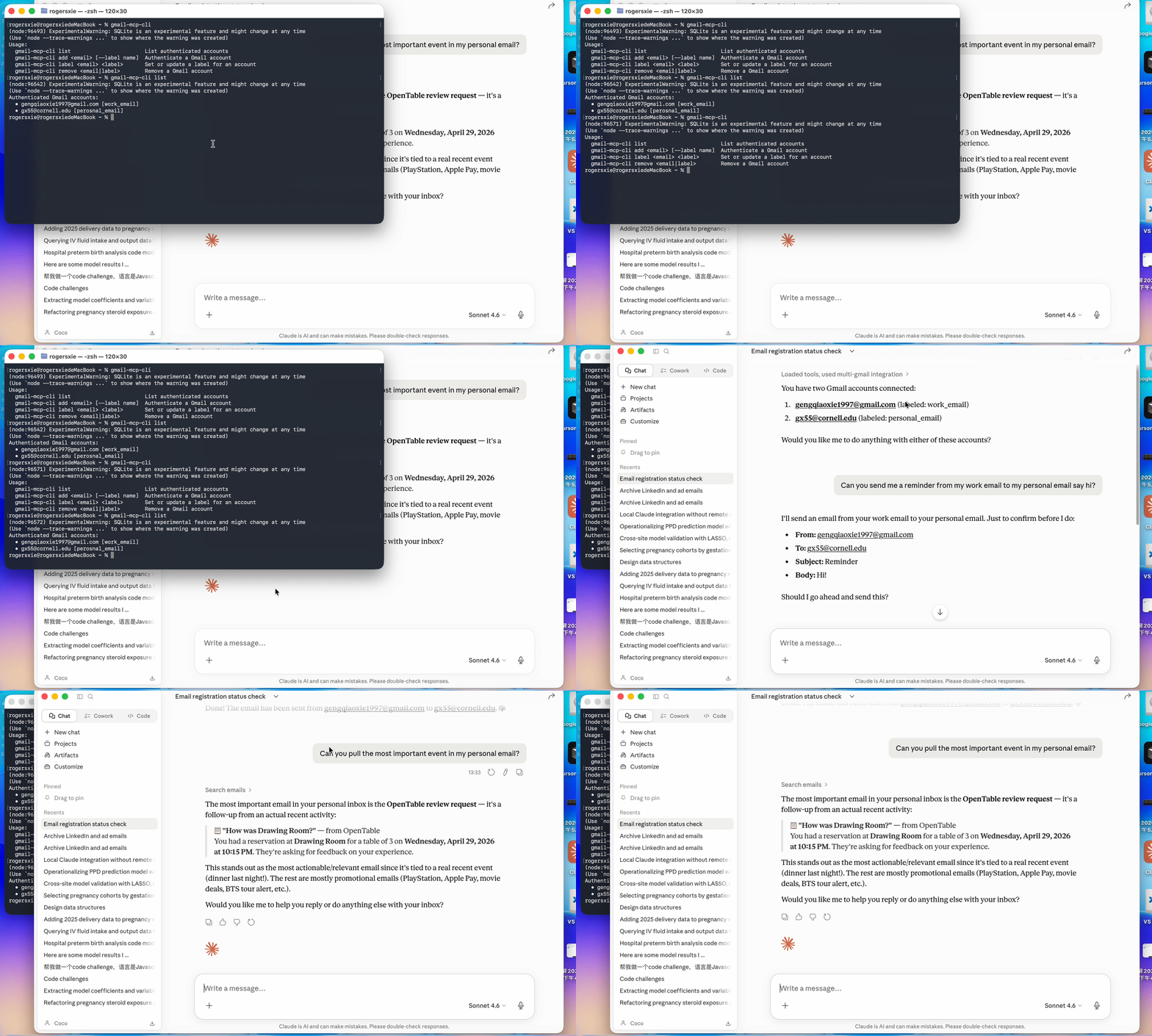
Features
- Connect unlimited Gmail accounts — personal, work, side projects
- Search any inbox using full Gmail search syntax
- Read complete emails with MIME parsing
- Send, reply in thread, and create drafts
- Organize with labels: add, remove, list, archive
- Mark as read / unread
- Tokens stored locally in
~/.gmail-mcp-tokens.db— never committed to git - Auto-refreshes OAuth tokens silently
Requirements
- Node.js >= 22.5.0
- A Google Cloud project with the Gmail API enabled
- Claude Desktop
Installation
npm install -g multi-gmail-mcp
This registers two global commands: gmail-mcp (the MCP server) and gmail-mcp-cli (account manager).
Google Cloud Setup
You only need to do this once.
- Go to console.cloud.google.com → create a project
- Enable the Gmail API (APIs & Services → Library)
- Configure the OAuth consent screen — External, add your Gmail addresses as test users
- Add scopes:
gmail.readonly,gmail.send,gmail.modify,gmail.labels - Create a Desktop app OAuth credential → download the JSON
- Save it to
~/.gmail-mcp-oauth.json
Alternatively, set environment variables in the Claude Desktop config (see below).
Authenticating Gmail Accounts
# Add accounts (opens browser for Google sign-in)
gmail-mcp-cli add [email protected]
gmail-mcp-cli add [email protected]

# List authenticated accounts
gmail-mcp-cli list

# Remove an account
gmail-mcp-cli remove [email protected]
Tokens are saved to ~/.gmail-mcp-tokens.db and refreshed automatically.
Claude Desktop Configuration
Edit ~/Library/Application Support/Claude/claude_desktop_config.json:
{
  "mcpServers": {
    "multi-gmail": {
      "command": "gmail-mcp"
    }
  }
}
If you prefer environment variables over ~/.gmail-mcp-oauth.json:
{
  "mcpServers": {
    "multi-gmail": {
      "command": "gmail-mcp",
      "env": {
        "GOOGLE_CLIENT_ID": "your-client-id.apps.googleusercontent.com",
        "GOOGLE_CLIENT_SECRET": "your-client-secret"
      }
    }
  }
}
Restart Claude Desktop after saving. Click the hammer icon to confirm 19 tools are loaded.
Available Tools
Account Management
| Tool | Description |
|---|---|
list_accounts |
List all authenticated Gmail accounts |
initiate_auth |
Start OAuth flow — returns a URL to open in browser |
complete_auth |
Finalize auth after completing Google sign-in |
remove_account |
Remove an account and its stored credentials |
Reading Email
| Tool | Description |
|---|---|
search_emails |
Search with Gmail syntax (is:unread, from:, after:, etc.) |
get_email |
Fetch full email content by message ID |
Writing Email
| Tool | Description |
|---|---|
send_email |
Send an email (supports To, CC, BCC) |
reply_to_email |
Reply in thread, preserving References headers |
create_draft |
Save an email as a draft |
Organization
| Tool | Description |
|---|---|
list_labels |
List all Gmail labels for an account |
add_label |
Add one or more labels to a message |
remove_label |
Remove one or more labels from a message |
archive_email |
Remove from Inbox |
mark_as_read |
Remove the UNREAD label |
mark_as_unread |
Add the UNREAD label |
Example Prompts
List all my authenticated Gmail accounts.
Search my [email protected] inbox for unread emails from this week.
Reply to that email from my personal account saying I'll be there Saturday.
Send an email from [email protected] to [email protected]
with subject "Dinner plans" and body "Are you free Saturday?"
Archive everything older than a week in my side-project inbox that's already read.
Check both my accounts for emails from GitHub and summarize them.
Security
~/.gmail-mcp-oauth.jsonand~/.gmail-mcp-tokens.dblive in your home directory — outside the project, never committed.gitignoreexcludes*.db,.gmail-mcp-oauth.json, and.env- The server runs over stdio only — no network port is opened
- OAuth scopes are limited to the minimum required
See SECURITY.md for full details: token storage, network behavior, scope rationale, revocation steps, and how to report a vulnerability.
Registry
Listed on the official Anthropic MCP registry:
io.github.gx-55/multi-gmail-mcp
curl "https://registry.modelcontextprotocol.io/v0.1/servers?search=io.github.gx-55"
Project Structure
multi-gmail-mcp/
├── bin/
│   ├── gmail-mcp.js        # Entry point for the MCP server command
│   └── gmail-mcp-cli.js    # Entry point for the CLI command
├── src/
│   ├── server.js           # MCP server — all 19 tools
│   ├── gmail-client.js     # Gmail API wrapper
│   ├── auth.js             # OAuth2 flow with auto-refresh
│   ├── db.js               # SQLite token storage (node:sqlite)
│   └── cli.js              # Account management CLI
└── package.json
Troubleshooting
"No OAuth credentials found"
Make sure ~/.gmail-mcp-oauth.json exists or set GOOGLE_CLIENT_ID / GOOGLE_CLIENT_SECRET in the Claude Desktop config.
"Account not found. Authenticate it first"
Run gmail-mcp-cli add [email protected] before using that account in Claude.
Tools not appearing in Claude Desktop
Confirm gmail-mcp is in your PATH (which gmail-mcp) and restart Claude Desktop.
Token expired errors
Tokens auto-refresh if a valid refresh token is stored. If refresh fails, remove the account and re-authenticate: gmail-mcp-cli remove [email protected] && gmail-mcp-cli add [email protected].
Install Multi Gmail in Claude Desktop, Claude Code & Cursor
unyly install multi-gmail-mcpInstalls into Claude Desktop, Claude Code, Cursor & VS Code — handles npx, uvx and build-from-source repos for you.
First time? Get the CLI: curl -fsSL https://unyly.org/install | sh
Or configure manually
Run in your terminal:
claude mcp add multi-gmail-mcp --env GOOGLE_CLIENT_ID="" --env GOOGLE_CLIENT_SECRET="" -- npx -y multi-gmail-mcpStep-by-step: how to install Multi Gmail
FAQ
Is Multi Gmail MCP free?
Yes, Multi Gmail MCP is free — one-click install via Unyly at no cost.
Does Multi Gmail need an API key?
Yes, it requires environment variables: GOOGLE_CLIENT_ID, GOOGLE_CLIENT_SECRET. Unyly injects them into the config during install.
Is Multi Gmail hosted or self-hosted?
Self-hosted: the server runs locally on your machine via the install command above.
How do I install Multi Gmail in Claude Desktop, Claude Code or Cursor?
Open Multi Gmail on unyly.org, pick your client tab (Claude Desktop, Claude Code, Cursor) and press Install — the config is generated automatically, no JSON editing.
Changes
Versions and requested access over time.
- New version published
- New version published
- New version published
- New version published
- New version published
- New version published
- New version published
- New version published
Related MCPs
Gmail
Read, send and search emails from Claude
 by Google
Slack
Send, search and summarize Slack messages
 by Slack
Runbear
No-code MCP client for team chat platforms, such as Slack, Microsoft Teams, and Discord.
Discord Server
A community discord server dedicated to MCP by [Frank Fiegel](https://github.com/punkpeye)
Klavis AI
Open Source MCP Infra. Hosted MCP servers and MCP clients on Slack and Discord.
Work90210/APIFold
Turn any REST API into a hosted MCP server, with ready-made public servers for GitHub, Stripe, Slack, OpenAI, Notion and more.
 by Work90210
arikusi/deepseek-mcp-server
DeepSeek AI chat and reasoning with multi-turn sessions, function calling, thinking mode and cost tracking.
 by arikusi
hashgraph-online/hashnet-mcp-js
Discover, register and chat with AI agents on the Hashgraph network via the Registry Broker.
 by hashgraph-online
profullstack/mcp-server
Developer utilities: SEO optimization, document conversion, domain lookup, email validation, QR codes, weather data, social media posting and security scanning.
 by profullstack
WayStation-ai/mcp
Connect MCP hosts to apps such as Notion, Slack, Monday and Airtable.
 by waystation-ai
Compare Multi Gmail with
Not sure what to pick?
Find your stack in 60 seconds
Author?
Embed badge for your README
Browse similar
All communication MCPs