
operative_sh/web-eval-agent
FreeNot checkedAn MCP Server that autonomously debugs web applications with browser-use browser agents

About
An MCP Server that autonomously debugs web applications with browser-use browser agents
README
This project has been discontinued. We're building something new at withrefresh.com
🚀 operative.sh web-eval-agent MCP Server
Let the coding agent debug itself, you've got better things to do.
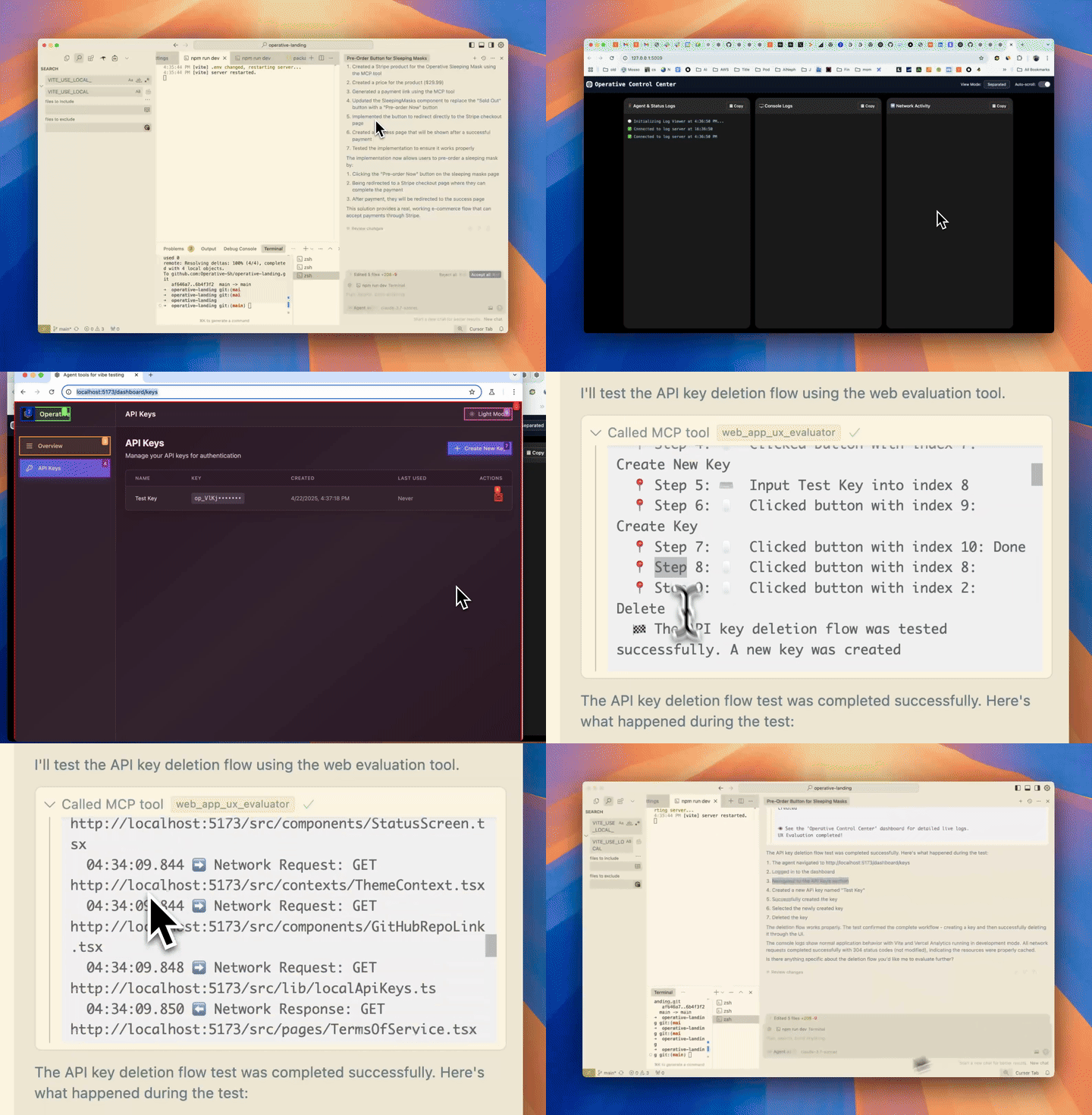
🔥 Supercharge Your Debugging
operative.sh's MCP Server launches a browser-use powered agent to autonomously execute and debug web apps directly in your code editor.
⚡ Features
- 🌐 Navigate your webapp using BrowserUse (2x faster with operative backend)
- 📊 Capture network traffic - requests are intelligently filtered and returned into the context window
- 🚨 Collect console errors - captures logs & errors
- 🤖 Autonomous debugging - the Cursor agent calls the web QA agent mcp server to test if the code it wrote works as epected end-to-end.
🧰 MCP Tool Reference
| Tool | Purpose |
|---|---|
web_eval_agent |
🤖 Automated UX evaluator that drives the browser, captures screenshots, console & network logs, and returns a rich UX report. |
setup_browser_state |
🔒 Opens an interactive (non-headless) browser so you can sign in once; the saved cookies/local-storage are reused by subsequent web_eval_agent runs. |
Key arguments
web_eval_agenturl(required) – address of the running app (e.g.http://localhost:3000)task(required) – natural-language description of what to test ("run through the signup flow and note any UX issues")headless_browser(optional, defaultfalse) – set totrueto hide the browser window
setup_browser_stateurl(optional) – page to open first (handy to land directly on a login screen)
You can trigger these tools straight from your IDE chat, for example:
Evaluate my app at http://localhost:3000 – run web_eval_agent with the task "Try the full signup flow and report UX issues".
🏁 Quick Start
Easy Setup with One-Click Integration
- Get your API key (free) - when you create your API key, you'll see:
- "Add to Cursor" button with a deeplink for instant Cursor installation
- Prefilled Claude Code command with your API key automatically included
Manual Setup (macOS/Linux)
- Pre-requisites (typically not needed):
- brew:
/bin/bash -c "$(curl -fsSL https://raw.githubusercontent.com/Homebrew/install/HEAD/install.sh)" - npm: (
brew install npm) - jq:
brew install jq
- Run the installer after getting an api key (free)
- Installs playwright
- Installs uv
- Inserts JSON into your code editor (Cursor/Cline/Windsurf) for you!
curl -LSf https://operative.sh/install.sh -o install.sh && bash install.sh && rm install.sh
- Visit your favorite IDE and restart to apply the changes
- Send a prompt in chat mode to call the web eval agent tool! e.g.
Test my app on http://localhost:3000. Use web-eval-agent.
🛠️ Manual Installation
- Get your API key at operative.sh/mcp
- Install uv
curl -LsSf https://astral.sh/uv/install.sh | sh
- Source environment variables after installing UV
Mac
source ~/.zshrc
Linux
source ~/.bashrc
- Install playwright:
npm install -g chromium playwright && uvx --with playwright playwright install --with-deps
- Add below JSON to your relevant code editor with api key
- Restart your code editor
🔃 Updating
uv cache clean- refresh MCP server
    "web-eval-agent": {
      "command": "uvx",
      "args": [
        "--refresh-package",
        "webEvalAgent",
        "--from",
        "git+https://github.com/Operative-Sh/web-eval-agent.git",
        "webEvalAgent"
      ],
      "env": {
        "OPERATIVE_API_KEY": "<YOUR_KEY>"
      }
    }
Operative Discord Server
🛠️ Manual Installation (Mac + Cursor/Cline/Windsurf)
- Get your API key at operative.sh/mcp
- Install uv
curl -LsSf https://astral.sh/uv/install.sh | sh)
- Install playwright:
npm install -g chromium playwright && uvx --with playwright playwright install --with-deps
- Add below JSON to your relevant code editor with api key
- Restart your code editor
Manual Installation (Windows + Cursor/Cline/Windsurf)
We're refining this, please open an issue if you have any issues!
- Do all this in your code editor terminal
curl -LSf https://operative.sh/install.sh -o install.sh && bash install.sh && rm install.sh- Get your API key at operative.sh/mcp
- Install uv
(curl -LsSf https://astral.sh/uv/install.sh | sh) uvx --from git+https://github.com/Operative-Sh/web-eval-agent.git playwright install- Restart code editor
🚨 Issues
- Updates aren't being received in code editors, update or reinstall for latest version: Run
uv cache cleanfor latest - Any issues feel free to open an Issue on this repo or in the discord!
- 5/5 - static apps without changes weren't screencasting, fixed!
uv clean+ restart to get fix
Changelog
- 4/29 - Agent overlay update - pause/play/stop agent run in the browser
📋 Example MCP Server Output Report
📊 Web Evaluation Report for http://localhost:5173 complete!
📝 Task: Test the API-key deletion flow by navigating to the API Keys section, deleting a key, and judging the UX.

🔍 Agent Steps
  📍 1. Navigate → http://localhost:5173
  📍 2. Click     "Login"        (button index 2)
  📍 3. Click     "API Keys"     (button index 4)
  📍 4. Click     "Create Key"   (button index 9)
  📍 5. Type      "Test API Key" (input index 2)
  📍 6. Click     "Done"         (button index 3)
  📍 7. Click     "Delete"       (button index 10)
  📍 8. Click     "Delete"       (confirm index 3)
🏁 Flow tested successfully – UX felt smooth and intuitive.

🖥️ Console Logs (10)
  1. [debug] [vite] connecting…
  2. [debug] [vite] connected.
  3. [info]  Download the React DevTools …
     …

🌐 Network Requests (10)
  1. GET /src/pages/SleepingMasks.tsx                   304
  2. GET /src/pages/MCPRegistryRegistry.tsx             304
     …

⏱️ Chronological Timeline
  01:16:23.293 🖥️ Console [debug] [vite] connecting…
  01:16:23.303 🖥️ Console [debug] [vite] connected.
  01:16:23.312 ➡️ GET /src/pages/SleepingMasks.tsx
  01:16:23.318 ⬅️ 304 /src/pages/SleepingMasks.tsx
     …
  01:17:45.038 🤖 🏁 Flow finished – deletion verified
  01:17:47.038 🤖 📋 Conclusion repeated above
👁️  See the "Operative Control Center" dashboard for live logs.
Star History
Built with <3 @ operative.sh
Installing operative_sh/web-eval-agent
This server has no published package — it is built from source. Open the repository and follow its README.
▸ github.com/Operative-Sh/web-eval-agentFAQ
Is operative_sh/web-eval-agent MCP free?
Yes, operative_sh/web-eval-agent MCP is free — one-click install via Unyly at no cost.
Does operative_sh/web-eval-agent need an API key?
No, operative_sh/web-eval-agent runs without API keys or environment variables.
Is operative_sh/web-eval-agent hosted or self-hosted?
Self-hosted: the server runs locally on your machine via the install command above.
How do I install operative_sh/web-eval-agent in Claude Desktop, Claude Code or Cursor?
Open operative_sh/web-eval-agent on unyly.org, pick your client tab (Claude Desktop, Claude Code, Cursor) and press Install — the config is generated automatically, no JSON editing.
Related MCPs
Playwright
Browser automation, scraping, screenshots
 by Microsoft
Puppeteer
Browser automation and web scraping.
 by modelcontextprotocol
Garmin Connect
An MCP server for Garmin Connect that provides access to fitness activities, health statistics, and sleep data by routing requests through a headless browser to
 by etweisberg
Higgsfield Unlimited
MCP server for Higgsfield AI that enables unlimited-mode image, video, audio generation, uploads, and job management via multiple parallel accounts, using brows
 by nukIeer
opentabs-dev/opentabs
Plugin-based server and Chrome extension that gives AI agents access to web apps through your authenticated browser session, with a plugin SDK.
 by opentabs-dev
hlydecker/ucsc-genome-mcp
Interact with the UCSC Genome Browser API to find genomes, chromosomes and more.
 by hlydecker
34892002/bilibili-mcp-js
Search Bilibili content, with LangChain integration examples.
 by 34892002
achiya-automation/safari-mcp
Native Safari browser automation without a Chrome dependency.
 by achiya-automation
agent-infra/mcp-server-browser
Browser automation using Puppeteer, supporting local and remote browser connections.