
Qgiscraft
FreeNot checked[ALPHA] QGIS-class GIS in pure Rust - clone shell, CLI + MCP first, keyless OSM. Implements the Storytold craft-app harness - see storytold/artcraft.

About
[ALPHA] QGIS-class GIS in pure Rust - clone shell, CLI + MCP first, keyless OSM. Implements the Storytold craft-app harness - see storytold/artcraft.
README
QGIS-class GIS in pure Rust: a clean-room 1:1 clone shell for QGIS muscle memory, with a modern core, CLI + MCP first, and no 2005 backend cruft.
What for: a workbench for asking questions of the world's free map (OpenStreetMap) and keeping the answers as your own map layers - scout locations, audit POIs, plan walks and hikes, verify what's really there. Type a question, get a layer, analyze it, export it - by hand or via an AI agent (MCP). Full picture: docs/ECOSYSTEM.md.
What this wraps
QGIS (LTR 3.44), the free and open-source desktop GIS
- the reference our menus, docks, canvas behavior and shortcuts are cloned from, black-box. No QGIS code ships here and none is needed to run. Full picture: docs/WRAPPEE.md. Our plugin answer vs plugins.qgis.org: docs/plugins.md.
Preview
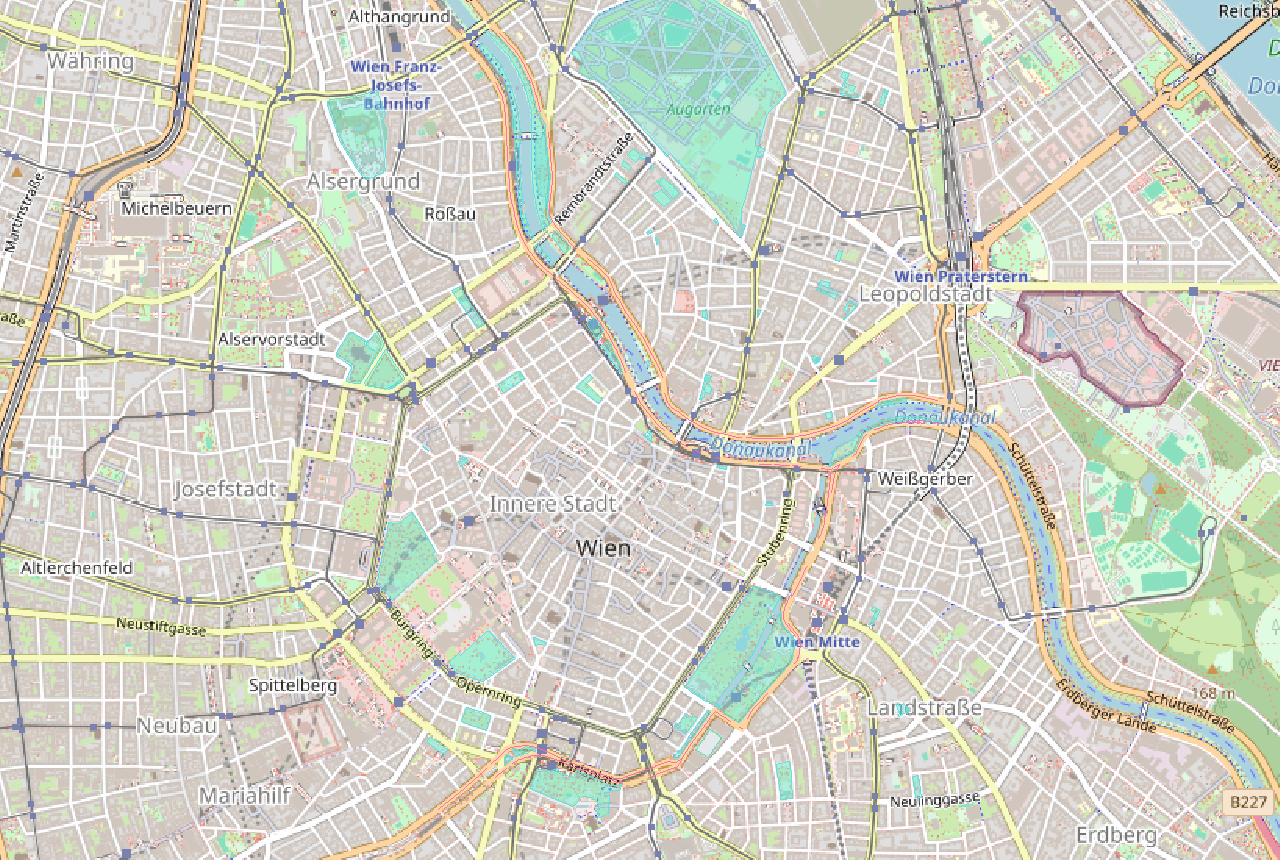 Rendered headless by the app itself (
--smoke BMP preview). Streets: (c) OpenStreetMap contributors.
What You Can Do
How it runs: native egui app + CLI + MCP server over stdio, one shared
command bus. SQLite project file is the project (our .qgz). Zero ports
for the native track; no accounts, no keys (Photon/Overpass/tiles are keyless).
- Geocode places (Photon live, Vienna demo offline), search the map
- Query OpenStreetMap via fenced Overpass builder (dry-run QL or live execute)
- Ingest hits as layers (points, lines, polygons) into the project DB
- Render vectors over cached XYZ tiles: per-layer colors, concave fills, labels
- Pan/zoom-to-cursor/Fit/F5, layers dock with counts, menus + shortcuts
- Drive all of it from Claude via 9 MCP tools (same bus as the GUI)
Track B (reserved, not built): ports 11253/11254 are claimed for a future sandraschi webapp for users who never learned QGIS. The native app needs none.
Install
Pre-release: building from source is currently the only path (no installer,
no .mcpb yet). It takes one command chain:
winget install Rustlang.Rustup
# + "Desktop development with C++" (MSVC linker, required on Windows)
cargo run -p giscraft --
Everything else - Claude Desktop wiring, env vars, verification prompt - is in INSTALL.md. Developers: docs/DEVELOPMENT.md.
Example Prompts
"Search for Stephansplatz and show it on the map" (geocode.search, demo offline or live with
--live)
"Find all pharmacies in Vienna's 1st district and ingest them as a layer" (overpass.query key=amenity value=pharmacy + bbox,
--live --ingest)
"List the project layers with feature counts" (layer.list - sources, geometry, visibility, counts)
Documentation
| Doc | Contents |
|---|---|
| Installation | All install methods, prerequisites |
| Onboarding | First run: QGIS side-by-side, keyless APIs, smoke test |
| Wrapped app | QGIS: what it is, official links, community |
| Plugin strategy | Why MCP tools are our plugin system |
| Architecture | L1/L2/L3, command bus, DB-as-project, stdio framing |
| Configuration | Env vars, config options |
| Tool Reference | All 10 MCP tools |
| Glossary | Plain-language terms: bbox, Overpass, tiles, CRS, ODbL... |
| Parity target | QGIS scope, oracle loop |
| UI parity | Measured checklist vs running QGIS |
| Development | Setup, recipes, gates |
| Troubleshooting | Common issues |
| Assessment | Tentative self-review + cross-checks |
Requirements
Windows 10/11 64-bit (primary), Rust stable via rustup, MSVC linker ("Desktop development with C++"). No accounts, no API keys, no Docker.
License
MIT OR Apache-2.0. QGIS itself is GPLv2+ and not included; map tiles (c) OpenStreetMap contributors (ODbL) - attribution shown in-app.
Status - does today / next week / non-goals
Does today: 5 crates + xtask; 25 docs files; 133 test fns; justfile;
clone-shell GUI (QGIS muscle memory) + headless MCP/CLI (9 tools);
--smoke BMP map preview; keyless Photon/Overpass with offline demo.
Next week: 3 democraft recipes (geocode-layer, overpass-fenced, render-preview); travelcraft boundary paragraph; live-service version/rate pinning.
Non-goals: not full QGIS parity (shell only, on purpose); web track reserved, not built.
Lineage - the Storytold craft-app pattern
Storytold ArtCraft (storytold/artcraft - "the IDE for artists") was the starting point. The 16 craft apps in the Storytold stable each ship one binary that is both the human CLI and the agent MCP server (stdio), headless-first, with run.json + report artifacts. That modus operandi and harness is what this repo implements; the code here is independent, the pattern is shared.
Installing Qgiscraft
This server has no published package — it is built from source. Open the repository and follow its README.
▸ github.com/sandraschi/qgiscraftFAQ
Is Qgiscraft MCP free?
Yes, Qgiscraft MCP is free — one-click install via Unyly at no cost.
Does Qgiscraft need an API key?
No, Qgiscraft runs without API keys or environment variables.
Is Qgiscraft hosted or self-hosted?
Self-hosted: the server runs locally on your machine via the install command above.
How do I install Qgiscraft in Claude Desktop, Claude Code or Cursor?
Open Qgiscraft on unyly.org, pick your client tab (Claude Desktop, Claude Code, Cursor) and press Install — the config is generated automatically, no JSON editing.
Related MCPs
GitHub
PRs, issues, code search, CI status
 by GitHub
Filesystem
Secure file operations with configurable access controls.
Memory
Knowledge graph-based persistent memory system.
Template MCP Server
A CLI tool to create a new Model Context Protocol server project with TypeScript support, dual transport options, and an extensible structure
 by mcpdotdirect
Server Sequential Thinking
MCP server for sequential thinking and problem solving
 by GitHub Actions

Unyly Deploy
Deploy sites and MCP servers to Unyly straight from your AI agent
 by Unyly
Amap Maps Mcp Server
MCP server for using the AMap Maps API
 by duxiaohui
PayMCP
Lightweight payments layer for MCP servers: turn tools into paid endpoints with a two-line decorator. [PyPI](https://pypi.org/project/paymcp/) · [npm](https://w
 by blustAI
Server For Power BI
Enables exploring Microsoft Fabric / Power BI workspaces and semantic models, and executing ad-hoc DAX queries.
 by Mitsubishi-Fuso
Gpt Image 2 Mcp
RunAPI GPT Image 2 MCP server for image generation: create tasks, poll results, and check pricing across 1 model from Claude Code, Codex, Cursor, and VS Code.
 by runapi-ai
Compare Qgiscraft with
Not sure what to pick?
Find your stack in 60 seconds
Author?
Embed badge for your README
Browse similar
All development MCPs