

About
Draw on JavaFX canvas.
README
This project contains Model Context Protocol servers, implemented in Java using the Quarkus MCP server framework.
These lets you extend the capabilities of your MCP enabled LLM (Large Language Model) AI applications.
These also work in MCP enabled LLM applications, like Claude Desktop. You can find other clients on Awesome MCP Clients page.
Running the servers
All of these servers are available to run with jbang everywhere: Java, JavaScript, Python and more. Where it says jbang it can be replaced with npx @jbangdev/jbang or uvx jbang or pipx jbang dependent on your preference.
Servers
jdbc

The jdbc server can be used to store and retrieve data from a database given just a JDBC URL. You can use any JDBC database, like Postgres, MySQL, Oracle, Sqlite, etc.
jbang jdbc@quarkiverse/quarkus-mcp-servers
See more in the jdbc readme.
jvminsight
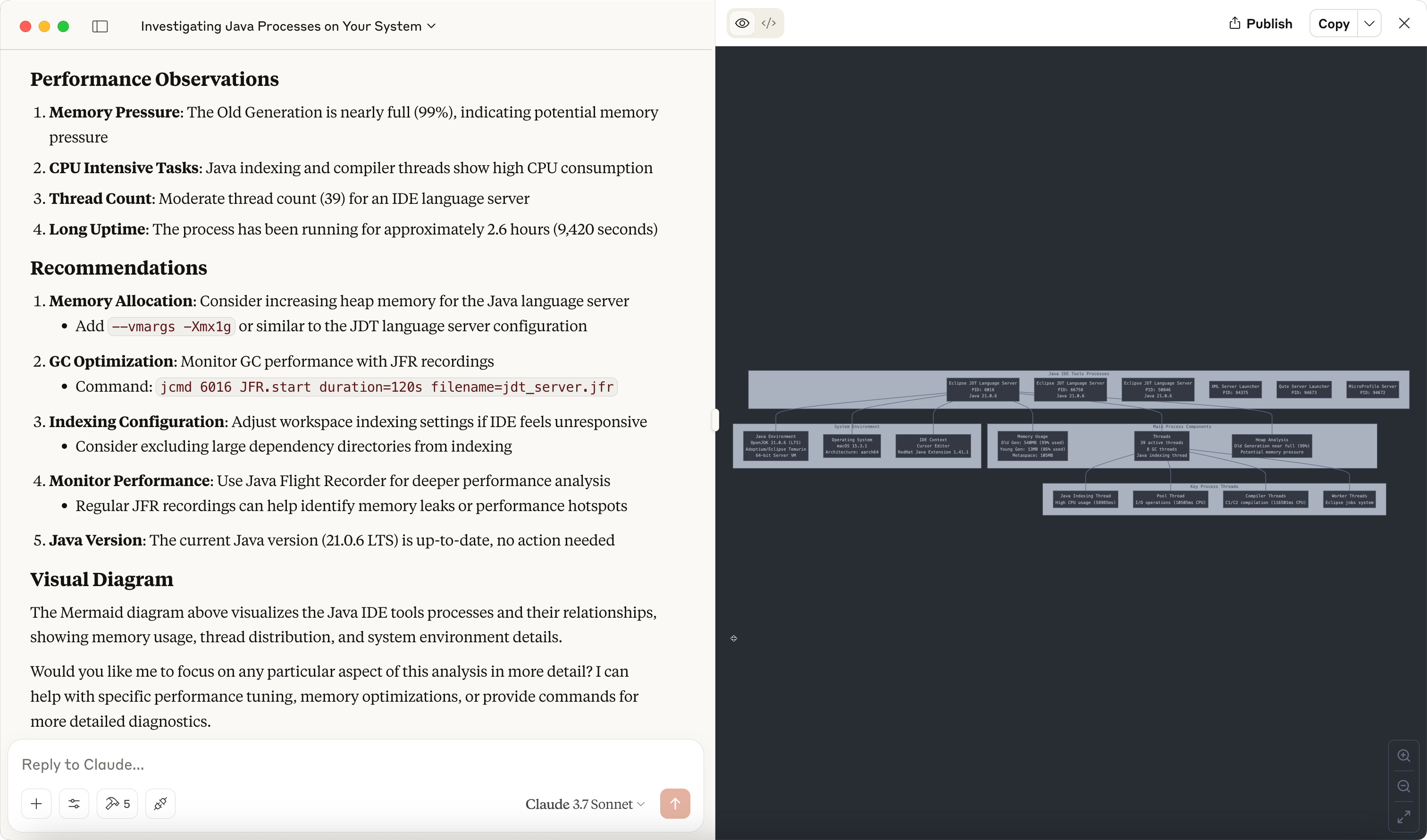
The jvminsight server is a server that can be used to inspect a running JVM process.
jbang jvminsight@quarkiverse/quarkus-mcp-servers
See more in the jvminsight readme.
filesystem
The filesystem server is a file system server that can be used to serve files from a file system.
jbang filesystem@quarkiverse/quarkus-mcp-servers [path1] [path2] ...
See more in the filesystem readme.
jfx
The jfx server exposes a canvas that can be used to make drawings using JavaFX.
jbang jfx@quarkiverse/quarkus-mcp-servers
See more in the jfx readme.
kubernetes
The kubernetes server can be used to interact with a Kubernetes cluster.
jbang kubernetes@quarkiverse/quarkus-mcp-servers
containers
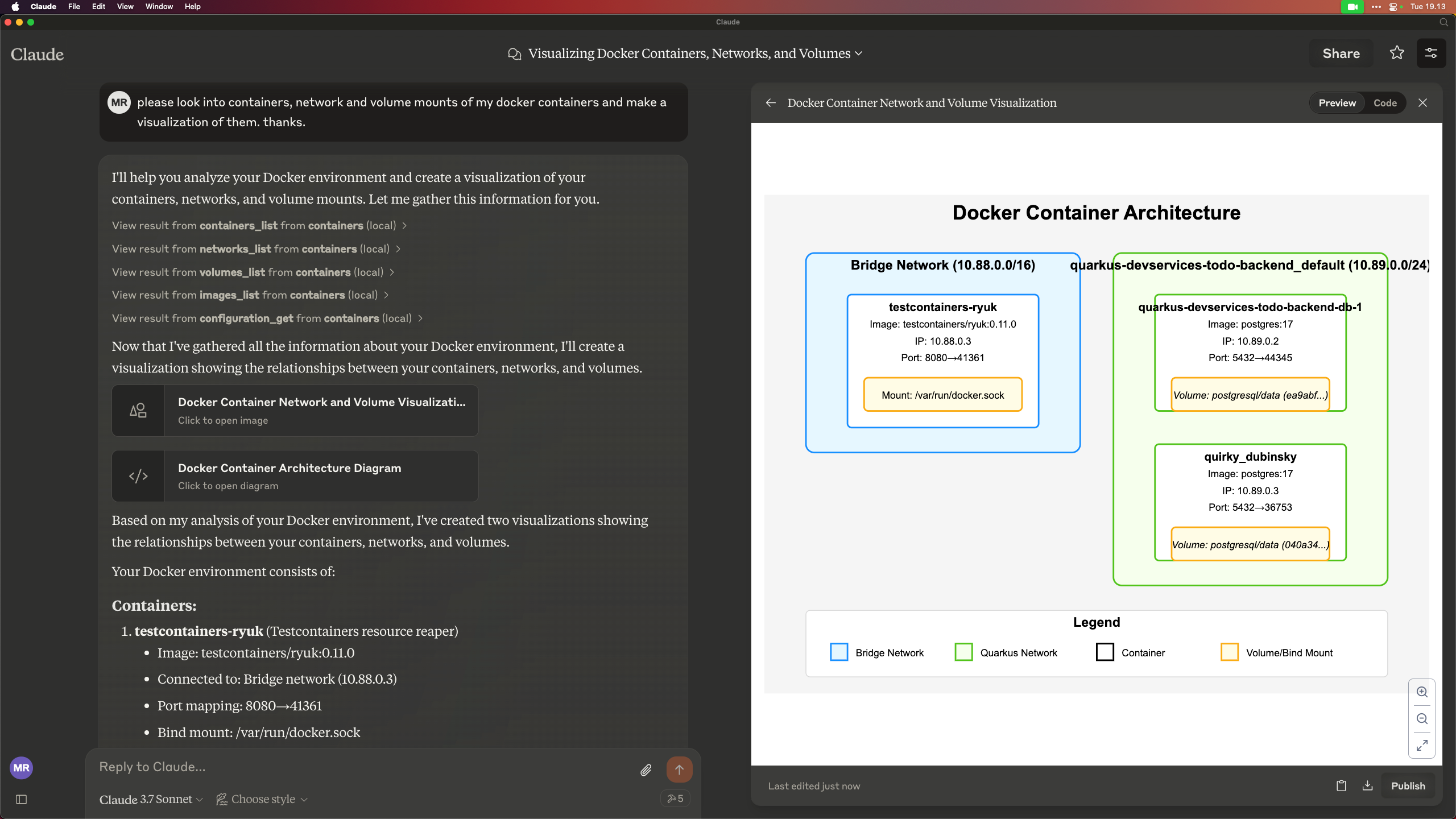
The 'containers' server lets you work with Docker/Podman/OCI compatible container engines.
jbang containers@quarkiverse/quarkus-mcp-servers
wolfram
The wolfram server can be used to perform web search optimized for use by a large language model through the Wolfram Alpha LLM API.
jbang wolfram@quarkiverse/quarkus-mcp-servers
Other Quarkus MCP based servers
WildFly
A WildFly MCP server that allows you to interact with WildFly running servers.
You can check this WildFly vlog that demonstrates its capabilities.
Read more in the WildFly MCP Server readme.
Ideas for other servers
If you have ideas for other servers, feel free to contribute them to this project.
If missing ideas, then look at the reference servers at https://github.com/modelcontextprotocol/servers and see if you can implement them in this project.
Other ideas:
- zulip
- jfr/java hooked to jmx/jfr
- quarkus dev mode
- ...
Contributing
If you have ideas for other servers, feel free to contribute them to this project.
To get started, clone the repository and build it:
git clone https://github.com/quarkiverse/quarkus-mcp-servers
cd quarkus-mcp-servers
mvn clean install
Then run the following command to generate a new server for i.e. jfr:
mkdir jfr
cd jfr
jbang init -t mcp jfr
This will create the jfr directory with a Hello World MCP server.
You can then build it:
mvn clean install
To wire it into the full project you need to add <module>jfr</module> to the root pom.xml file.
Make sure you have added some useful content to the README.md file + updated the demo image.
Then open a PR :)
Installing quarkiverse/mcp-server-jfx
This server has no published package — it is built from source. Open the repository and follow its README.
▸ github.com/quarkiverse/quarkus-mcp-serversFAQ
Is quarkiverse/mcp-server-jfx MCP free?
Yes, quarkiverse/mcp-server-jfx MCP is free — one-click install via Unyly at no cost.
Does quarkiverse/mcp-server-jfx need an API key?
No, quarkiverse/mcp-server-jfx runs without API keys or environment variables.
Is quarkiverse/mcp-server-jfx hosted or self-hosted?
Self-hosted: the server runs locally on your machine via the install command above.
How do I install quarkiverse/mcp-server-jfx in Claude Desktop, Claude Code or Cursor?
Open quarkiverse/mcp-server-jfx on unyly.org, pick your client tab (Claude Desktop, Claude Code, Cursor) and press Install — the config is generated automatically, no JSON editing.
Related MCPs
LibreOffice Tools
Enables AI agents to read, write, and edit Office documents via LibreOffice with token-efficient design. Supports multiple formats including DOCX, XLSX, PPTX, a
 by passerbyflutter
dannote/figma-use
Full Figma control: create shapes, text, components, set styles, auto-layout, variables, export. 80+ tools.
 by dannote
Logo.dev
Search and retrieve company logos by brand or domain. Customize size, format, and theme to match your design needs. Accelerate design, prototyping, and content
 by NOVA-3951
Design Inspiration Server
Searches top design platforms like Dribbble and Behance to provide UI inspiration, color palettes, and layout patterns via the Serper API. It allows users to re
 by YonasValentin
PIX4Dmatic
Enables GUI automation for controlling PIX4Dmatic on Windows through MCP. Supports launching, focusing, capturing screenshots, sending hotkeys, clicking UI elem
 by jangjo123
Figma
Extract design specs and assets
 by Figma
mcp-dockmaster
An Open-Sourced UI to install and manage MCP servers for Windows, Linux and macOS.
ariekogan/ateam-mcp
Build, validate, and deploy multi-agent AI solutions on the ADAS platform. Design skills with tools, manage solution lifecycle, and connect from any AI environm
 by ariekogan
thinkchainai/mcpbundles
MCP Bundles: Create custom bundles of tools and connect providers with OAuth or API keys. Use one MCP server across thousands of integrations, with programmatic
 by thinkchainai
arikusi/nakkas
MCP server that turns AI into an SVG artist. One rendering engine with JSON config, AI controls all design parameters. CSS @keyframes + SMIL animations, 16+ ele
 by arikusi
Compare quarkiverse/mcp-server-jfx with
Not sure what to pick?
Find your stack in 60 seconds
Author?
Embed badge for your README
Browse similar
All design MCPs