
Rbx
FreeNot checkedAn MCP server that bridges any MCP-capable AI host to Roblox Studio. The AI executes Lua live in Studio, reads output/errors, and iterates.

About
An MCP server that bridges any MCP-capable AI host to Roblox Studio. The AI executes Lua live in Studio, reads output/errors, and iterates.
README
npm version npm downloads License: MIT rbx-mcp MCP server
Let an AI agent (Claude) write Lua and execute it live inside Roblox Studio, read the result, and iterate — over the Model Context Protocol.
rbx-mcp is a small bridge with two halves in one process:
- an MCP server (stdio) that exposes Studio actions to Claude as tools
(
execute_lua,read_studio_state,get_errors), and - a localhost HTTP server that a tiny Roblox Studio plugin polls — it runs
the Lua via
loadstring()and reports back output, return values, and errors (with tracebacks).
The plugin is deliberately dumb and universal: it just runs whatever Lua it's given, so it never needs updating for new tasks. All the intelligence stays on the AI side.
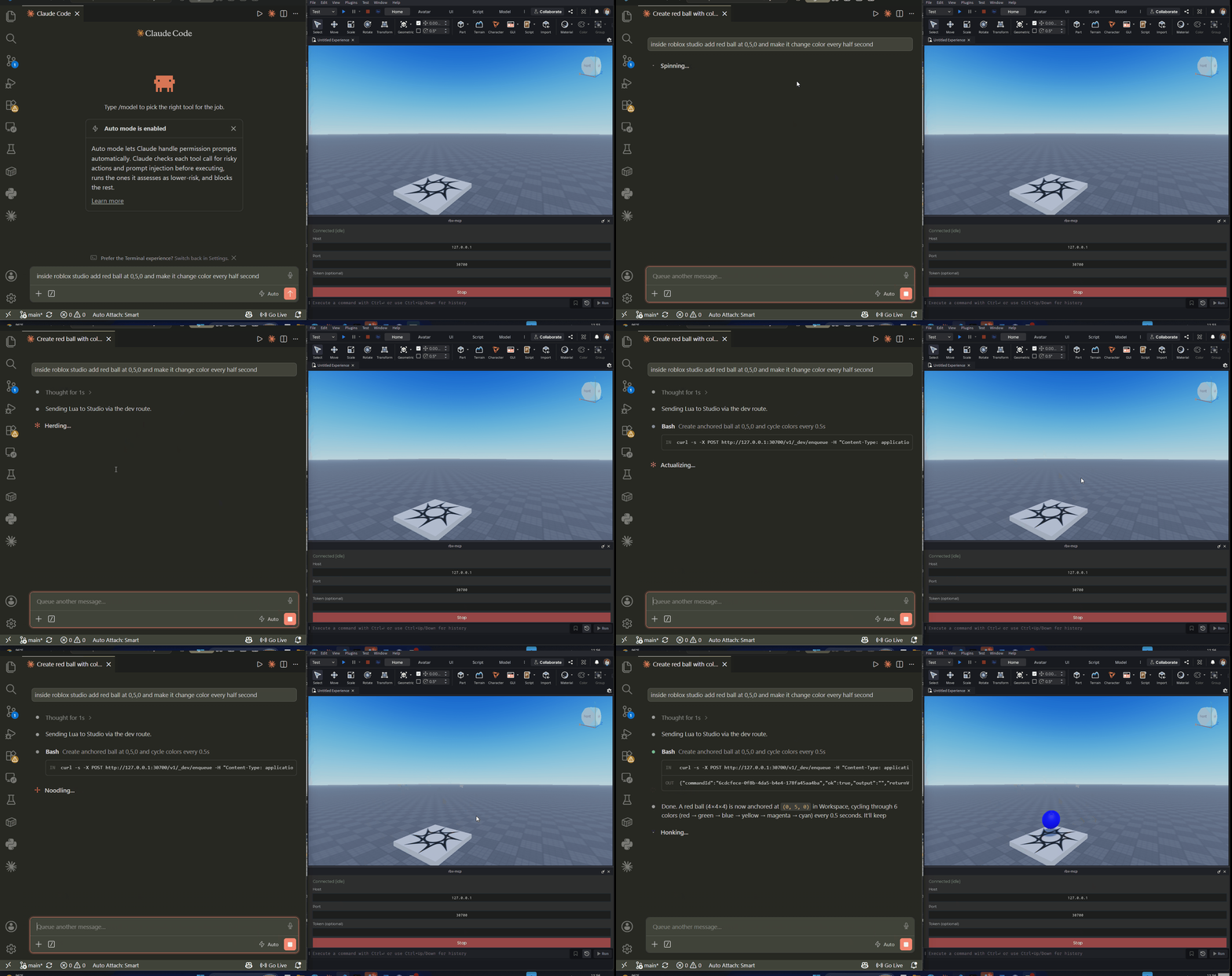
Status
Stable. Published on npm as @lolofuk123/rbx-mcp. Design docs and the phased build plan live in work/; start with work/README.md and the concept doc PROJECT_CONCEPT_1.md.
Repo layout
server/   Node/TS package, published to npm as `rbx-mcp`
          (MCP side + localhost HTTP side; bundles & auto-installs the plugin)
plugin/   single-file Studio plugin: src/rbx-mcp.server.luau (no build step)
work/     specs + implementation plan
Setup
Prerequisites: Node.js ≥ 20, Roblox Studio, and an
MCP-capable AI host (see below). rbx-mcp is model-agnostic — bring Claude,
GPT, or any model your host drives; the server only exposes MCP tools, the model
just calls them. The host must run a local stdio server on the same
machine as Studio (the plugin talks to localhost).
1. Add the MCP server to your AI host
Claude Desktop / Claude Code — top-level key mcpServers:
{
  "mcpServers": {
    "rbx-mcp": { "command": "npx", "args": ["-y", "@lolofuk123/rbx-mcp"] }
  }
}
- Claude Desktop:
%APPDATA%\Claude\claude_desktop_config.json(Windows) /~/Library/Application Support/Claude/claude_desktop_config.json(macOS). - Claude Code:
.mcp.jsonat the project root, orclaude mcp add rbx-mcp -- npx -y @lolofuk123/rbx-mcp.
VS Code / GitHub Copilot (agent mode) — note the different key (servers) and
type. File .vscode/mcp.json (or Command Palette → MCP: Add Server):
{
  "servers": {
    "rbx-mcp": { "type": "stdio", "command": "npx", "args": ["-y", "@lolofuk123/rbx-mcp"] }
  }
}
(Cursor / Windsurf are similar — e.g. .cursor/mcp.json, same mcpServers shape as Claude.)
2. Open Roblox Studio
On first launch the server auto-installs the plugin into your local Plugins folder; Studio loads it on (re)start. Then open the rbx-mcp panel → click Start. If HttpService is off, the panel tells you exactly where to enable it (Experience settings → Security → Allow HTTP Requests); it connects automatically once you do.
That's it. See server/README.md for env vars, an optional auth token, and manual plugin install.
Setup on a managed / corporate machine (Claude Code)
On org-managed machines, enterprise policy often blocks Claude Code from
registering MCP servers (both claude mcp add and .mcp.json loading). The
workaround: start the server yourself with the dev route enabled, then let
Claude Code drive Studio via direct HTTP calls instead of MCP tools.
Prerequisites
- Node.js ≥ 20 installed
- Roblox Studio installed
- Claude Code CLI
Step 1 — Start the server manually
Open a terminal (keep it running in the background) and start the server with the dev route enabled:
# bash / macOS / Linux
RBXMCP_DEV=1 npx -y @lolofuk123/rbx-mcp
# PowerShell (Windows)
$env:RBXMCP_DEV=1; npx -y @lolofuk123/rbx-mcp
On first run the server writes the Studio plugin into your local Plugins folder:
%LOCALAPPDATA%\Roblox\Plugins\rbx-mcp.lua   (Windows)
~/Documents/Roblox/Plugins/rbx-mcp.lua       (macOS)
Step 2 — Open Roblox Studio and connect the plugin
- Restart Studio — it only scans the Plugins folder at launch, so a full restart is required after the first run in Step 1.
- Enable HttpService — Game Settings → Security → Allow HTTP Requests. The plugin cannot do this for you; it is a one-time manual step per experience.
- Open the rbx-mcp panel (Plugins toolbar) → click Start.
Verify in a browser that both sides are up:
http://127.0.0.1:30700/v1/health
"pluginConnected": true means you're ready.
Step 3 — Tell Claude Code to use the dev route
Because MCP tools are blocked, Claude Code executes Lua by posting directly to the server's dev endpoint. Tell Claude Code at the start of your session:
"The rbx-mcp server is running with
RBXMCP_DEV=1. MCP tools are blocked by policy on this machine. Execute Lua in Studio by posting tohttp://127.0.0.1:30700/v1/_dev/enqueuewith body{"code": "..."}and reading the result from the response."
Claude Code uses its PowerShell or Bash tool to POST to that endpoint and reads the result synchronously from the response — no MCP handshake needed. You're live.
Troubleshooting
VS Code / Copilot (Windows):
- MCP tools don't appear / no "Start" shows up — MCP tools only work in
Copilot Agent mode (not Ask/Edit). Start the server via Command Palette →
MCP: List Servers →
rbx-mcp, and enable it in the chat's 🔧 Tools picker. node/npx"not recognized" in VS Code's terminal (but fine in a normal terminal) — VS Code launched with a stale PATH from before Node was installed. Fully quit and reopen VS Code (reboot if it persists) so it picks up Node.spawn npx ENOENTwhen starting the server — on Windowsnpxis actuallynpx.cmd, which VS Code's direct spawn can miss. Wrap it incmd:
(or set{ "servers": { "rbx-mcp": { "type": "stdio", "command": "cmd", "args": ["/c", "npx", "-y", "@lolofuk123/rbx-mcp"] } } }"command": "npx.cmd").
Roblox Studio:
- No rbx-mcp toolbar button after install — fully restart Studio; it only
scans the Plugins folder at launch. (The installed file must be
.lua, which the auto-installer handles.) - Stuck on "HTTP service disabled" — enable it (Experience settings → Security → Allow HTTP Requests); the plugin connects automatically once it's on.
pluginConnected: falsein/v1/health— open the rbx-mcp panel and click Start; check Host/Port (and Token, if set) match the server.
Development
cd server
npm install
npm test          # vitest
npm run build     # tsc -> dist/
npm run dev       # run the server locally (stdio MCP + HTTP on 127.0.0.1:30700)
License
See LICENSE.
Installing Rbx
This server has no published package — it is built from source. Open the repository and follow its README.
▸ github.com/lolofuk123/rbx-mcpFAQ
Is Rbx MCP free?
Yes, Rbx MCP is free — one-click install via Unyly at no cost.
Does Rbx need an API key?
No, Rbx runs without API keys or environment variables.
Is Rbx hosted or self-hosted?
Self-hosted: the server runs locally on your machine via the install command above.
How do I install Rbx in Claude Desktop, Claude Code or Cursor?
Open Rbx on unyly.org, pick your client tab (Claude Desktop, Claude Code, Cursor) and press Install — the config is generated automatically, no JSON editing.
Related MCPs
Opencode Omniroute Plugin
OpenCode plugin for the OmniRoute AI Gateway. Drives dynamic model discovery, /connect auth flow, and multi-instance OmniRoute providers via the official @openc
 by GitHub Actions
Roblox Studio
Enables AI coding tools to control Roblox Studio for workspace exploration, instance manipulation, and script management. It provides tools for playtesting, sce
 by paralov
Antigravity Drawio
MCP server that enables AI assistants to create, parse, render, and validate Draw.io diagrams programmatically.
 by S-SUJAN-S
Fetch
Web content fetching and conversion for efficient LLM usage.
AWS KB Retrieval
Retrieval from AWS Knowledge Base using Bedrock Agent Runtime.
 by modelcontextprotocol
Spring AI MCP Server
Provides auto-configuration for setting up an MCP server in Spring Boot applications.
llm-analysis-assistant
A very streamlined mcp client that supports calling and monitoring stdio/sse/streamableHttp, and can also view request responses through the /logs page. It also
 by xuzexin-hz
MCP-Agent
A simple, composable framework to build agents using Model Context Protocol by [LastMile AI](https://www.lastmileai.dev)
 by lastmile-ai
Spring AI MCP Client
Provides auto-configuration for MCP client functionality in Spring Boot applications.
mcp.natoma.ai
A Hosted MCP Platform to discover, install, manage and deploy MCP servers by [Natoma Labs](https://www.natoma.ai)
Compare Rbx with
Not sure what to pick?
Find your stack in 60 seconds
Author?
Embed badge for your README
Browse similar
All ai MCPs