
Trend Radar
FreeNot checkedAn MCP server that fetches live trends from X, Google News, GitHub, and Hugging Face, and generates a self-contained HTML dashboard displaying top 20 lists for

About
An MCP server that fetches live trends from X, Google News, GitHub, and Hugging Face, and generates a self-contained HTML dashboard displaying top 20 lists for AI news, coding repositories, and models.
README
Trend Radar is a Model Context Protocol (MCP) server written in Python. It gives any MCP client — Claude Desktop, Claude Code, the MCP Inspector, or your own agent — eight tools that fetch Top 20 trend lists from across the AI ecosystem and render them into a polished, self-contained HTML dashboard:
What is this MCP server?
MCP is an open protocol that lets AI assistants call external tools. This server plugs into your assistant and answers questions like "what's trending in AI right now?" with live, structured data instead of stale training knowledge. It covers three categories:
| Category | Tool | Data source |
|---|---|---|
| 📰 News | get_x_ai_trends |
X (Twitter) API v2 — live with a bearer token, curated mock fallback without |
| 📰 News | get_google_news_ai_trends |
Official Google News RSS feed, parsed with feedparser |
| 💻 Coding | get_github_trends |
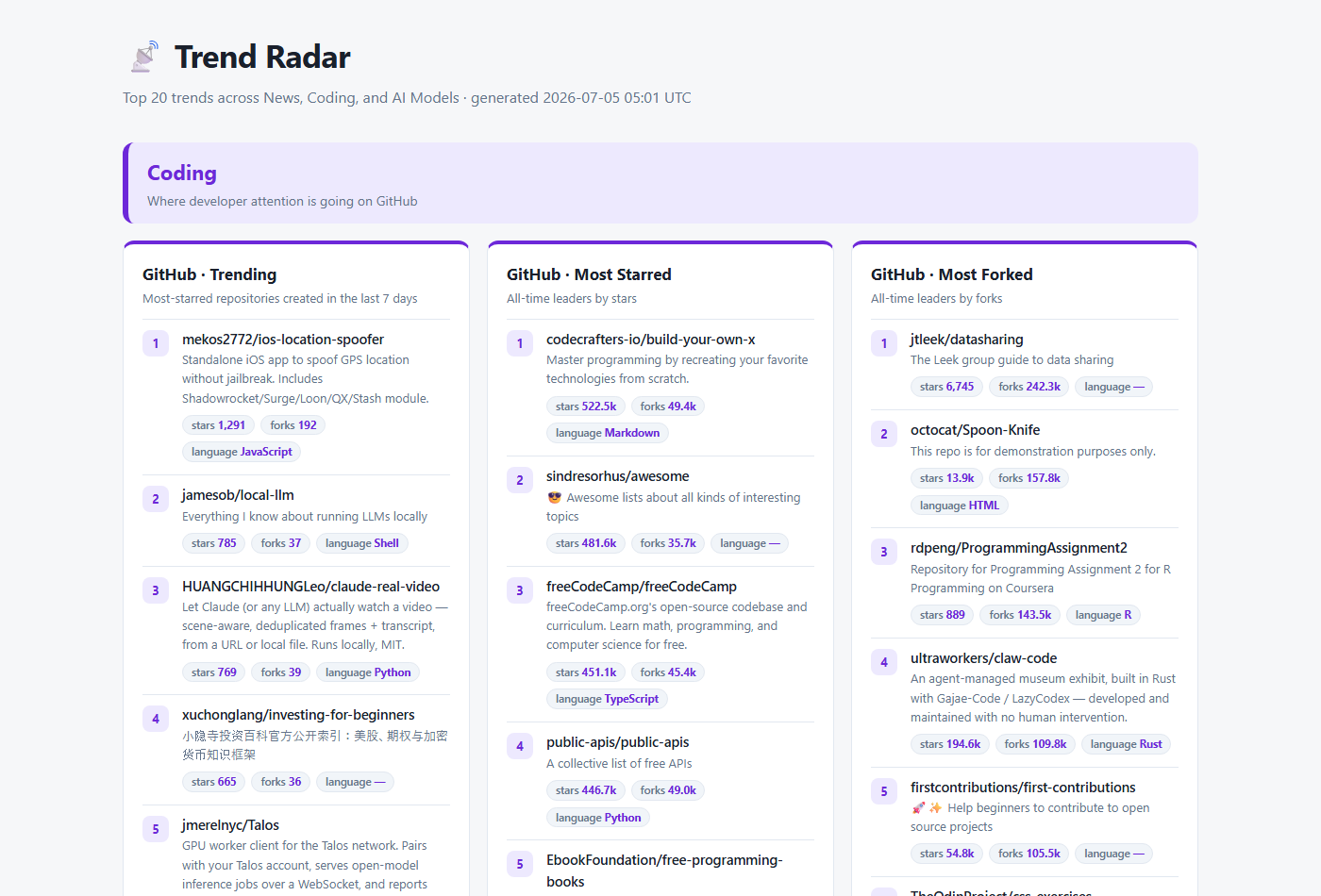
GitHub Search API — most-starred repos created in the last 7 days |
| 💻 Coding | get_github_most_starred |
GitHub Search API — all-time star leaders |
| 💻 Coding | get_github_most_forked |
GitHub Search API — all-time fork leaders |
| 🤗 Models | get_hf_trending_models |
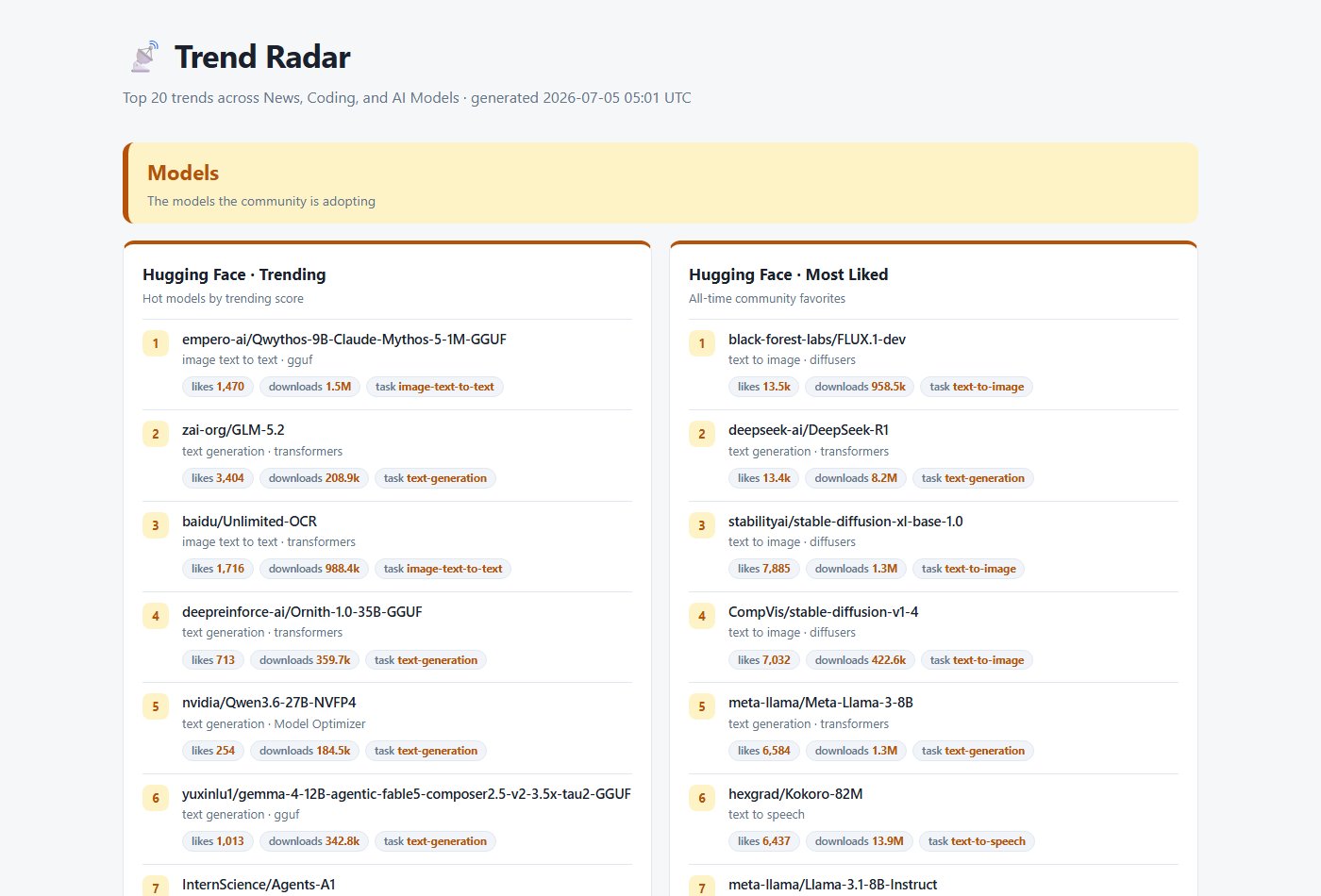
Hugging Face Hub API (sort=trendingScore) |
| 🤗 Models | get_hf_most_liked_models |
Hugging Face Hub API (sort=likes) |
| 🎨 Web | generate_trends_dashboard |
Aggregates all 7 feeds → one index.html |
Every data tool returns clean JSON:
{
  "source": "github_trending",
  "count": 20,
  "items": [
    {
      "rank": 1,
      "title": "owner/repo",
      "url": "https://github.com/owner/repo",
      "description": "What the project does",
      "metrics": { "stars": "12.4k", "forks": "980", "language": "Python" }
    }
  ]
}
If a feed fails, the tool returns {"source": ..., "error": ..., "items": []} instead of
crashing — and the dashboard shows an inline note for that card while the rest of the page
still renders.
Project structure
mcp_Trend_Radar/
├── server.py                 # FastMCP server — registers all 8 tools
├── services/
│   ├── models.py             # TrendItem dataclass + badge formatting
│   ├── http_client.py        # shared requests wrapper + ServiceError
│   ├── x.py                  # X trends (live API / mock fallback)
│   ├── google_news.py        # Google News RSS via feedparser
│   ├── github.py             # GitHub Search API (3 views)
│   ├── huggingface.py        # HF Hub API (trending / most liked)
│   └── dashboard.py          # aggregation + HTML generation + local server
├── docs/images/              # screenshots used in this README
├── requirements.txt
└── .env.example
How to use it — step by step
Step 1 · Install
git clone https://github.com/girlmoony/mcp_Trend_Radar.git
cd mcp_Trend_Radar
python -m venv .venv
.venv\Scripts\Activate.ps1
pip install -r requirements.txt
copy .env.example .env    # optional — every tool works without tokens
Step 2 · Try it standalone (no MCP client needed)
The dashboard module doubles as a CLI. This fetches all seven feeds and serves the result:
python -m services.dashboard          # builds output/index.html + serves on :8000
python -m services.dashboard --build  # build only
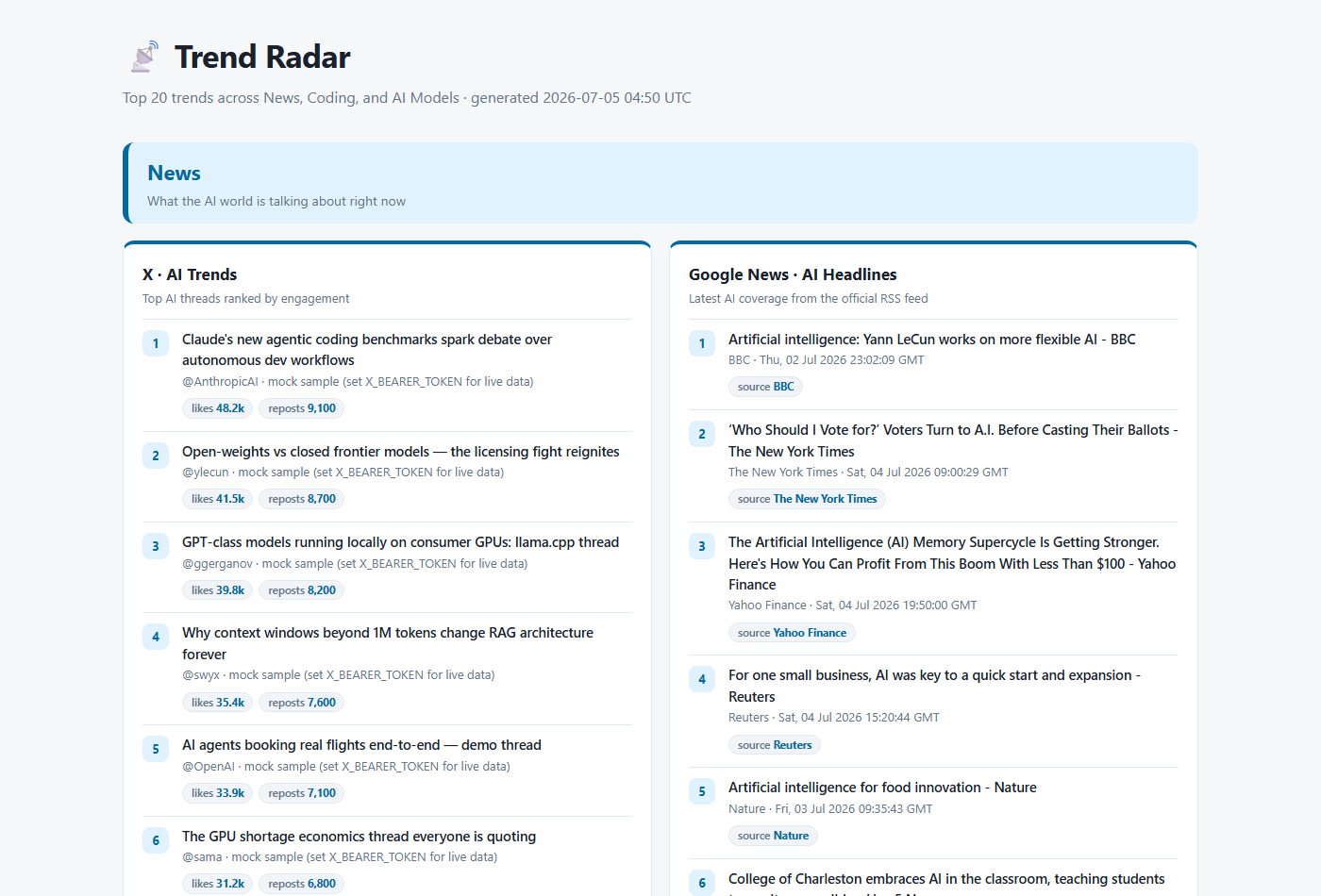
Open http://127.0.0.1:8000 and you'll see the page from the screenshot above: three color-coded categories, numbered Top-20 lists, and engagement badges.
💻 Coding section — three GitHub views side by side, with stars / forks / language badges:
🤗 Models section — Hugging Face trending and most-liked models, with likes / downloads / task badges:
Step 3 · Register with Claude Desktop
Add the server to claude_desktop_config.json
(Windows: %APPDATA%\Claude\claude_desktop_config.json, macOS: ~/Library/Application Support/Claude/claude_desktop_config.json):
{
  "mcpServers": {
    "trend-radar": {
      "command": "C:\\path\\to\\python.exe",
      "args": ["C:\\path\\to\\mcp_Trend_Radar\\server.py"]
    }
  }
}
Restart Claude Desktop. The 8 tools appear under the 🔨 tools menu, and you can simply ask:
"What are the trending GitHub repos this week?" "Show me the most liked Hugging Face models." "Generate the trends dashboard and tell me where the file is."
Step 4 · Register with Claude Code (CLI)
claude mcp add trend-radar -- python "C:\path\to\mcp_Trend_Radar\server.py"
Step 5 · Debug with the MCP Inspector
mcp dev server.py
This opens the Inspector web UI where you can list the tools, call each one, and inspect the raw JSON responses interactively.
The dashboard tool
Calling generate_trends_dashboard (from any MCP client, or via the CLI in Step 2) writes a
single self-contained index.html:
- Semantic HTML5 + custom CSS variables — zero JavaScript, zero external assets
- Distinct colored sections per platform: 🔵 News, 🟣 Coding, 🟡 Models
- Numbered lists with linked titles, snippets, and engagement badges (stars, forks, likes, downloads, reposts)
- Automatic dark mode via
prefers-color-schemeand a print-friendly layout - Per-feed error isolation — one failing API never blanks the page
The tool returns a JSON build summary with the absolute output path and per-section item counts.
Configuration (all optional)
| Variable | Effect |
|---|---|
GITHUB_TOKEN |
Raises the GitHub Search rate limit from 10 to 30 requests/min |
X_BEARER_TOKEN |
Switches X trends from curated mock data to the live X API v2 |
HF_TOKEN |
Authenticated Hugging Face Hub requests |
Copy .env.example to .env and fill in what you have — the server loads it automatically.
Requirements
- Python 3.10+
mcp·requests·feedparser·python-dotenv(seerequirements.txt)
Related projects
This repo previously included AgentLens, a local cost/efficiency scanner for Claude Code sessions. It has been split out into its own repository, since it's a general-purpose tool unrelated to trend research: https://github.com/girlmoony/agentlens
License
MIT
Installing Trend Radar
This server has no published package — it is built from source. Open the repository and follow its README.
▸ github.com/girlmoony/mcp_Trend_RadarFAQ
Is Trend Radar MCP free?
Yes, Trend Radar MCP is free — one-click install via Unyly at no cost.
Does Trend Radar need an API key?
No, Trend Radar runs without API keys or environment variables.
Is Trend Radar hosted or self-hosted?
A hosted option is available: Unyly runs the server in the cloud, no local setup required.
How do I install Trend Radar in Claude Desktop, Claude Code or Cursor?
Open Trend Radar on unyly.org, pick your client tab (Claude Desktop, Claude Code, Cursor) and press Install — the config is generated automatically, no JSON editing.
Related MCPs
GitHub
PRs, issues, code search, CI status
 by GitHub
Filesystem
Secure file operations with configurable access controls.
Memory
Knowledge graph-based persistent memory system.
Template MCP Server
A CLI tool to create a new Model Context Protocol server project with TypeScript support, dual transport options, and an extensible structure
 by mcpdotdirect
Amap Maps Mcp Server
MCP server for using the AMap Maps API
 by duxiaohui
Supabase
Database, auth and storage
 by Supabase
Everything
Reference / test server with prompts, resources, and tools.
Git
Tools to read, search, and manipulate Git repositories.
Sequential Thinking
Dynamic and reflective problem-solving through thought sequences.
Time
Time and timezone conversion capabilities.
Compare Trend Radar with
Not sure what to pick?
Find your stack in 60 seconds
Author?
Embed badge for your README
Browse similar
All development MCPs