
Whisper Telegram
FreeNot checkedAn MCP server that enables transcribing local audio files and Telegram voice messages using OpenAI's Whisper via local inference or cloud API. It supports multi

About
An MCP server that enables transcribing local audio files and Telegram voice messages using OpenAI's Whisper via local inference or cloud API. It supports multiple audio formats, automatic language detection, and optional word-level timestamps for AI-powered audio analysis.
README
Transcribe and speak — two-way voice for Claude via Telegram
CI PyPI Downloads Python License: MIT MCP Ko-fi
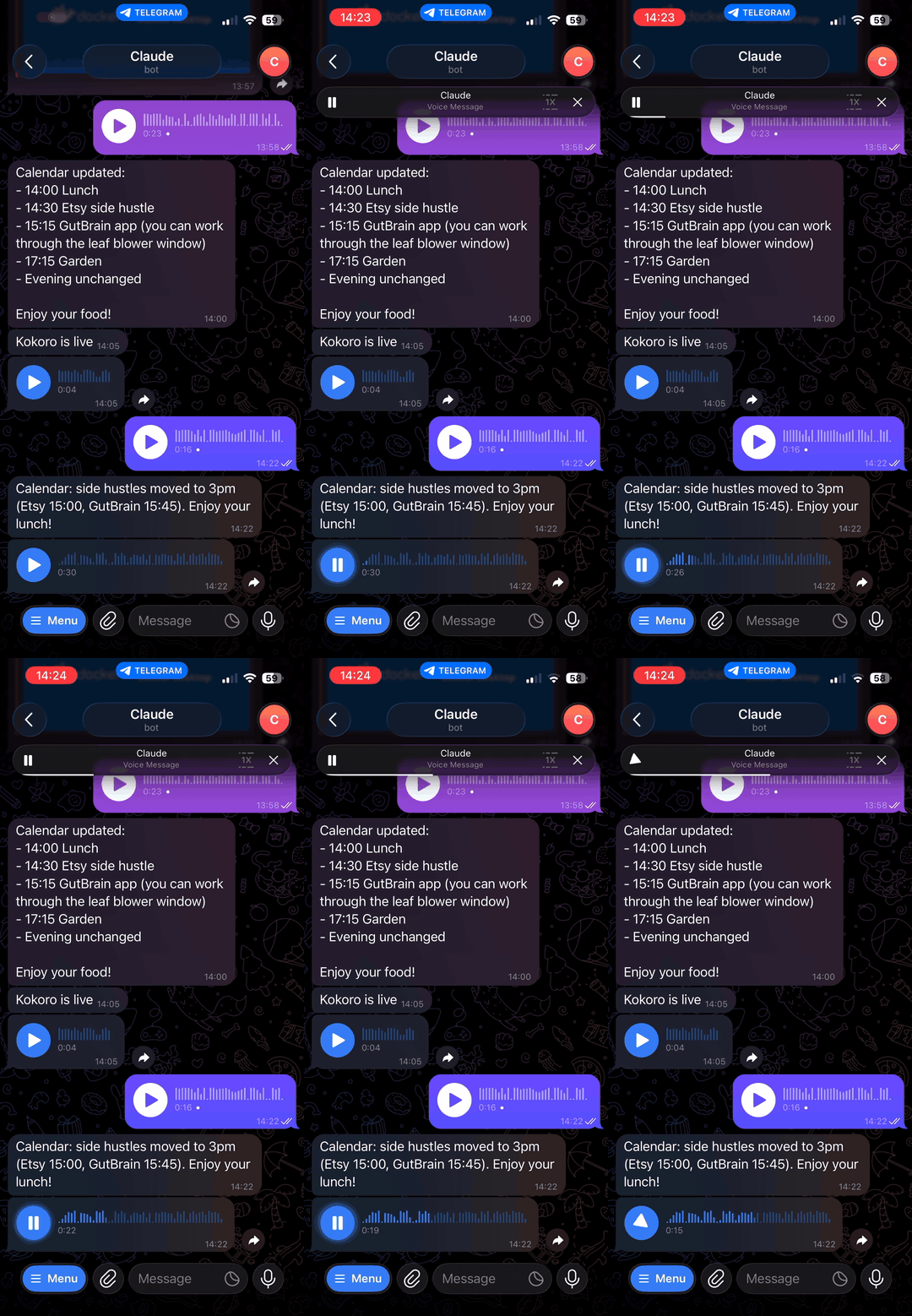
An MCP server that gives Claude two-way voice capabilities via Telegram: transcribe incoming voice messages with Whisper, and reply with synthesized speech. Works with Claude Desktop, Claude Code, and any MCP-compatible client.
What It Does
- Transcribe local audio files -- OGG, WAV, MP3, FLAC, and more
- Transcribe Telegram voice messages -- pass a
file_id, get text back - Speak text as voice notes -- synthesise speech and send back as OGG (plays as a voice note in Telegram)
- Two transcription backends -- local faster-whisper (free, private) or OpenAI Whisper API (cloud)
- Auto mode -- tries local first, falls back to OpenAI if it fails
- Language detection -- automatic or specify an ISO-639-1 code
- Word-level timestamps -- optional fine-grained timing
Prerequisites
| Feature | Requirement |
|---|---|
| Transcription (local) | None — faster-whisper bundled via [local] extras |
| Transcription (cloud) | OPENAI_API_KEY env var |
| Voice replies — Kokoro (best quality) | Docker — run docker run -p 8880:8880 ghcr.io/remsky/kokoro-fastapi-cpu:latest |
| Voice replies — OpenAI TTS (fallback) | OPENAI_API_KEY env var |
| Voice replies — macOS say (last resort) | Mac only, no setup |
Kokoro requires Docker. If Docker isn't running, voice replies fall back to OpenAI TTS or macOS
sayautomatically.
Quick Start
Set up in 30 seconds with Claude Code
The fastest way to get started — just tell Claude Code to set it up for you:
- Add to your
.mcp.json(Claude Code) orclaude_desktop_config.json(Claude Desktop):
{
  "mcpServers": {
    "whisper-telegram-mcp": {
      "command": "uvx",
      "args": ["whisper-telegram-mcp"],
      "env": {
        "TELEGRAM_BOT_TOKEN": "your-bot-token-here"
      }
    }
  }
}
- Restart Claude and say: "Set up my Telegram bot for voice transcription" — Claude will walk you through creating the bot with BotFather and configuring everything.
One command with uvx
uvx whisper-telegram-mcp
No installation needed -- uvx handles everything.
Or install with pip
pip install "whisper-telegram-mcp[all]"
whisper-telegram-mcp
Telegram Bot Setup
- Open Telegram and message @BotFather
- Send
/newbotand follow the prompts to create a bot - Copy the token (looks like
1234567890:ABCdef...) - Add
TELEGRAM_BOT_TOKENto your MCP config env (see below) - Message your bot to start — it'll only respond to approved users
The Claude Telegram plugin handles access control. See its docs for pairing/allowlist setup.
Integration
Claude Desktop
Add to your Claude Desktop config (~/Library/Application Support/Claude/claude_desktop_config.json):
{
  "mcpServers": {
    "whisper-telegram-mcp": {
      "command": "uvx",
      "args": ["whisper-telegram-mcp"],
      "env": {
        "WHISPER_MODEL": "base",
        "WHISPER_BACKEND": "auto",
        "TELEGRAM_BOT_TOKEN": "your-bot-token-here"
      }
    }
  }
}
Claude Code
Add to your project's .mcp.json:
{
  "mcpServers": {
    "whisper-telegram-mcp": {
      "command": "uvx",
      "args": ["whisper-telegram-mcp"],
      "env": {
        "WHISPER_MODEL": "base",
        "WHISPER_BACKEND": "auto",
        "TELEGRAM_BOT_TOKEN": "your-bot-token-here"
      }
    }
  }
}
Tools
| Tool | Description |
|---|---|
transcribe_audio |
Transcribe a local audio file (OGG, WAV, MP3, etc.) to text |
transcribe_telegram_voice |
Download and transcribe a Telegram voice message by file_id |
speak_text |
Convert text to speech → OGG/Opus file (plays as voice note in Telegram) |
list_models |
List available Whisper model sizes with speed/accuracy info |
check_backends |
Check which backends (local/OpenAI) are available and configured |
transcribe_audio
file_path: str        # Absolute path to audio file
language: str | None  # ISO-639-1 code (e.g. "en"), None = auto-detect
word_timestamps: bool # Include word-level timestamps (default: false)
transcribe_telegram_voice
file_id: str          # Telegram voice message file_id
bot_token: str | None # Bot token (falls back to TELEGRAM_BOT_TOKEN env var)
language: str | None  # ISO-639-1 code, None = auto-detect
word_timestamps: bool # Include word-level timestamps (default: false)
speak_text
Converts text to an OGG/Opus audio file. Automatically selects the best available TTS backend.
text: str             # Text to synthesise
voice: str            # Voice name (default: "af_sky")
output_path: str|None # Optional path for output .ogg file
TTS Backends (in priority order):
| Backend | Cost | Quality | Setup |
|---|---|---|---|
| Kokoro (local) | Free | Natural, high quality | Start manually (see below) |
| OpenAI TTS (cloud) | ~$0.015/1k chars | High quality | OPENAI_API_KEY env var |
| macOS say (fallback) | Free | Robotic | Mac only, no setup |
In auto mode (default), the server tries Kokoro first, then OpenAI, then macOS say. Configure with TTS_BACKEND env var.
Starting Kokoro locally:
Kokoro FastAPI is not on PyPI — start it before running the MCP server:
# Docker (simplest, recommended)
docker run -p 8880:8880 ghcr.io/remsky/kokoro-fastapi-cpu:latest

# Apple Silicon (GPU-accelerated)
docker run -p 8880:8880 ghcr.io/remsky/kokoro-fastapi-gpu-mac:latest

# From source
git clone https://github.com/remsky/Kokoro-FastAPI && cd Kokoro-FastAPI && ./start-cpu.sh
Once running, the MCP server auto-detects it at http://127.0.0.1:8880/v1. Override with KOKORO_BASE_URL env var.
Kokoro voices (primary):
| Voice | Accent | Style |
|---|---|---|
af_sky |
US | Female (default) |
af_bella |
US | Female |
af_sarah |
US | Female |
af_nicole |
US | Female |
am_adam |
US | Male |
am_michael |
US | Male |
bf_emma |
UK | Female |
bf_isabella |
UK | Female |
bm_george |
UK | Male |
bm_lewis |
UK | Male |
OpenAI voices (fallback):
| Voice | Style |
|---|---|
alloy |
Neutral |
echo |
Male |
fable |
Narrative |
onyx |
Deep male |
nova |
Female |
shimmer |
Soft female |
Kokoro voice names are automatically mapped to the closest OpenAI or macOS equivalent when falling back.
Returns:
{
  "file_path": "/tmp/tmpXXX.ogg",
  "size_bytes": 16555,
  "backend": "kokoro",
  "voice": "af_sky",
  "success": true,
  "error": null
}
Send the returned file_path as a Telegram attachment and it will appear as a native voice note.
Transcription response format
All transcription tools return:
{
  "text": "Hello, this is a voice message.",
  "language": "en",
  "language_probability": 0.98,
  "duration": 3.5,
  "segments": [
    {"start": 0.0, "end": 3.5, "text": "Hello, this is a voice message."}
  ],
  "backend": "local",
  "success": true,
  "error": null
}
Configuration
All configuration is via environment variables:
| Variable | Default | Description |
|---|---|---|
WHISPER_BACKEND |
auto |
auto, local, or openai |
WHISPER_MODEL |
base |
Whisper model size (see below) |
OPENAI_API_KEY |
-- | Required for openai transcription and TTS backends |
TELEGRAM_BOT_TOKEN |
-- | Required for transcribe_telegram_voice |
WHISPER_LANGUAGE |
auto-detect | ISO-639-1 language code |
TTS_BACKEND |
auto |
auto, kokoro, openai, or macos |
TTS_VOICE |
af_sky |
Default voice for speak_text (Kokoro voice name) |
KOKORO_BASE_URL |
http://127.0.0.1:8880/v1 |
Kokoro FastAPI base URL |
How It Works
                         MCP Client (Claude)
                              |
                         [MCP stdio]
                              |
                    whisper-telegram-mcp
                    /         |         \
                   /          |          \
      transcribe_audio  transcribe_     speak_text
                        telegram_voice      |
              |               |          auto_tts()
              |         [Bot API DL]    /    |    \
              +--------+------+     Kokoro OpenAI macOS
                       |            (local) (cloud) (say)
                 auto_transcribe()      |
                  /           \      .ogg file
           LocalBackend    OpenAIBackend
           (faster-whisper)  (Whisper API)
- Claude sends a tool call via MCP (stdio transport)
- For Telegram voice messages, the file is downloaded via Bot API
auto_transcribe()picks the best available transcription backendauto_tts()picks the best available TTS backend (Kokoro -> OpenAI -> macOS)- Results are returned as structured JSON
Local vs OpenAI
| Local (faster-whisper) | OpenAI API | |
|---|---|---|
| Cost | Free | $0.006/min |
| Privacy | All data stays on device | Audio sent to OpenAI |
| Speed | ~1-10s depending on model | ~1-3s |
| Setup | Automatic (downloads model on first use) | Requires OPENAI_API_KEY |
| Accuracy | Excellent with base or larger |
Excellent |
| Offline | Yes | No |
Model Sizes
| Model | Parameters | Speed | Accuracy | VRAM |
|---|---|---|---|---|
tiny |
39M | Fastest | Lowest | ~1GB |
base |
74M | Fast | Good | ~1GB |
small |
244M | Moderate | Better | ~2GB |
medium |
769M | Slow | High | ~5GB |
large-v3 |
1550M | Slowest | Highest | ~10GB |
turbo |
~800M | Fast | High | ~6GB |
English-only variants (tiny.en, base.en, small.en, medium.en) are slightly more accurate for English.
Privacy & Data
- Local backend (faster-whisper): Audio stays on your device. Nothing leaves your machine.
- OpenAI backend: Audio sent to OpenAI API per their data retention policy
- Temporary files: Audio downloaded from Telegram is written to
/tmpand deleted immediately after transcription - Logs: Go to stderr only — no audio content or credentials are ever logged
Development
git clone https://github.com/abid-mahdi/whisper-telegram-mcp.git
cd whisper-telegram-mcp
python3.12 -m venv .venv
source .venv/bin/activate
pip install -e ".[dev]"

# Run unit tests
pytest tests/ -v -m "not integration"

# Run integration tests (downloads ~150MB model on first run)
pytest tests/ -m integration -v

# Run with coverage
pytest tests/ --cov=src/whisper_telegram_mcp --cov-report=term-missing
MCP Inspector
uvx mcp dev src/whisper_telegram_mcp/server.py
Contributing
- Fork the repository
- Create a feature branch (
git checkout -b feat/amazing-feature) - Run tests (
pytest tests/ -v -m "not integration") - Commit with conventional commits (
feat:,fix:,docs:, etc.) - Open a pull request
License
Install Whisper Telegram in Claude Desktop, Claude Code & Cursor
unyly install whisper-telegram-mcpInstalls into Claude Desktop, Claude Code, Cursor & VS Code — handles npx, uvx and build-from-source repos for you.
First time? Get the CLI: curl -fsSL https://unyly.org/install | sh
Or configure manually
Run in your terminal:
claude mcp add whisper-telegram-mcp -- uvx whisper-telegram-mcpStep-by-step: how to install Whisper Telegram
FAQ
Is Whisper Telegram MCP free?
Yes, Whisper Telegram MCP is free — one-click install via Unyly at no cost.
Does Whisper Telegram need an API key?
No, Whisper Telegram runs without API keys or environment variables.
Is Whisper Telegram hosted or self-hosted?
Self-hosted: the server runs locally on your machine via the install command above.
How do I install Whisper Telegram in Claude Desktop, Claude Code or Cursor?
Open Whisper Telegram on unyly.org, pick your client tab (Claude Desktop, Claude Code, Cursor) and press Install — the config is generated automatically, no JSON editing.
Related MCPs
Gmail
Read, send and search emails from Claude
 by Google
Slack
Send, search and summarize Slack messages
 by Slack
Runbear
No-code MCP client for team chat platforms, such as Slack, Microsoft Teams, and Discord.
Discord Server
A community discord server dedicated to MCP by [Frank Fiegel](https://github.com/punkpeye)
Klavis AI
Open Source MCP Infra. Hosted MCP servers and MCP clients on Slack and Discord.
Work90210/APIFold
Turn any REST API into a hosted MCP server, with ready-made public servers for GitHub, Stripe, Slack, OpenAI, Notion and more.
 by Work90210
arikusi/deepseek-mcp-server
DeepSeek AI chat and reasoning with multi-turn sessions, function calling, thinking mode and cost tracking.
 by arikusi
hashgraph-online/hashnet-mcp-js
Discover, register and chat with AI agents on the Hashgraph network via the Registry Broker.
 by hashgraph-online
profullstack/mcp-server
Developer utilities: SEO optimization, document conversion, domain lookup, email validation, QR codes, weather data, social media posting and security scanning.
 by profullstack
WayStation-ai/mcp
Connect MCP hosts to apps such as Notion, Slack, Monday and Airtable.
 by waystation-ai
Compare Whisper Telegram with
Not sure what to pick?
Find your stack in 60 seconds
Author?
Embed badge for your README
Browse similar
All communication MCPs