
Team Task Manager
FreeNot checkedA production-ready full-stack project and task management system with React, Express, MongoDB, and a LangGraph-orchestrated Python AI Swarm service.

About
A production-ready full-stack project and task management system with React, Express, MongoDB, and a LangGraph-orchestrated Python AI Swarm service.
README
Node.js npm Python FastAPI Express MongoDB License
A production-ready, full-stack project and task management application integrated with a specialized multi-agent AI Swarm microservice. The platform features a responsive glassmorphic React frontend, a secure Express API server, and a LangGraph-orchestrated Python service for project health auditing, workload risk detection, and smart task recommendations.
🗺️ System Architecture
The application is built as a three-tier system communicating over secure cross-origin APIs:
graph TD
    Client[React Client <br> Port 5173] <-->|HTTP / JSON / JWT| Server[Express API Server <br> Port 5000]
    Server <-->|MongoDB Driver| DB[(MongoDB <br> Port 27017)]
    Server <-->|HTTP / JSON / JWT| Swarm[FastAPI AI Swarm <br> Port 8000]
    Swarm <-->|Motor / PyMongo| DB
    Swarm -->|Ollama Client| LocalLLM[Ollama Local LLM <br> Port 11434]
    Swarm -->|OpenRouter API| CloudLLM[OpenRouter AI <br> Cloud]

    subgraph AI Swarm Service
        Swarm
        LocalLLM
        CloudLLM
    end
📸 Visual Preview
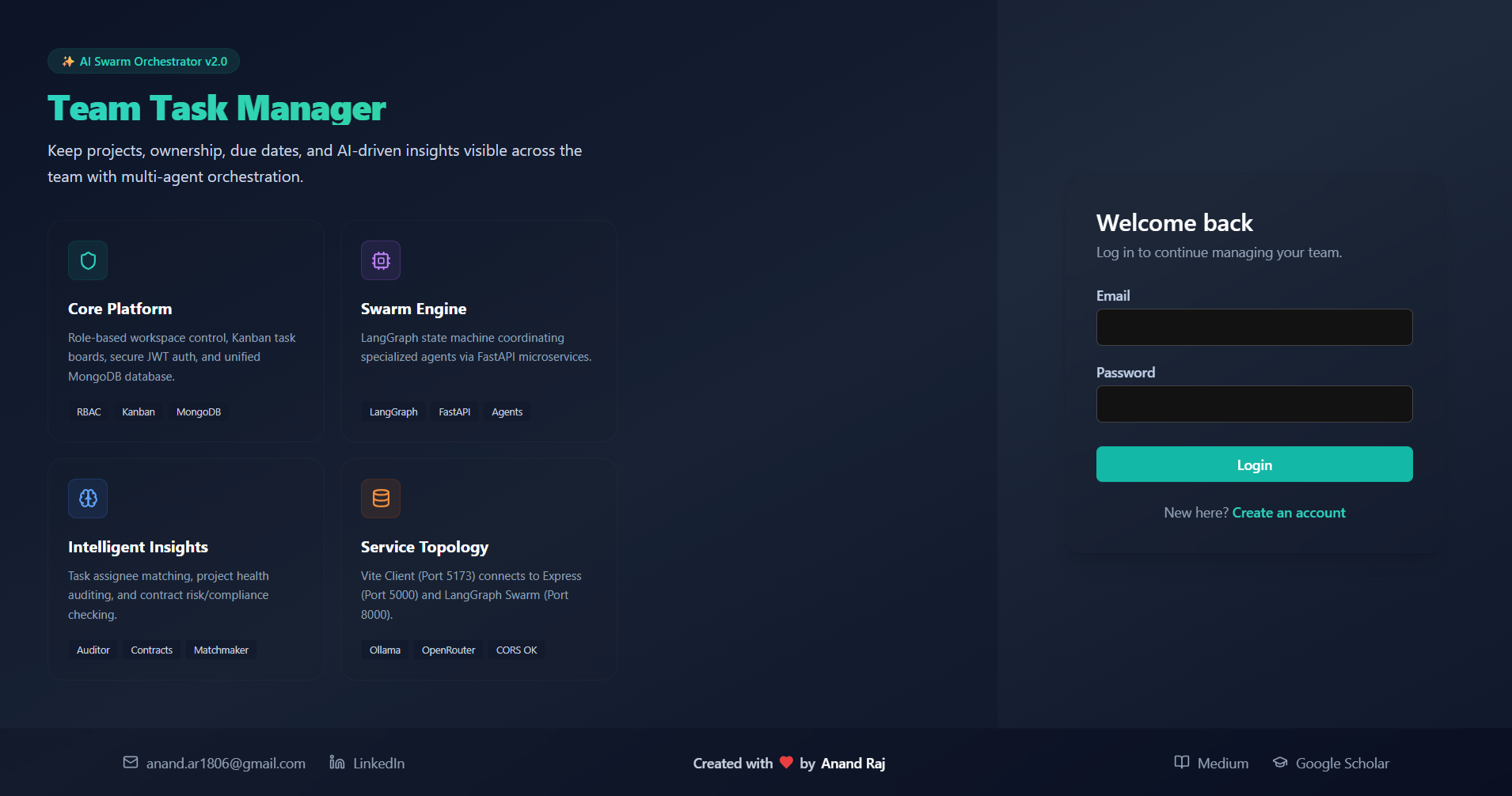
🔐 Bento Promo & Onboarding
The split-screen authorization screen features a custom Bento Promo Panel mapping system network structures and AI service layers, complete with a platform-wide contact footer:
Try With this id
User id- [email protected] & password:- abc123456
⚠️ DEMO ACCOUNT NOTICE ⚠️This demo account is shared publicly. Please do not flood the database with spam, create unnecessary new accounts, or abuse the system.
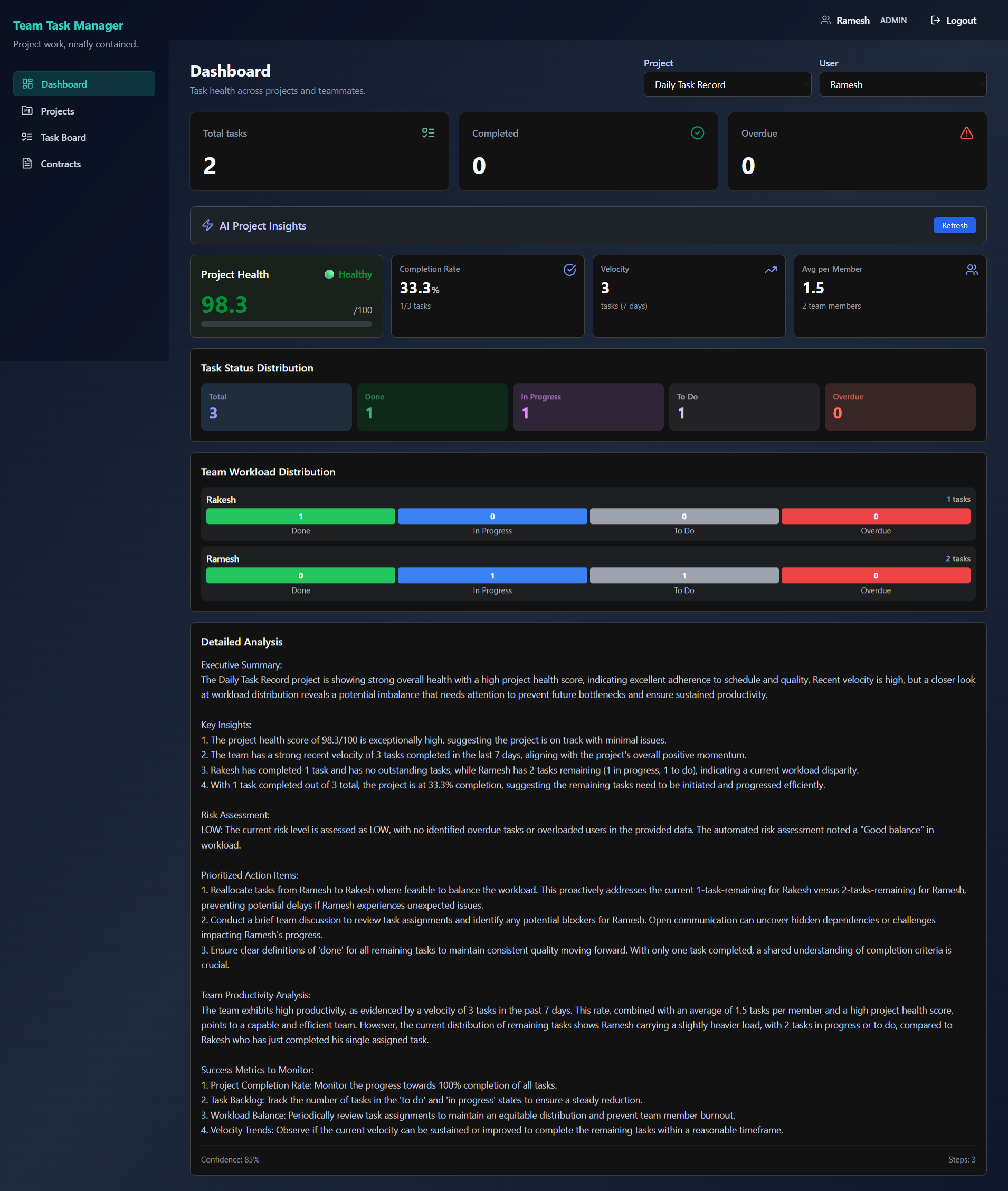
📊 Real-time Dashboard & AI Insights
Monitor project completion progress, health metrics, and run deep-dive task workload audits using the LangGraph swarm analyzer:
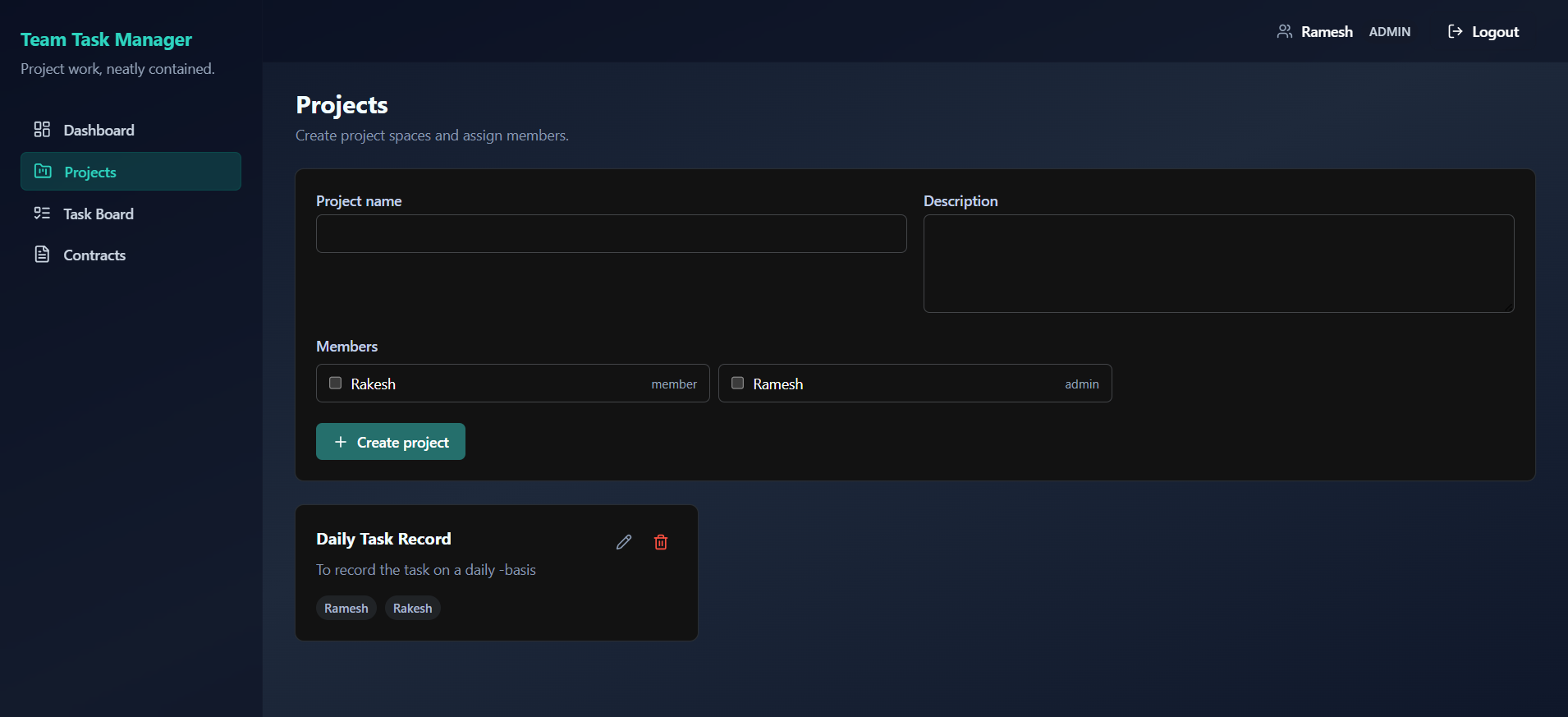
📁 Workspace & Project Auditing
Manage projects, allocate team access, and audit overall workspace status:
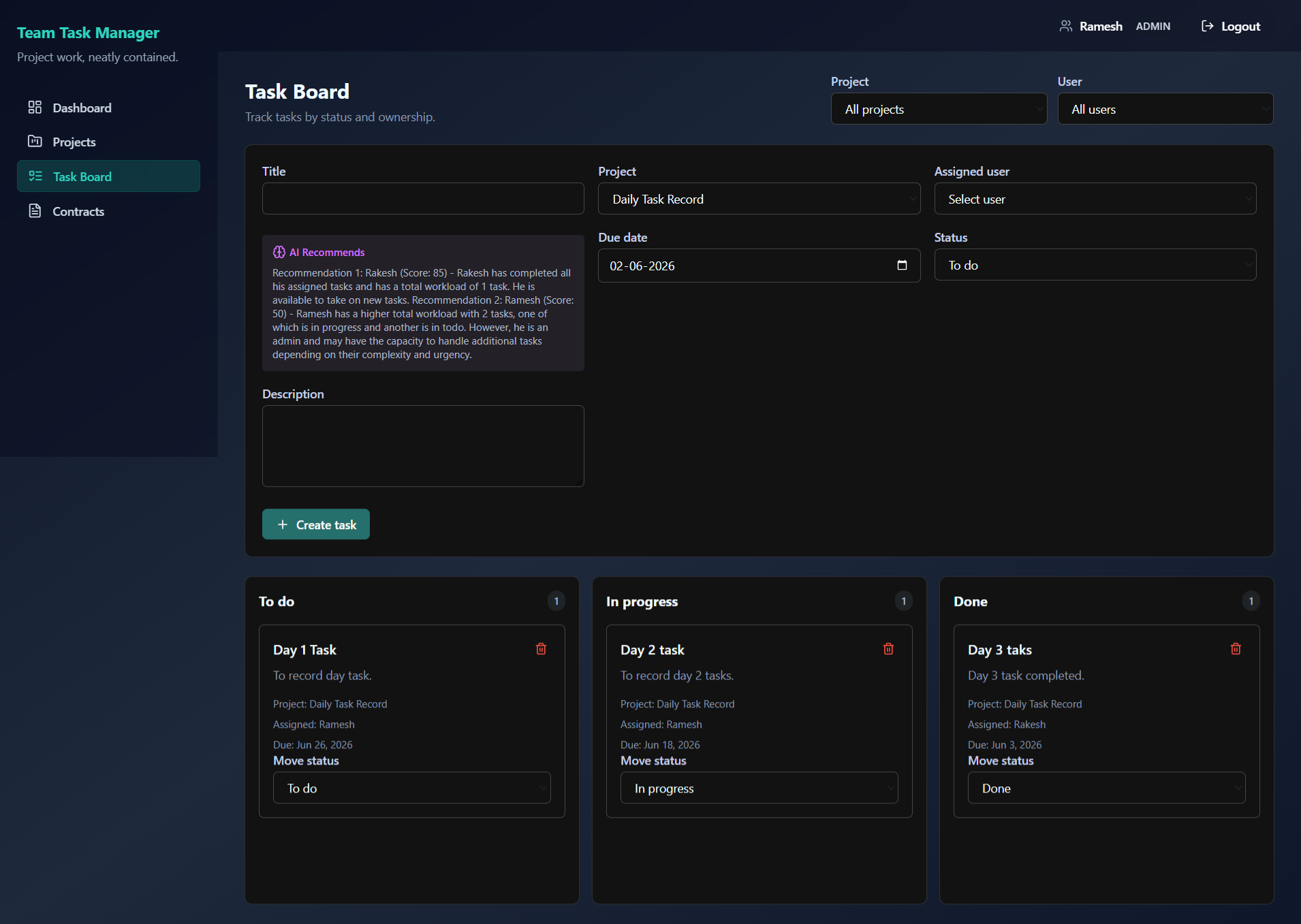
📋 Interactive Kanban Task Board
Assign, review, and filter tasks. Track team performance and instantly detect overdue items:
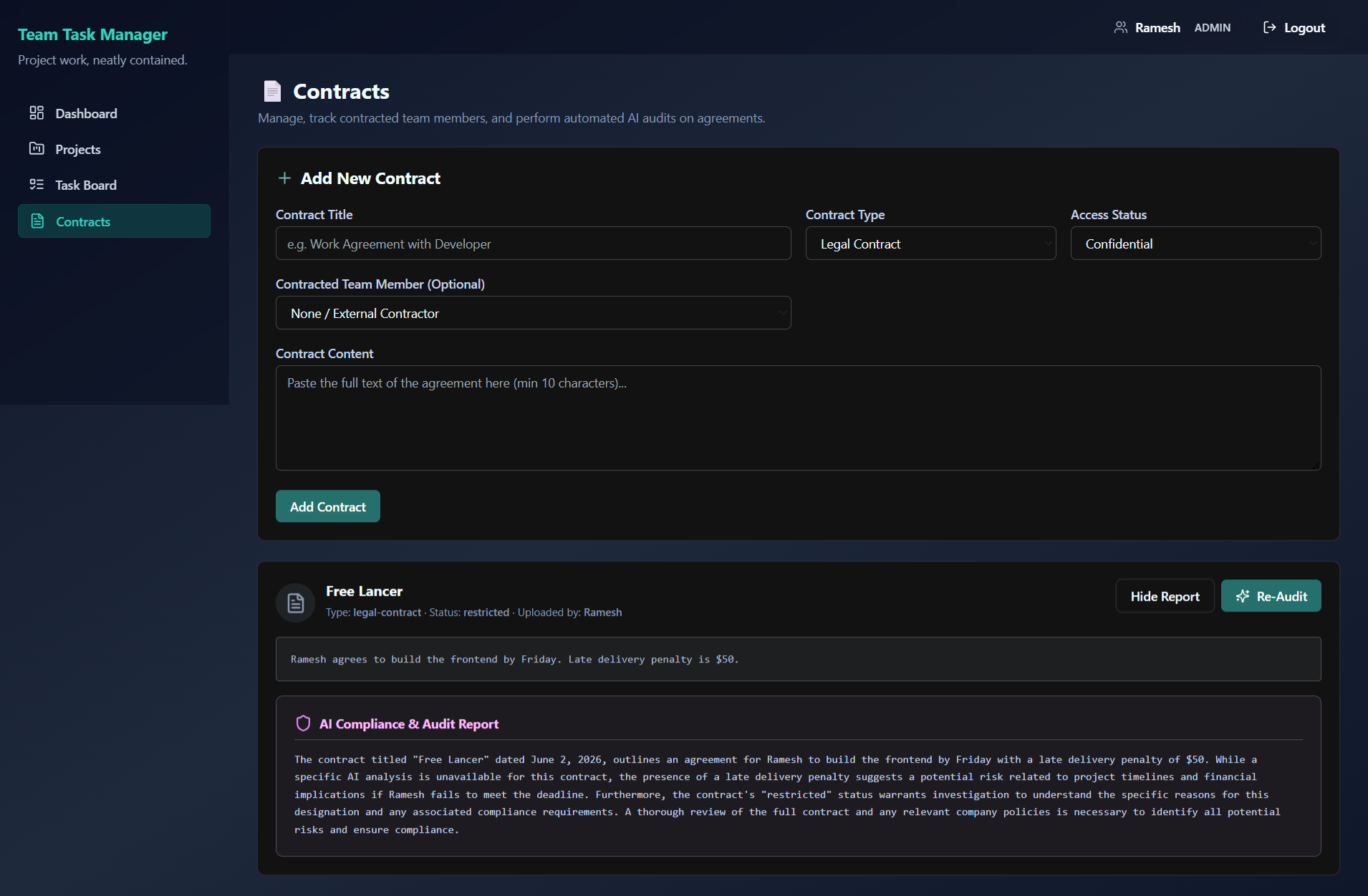
📄 Document Classification & Compliance Risk Mapping
Upload organizational contracts and memos to execute compliance audits and OPA policy-based verification:
✨ Features & Benefits
💻 Core Platform
- Role-Based Access Control (RBAC): Secure access levels featuring
adminandmemberroles. The initial registered user is promoted automatically toadmin. - Kanban Task Board: Intuitive drag-and-drop workflow status updating (
To Do➔In Progress➔Done). - Real-time Analytics: High-performance dashboard detailing project task metrics, completed percentages, workload statistics, and overdue tasks.
- Document Audit System: Secure contract management allowing admins to upload and classify documents (SEC filings, legal contracts, internal memos).
🧠 AI Swarm Engine
- Multi-Agent Orchestration: Powered by LangGraph to execute complex workflow graphs (Retrieve ➔ Analyze ➔ Synthesize ➔ Finalize).
- Model Context Protocol (MCP): Utilizes custom MCP servers for data retrieval:
- Task Retriever Server: Gathers real-time task statuses and user workloads directly.
- Project Auditor Server: Audits project metrics, checks due dates, and detects overload risks.
- Report Synthesizer Server: Compiles natural language project health summaries.
- Flexible LLM Backends: Integrates with local LLMs (via Ollama) or cloud LLMs (via OpenRouter like DeepSeek-R1 or Claude-3.5-Sonnet).
🔒 Policy-Based Security
- OPA (Open Policy Agent): Security policies defined via Rego (
ai-swarm/security/policies.rego) run at the agent level to guard tool execution, ensuring members can only request authorized tools (e.g. limiting contract analysis exclusively to admins).
🎨 Premium UI/UX Experience
- Glassmorphic Theme: Dark slate layouts (
bg-gradient-to-br from-slate-900 via-slate-800 to-slate-900) combined with backdrop-blur sidebars and headers. - Bento Promo Panel: Beautiful, responsive onboarding graphics detailing platform capabilities during Login/Signup.
- Contrast-Optimized: High-visibility glowing teal brand styling (
text-teal-400) ensuring perfect accessibility.
📁 Repository Structure
team-task-manager/
├── package.json          # Root scripts for concurrent development
├── docs/                 # Detailed system documentation and guides
│   ├── DEV_TRACKING.md   # Setup notes, troubleshooting, and dev history
│   ├── TESTING_REPORT.md # End-to-end integration and verification logs
│   └── AI_INTEGRATION_LEARNING_PATH.md # Complete multi-agent building path
│
├── client/               # React Frontend (Vite, Tailwind, Lucide React)
│   ├── src/
│   │   ├── components/   # Bento PromoPanel, Layout, and routing guards
│   │   ├── pages/        # Kanban board, Dashboard, Contracts, Auth
│   │   └── api/          # Axios configurations with JWT auth interceptors
│   └── package.json
│
├── server/               # Express API Server (Node.js, MongoDB, JWT)
│   ├── src/
│   │   ├── controllers/  # Auth, projects, contracts, and tasks endpoints
│   │   ├── models/       # Mongoose Schemas (User, Project, Task, Contract)
│   │   └── routes/       # Express routes including /api/ai proxy endpoints
│   └── package.json
│
└── ai-swarm/             # Python AI Swarm Microservice (FastAPI, LangGraph)
    ├── api/main.py       # FastAPI application and query router
    ├── orchestration/    # LangGraph agent definitions and state machines
    ├── mcp_servers/      # TaskRetriever, ProjectAuditor, ReportSynthesizer
    ├── security/         # OPA integration and policies.rego policies
    └── run.py            # Service runner and prerequisite validator
🚀 Getting Started
📋 Prerequisites
| Component | Requirement | Check Command |
|---|---|---|
| Node.js | >= 18.0.0 |
node -v |
| npm | >= 9.0.0 |
npm -v |
| Python | >= 3.8.0 |
python --version |
| MongoDB | >= 6.0 |
mongod --version |
| Ollama (Optional) | Local Service | ollama --version |
🔧 Installation & Setup
Clone the Repository
git clone https://github.com/anan5093/team-task-manager.git
cd team-task-manager
Install Node.js Dependencies
# Install root tools (concurrently)
npm install

# Install Express Server dependencies
npm install --prefix server

# Install React Client dependencies
npm install --prefix client
Install AI Swarm Dependencies Ensure you have a Python virtual environment activated:
cd ai-swarm
python -m venv .venv

# Windows:
.venv\Scripts\activate
# Unix/macOS:
source .venv/bin/activate

pip install -r requirements.txt
cd ..
⚙️ Environment Configuration
Create the following files in their respective folders:
1. Express Backend Setup (server/.env)
PORT=5000
NODE_ENV=development
MONGO_URI=mongodb://127.0.0.1:27017/team-task-manager
JWT_SECRET=generate-a-long-secure-random-key-here
JWT_EXPIRES_IN=7d
CLIENT_URL=http://localhost:5173
SWARM_API_URL=http://localhost:8000/api/swarm
SWARM_ENABLED=true
AI_SERVICE_SECRET=your-shared-agentic-secret
2. React Client Setup (client/.env)
VITE_API_URL=http://localhost:5000/api
3. AI Swarm Service Setup (ai-swarm/.env)
# LLM Provider Configuration
OLLAMA_BASE_URL=http://localhost:11434
MODEL=tinyllama

# For Cloud LLM override (Optional)
USE_OPENROUTER=false
OPENROUTER_API_KEY=your-openrouter-key-here
OPENROUTER_MODEL=deepseek/deepseek-r1:free

# Service Bindings
EXPRESS_API_URL=http://localhost:5000/api
FASTAPI_PORT=8000
MONGO_URI=mongodb://127.0.0.1:27017/team-task-manager
JWT_SECRET=generate-a-long-secure-random-key-here
AI_SERVICE_SECRET=your-shared-agentic-secret
🏃 Running the Application
For the application to run successfully, ensure MongoDB (and Ollama if running locally) is running in the background.
Step 1: Start Database & LLM Engine
# Start MongoDB (Default port: 27017)
mongod

# Start Ollama (Default port: 11434)
ollama serve
Step 2: Start the Web App Services
From the root directory, run:
npm run dev
This concurrently boots the React Frontend and the Express Backend.
Step 3: Start the Python AI Swarm Service
Open a new terminal window, activate your virtual environment, and run:
cd ai-swarm
python run.py
This runs validation checks and starts the FastAPI service.
Service Network Map
| Service | Port | Endpoint / URL |
|---|---|---|
| React Client | 5173 |
http://localhost:5173/ |
| Express Server | 5000 |
http://localhost:5000/health |
| FastAPI Swarm | 8000 |
http://localhost:8000/health |
🛠️ Usage Workflows
- User Registration: Sign up via the login screen. The first account created will be given the
adminrole automatically. - Setup Projects & Teams: Admins can navigate to Projects, create a new workspace, and invite registered members.
- Task Allocation: Create tasks inside the Task Board, assigning specific users, descriptions, and due dates.
- Kanban Operations: Team members move tasks between
Todo,In-Progress, andDonestates. Overdue tasks are highlighted automatically in red. - AI Dashboard Insights: Navigate to a project dashboard and click Get AI Insights to execute the multi-agent swarm analysis. The service analyzes workloads, formats risks, and returns recommendations.
- AI Document Audit: Upload a contract (Admin only) and click Analyze Contract to trigger the compliance risk evaluation.
📚 Documentation & Help
- Detailed Development Logs: Review DEV_TRACKING.md for step-by-step setup guides, troubleshooting steps, and session logs.
- AI Architecture Walkthrough: Refer to AI_INTEGRATION_LEARNING_PATH.md for details on LangGraph configuration, MCP state models, and security structures.
- Testing Reports: See TESTING_REPORT.md for end-to-end trace validation and performance analysis.
For bugs, inquiries, or support, please open an issue in the GitHub Issues tab or use the Discussions panel.
👥 Maintenance & Contributing
This project is currently maintained by @anan5093.
Contributions are highly encouraged! Please review our Contribution Guidelines to get started. For details on code style standards, linting, and development tracking, please read the Developer Tracking Docs.
📄 License
This project is licensed under the MIT License. See the LICENSE file for more information.
Installing Team Task Manager
This server has no published package — it is built from source. Open the repository and follow its README.
▸ github.com/anan5093/team-task-managerFAQ
Is Team Task Manager MCP free?
Yes, Team Task Manager MCP is free — one-click install via Unyly at no cost.
Does Team Task Manager need an API key?
No, Team Task Manager runs without API keys or environment variables.
Is Team Task Manager hosted or self-hosted?
Self-hosted: the server runs locally on your machine via the install command above.
How do I install Team Task Manager in Claude Desktop, Claude Code or Cursor?
Open Team Task Manager on unyly.org, pick your client tab (Claude Desktop, Claude Code, Cursor) and press Install — the config is generated automatically, no JSON editing.
Related MCPs
Notion
Read and write pages in your workspace
 by Notion
Linear
Issues, cycles, triage — from Claude
 by Linear
Google Drive
Search and read your Drive files
 by Google
mindsdb/mindsdb
Connect and unify data across various platforms and databases with [MindsDB as a single MCP server](https://docs.mindsdb.com/mcp/overview).
 by mindsdb
fulcradynamics/fulcra-context-mcp
MCP server for accessing personal health and biometric data including sleep stages, heart rate, HRV, glucose, workouts, calendar, and location via the Fulcra Li
 by fulcradynamics
aymericzip/intlayer
A MCP Server that enhance your IDE with AI-powered assistance for Intlayer i18n / CMS tool: smart CLI access, access to the docs.
 by aymericzip
rinadelph/Agent-MCP
A framework for creating multi-agent systems using MCP for coordinated AI collaboration, featuring task management, shared context, and RAG capabilities.
 by rinadelph
WhenLabs-org/when
Developer toolkit: auto-detect stack for AI context files, catch port conflicts, validate .env schemas, spot docs drift, audit dependency licenses, and time cod
 by WhenLabs-org
Beltran12138/wecom-docs-mcp-server
WeCom (Enterprise WeChat) document operations via MCP: create, read, and edit Docs and Smartsheets (9 tools). Fills the doc-CRUD gap — existing WeCom MCP server
 by Beltran12138
madbonez/caldav-mcp
Universal MCP server for CalDAV protocol integration. Works with any CalDAV-compatible calendar server including Yandex Calendar, Google Calendar (via CalDAV),
 by madbonez
Compare Team Task Manager with
Not sure what to pick?
Find your stack in 60 seconds
Author?
Embed badge for your README
Browse similar
All productivity MCPs